

What Is Spam Score Checker and How to Reduce Your Spam Score
You run a spam score checker, get a number back — 22%, maybe 6/10 — and then just stare at it for a second. Is that bad? Is Google mad at you? Is your next email campaign already doomed?
Here’s the thing, there are two different things people call “spam score,” and they have almost nothing to do with each other.
One has to do with your website, the other is about your emails. So before you start fixing anything, it helps to know which problem you’re actually looking at. This guide covers what is spam score, how both versions work, how to check them, and what to do when the number looks higher than you’d like.
What is a spam score?
A spam score is basically a risk signal. It estimates how likely something is to look spammy to a system, tool, or filter. Simple enough.
The catch is that “something” can mean two completely different things:
- The first one is your website’s spam score, or more specifically, Moz spam score. This is a Moz metric, not a Google metric, that estimates how spammy your domain looks, primarily based on backlink patterns. Moz looks at signals that often show up on penalized or low-quality websites, then checks how closely your site matches them.
- The second one is your email spam score, usually based on SpamAssassin-style checks, that looks at one specific email and estimates how spammy it appears to your recipients’ email providers before it reaches their inbox. This one is all about email deliverability.
Easy to mix up, right? Same phrase, totally different jobs. Here’s the summarized version:
| Website spam score | Email spam score | |
|---|---|---|
| What it measures | Domain / backlink risk | Individual email risk |
| Source | Moz (Link Explorer) | SpamAssassin-based tools |
| Scale | 1–100% (lower is better) | 0–10 (depends on the tool) |
| Matters for | SEO & link building | Deliverability & inbox placement |
So before anything else, figure out which column you’re in. Otherwise, you can spend hours “fixing” the wrong thing.
What is Moz spam score and how does it work?
If you searched for a spam score checker and got a percentage back, you’re almost certainly looking at Moz’s website metric. So, what is Moz spam score in plain English? It’s a third-party score from 1 to 100 that estimates how risky your domain looks based on patterns Moz has seen across penalized or banned websites.
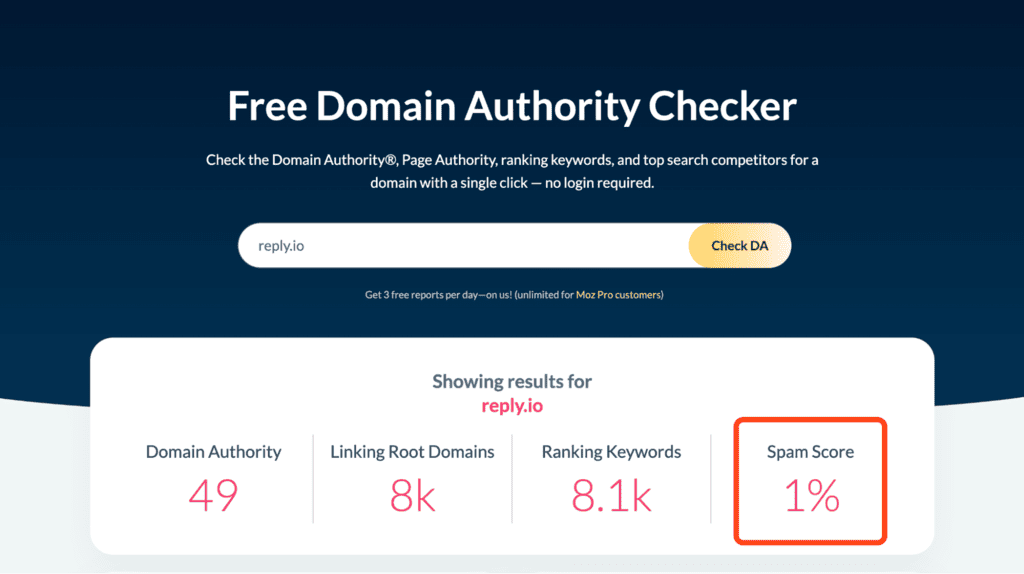
If you’re wondering how Moz spam score works, it simply checks your domain against roughly 27 signals that often appear on spammy sites. It’s correlation, not causation, which means the score doesn’t prove your site is spam, but it can point you toward things worth auditing. It’s free to use for 3 reports per day, but you only get the details of your spam score on their paid plans.
A few signals you can actually do something about:
- Links from toxic or very low-authority domains
- Over-optimized, exact-match anchor text repeated across many sites
- An unnatural ratio of followed to nofollowed links
- Thin or low-value content
- Low domain authority overall
The score usually falls into three bands, which also answers the common question of what the max Moz spam score you should have is:
| Score | Risk level |
|---|---|
| 1–30% | Low → most healthy sites |
| 31–60% | Medium → worth investigating |
| 61–100% | High → generally avoid as a link source |
In reality, staying under 30% is the safe zone. If you’re above that, don’t panic, but don’t ignore it either.
One important thing that gets missed a lot: Google doesn’t use the Moz spam score. It’s not a Google ranking factor, and it doesn’t mean Google has manually penalized you. It’s Moz’s own estimate, useful for SEO triage and link checks, but not an official verdict from Google.
What is a spam score checker?
A spam score checker is the tool that analyzes your website or emails and gives you the % or score. The real work comes after, when you understand what the number means and what needs fixing.
For websites, Moz is the original source for running a spam score check on your domain, as covered above.
For email, tools like Mail-Tester and GlockApps work differently. You send a test email to a unique address they provide you, and the tool reviews the message, authentication, links, formatting, and multiple other signals before giving you a score out of 10:
So when someone says they want to check website spam score, they’re usually talking about Moz. When they’re testing whether an email might hit spam, they’re talking about an email deliverability tool. Same wording, different world.
How to reduce your spam score
Because there are two scores, there are two distinct fixing strategies:
Reducing your website (Moz) spam score
- Audit your backlinks → pull your backlink profile from Moz, Ahrefs, Semrush, and Google Search Console. You’re looking for links from low-authority domains, irrelevant/unrelated sites, link farms, scraped pages, and anything else that looks unnatural.
- Disavow the genuinely toxic ones → if the links are clearly harmful and you can’t get them removed, create a disavow file and submit it through Google Search Console. For the worst cases, it’s still worth reaching out and asking for removal directly.
- Diversify your anchor text → a backlink profile filled with exact-match commercial anchors like “buy now” or “best CRM software” looks manipulated. Natural backlink profiles mix branded anchors, generic phrases, naked URLs, and varied wording.
- Build real links to dilute the bad ones → the best long-term fix is earning stronger links from relevant, trusted sites. Over time, that improves your website’s domain rating and the overall quality ratio of your backlink profile.
Just keep in mind that Moz doesn’t update everything instantly, and changes you make today usually take a few weeks to show up (anywhere from a few days to 3-4 weeks.)
Reducing your email spam score
- Authenticate first → SPF, DKIM, and DMARC. This is the boring technical setup that matters a lot in email outreach. Missing or broken authentication is one of the most common reasons email clients flag your emails and prevent them from being delivered.
- Clean up your content → avoid obvious spam keywords, don’t overload the email with links or images, keep formatting clean, and include a working unsubscribe link when required. Pretty straightforward, but still often overlooked.
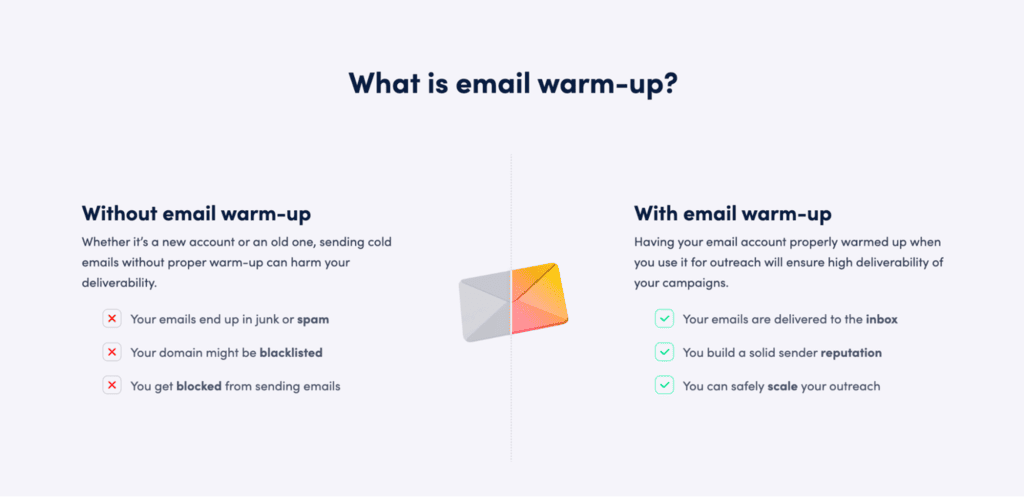
- Warm up your domain → a new domain sending high volume out of nowhere is a big red flag, and so is an existing one that hasn’t gradually increased volume over time, also known as email warmup. It helps build your sender reputation, which is a much-needed trust signal to stay out of spam.
Why your spam score is only part of the deliverability picture
Here’s where email spam scores get a bit tricky — a perfect 10/10 score doesn’t guarantee inbox placement.
You can pass a Mail-Tester-style check, have SPF, DKIM, and DMARC set up properly, keep your content clean, and still land in Outlook junk. Why? Because Gmail, Outlook, and Yahoo don’t simply run your email through SpamAssassin and call it a day.
They look at their own signals, which include your sender reputation, recipient engagement history, domain age, sending patterns, authentication, bounce rates, spam complaints, and probably a few things they’re not exactly publishing in a neat little checklist.
One of those signals sits entirely outside the score. A SpamAssassin-style test reads your message, not your DNS, so a domain with a malformed DMARC record, or a reporting address that was never authorised to receive the reports, can score a clean 10/10 and still get filtered. That’s a quick two-minute check rather than an entire separate project:
Free DMARC Record Checker
Check any domain’s DMARC record, see exactly how much protection it actually gives you, and get the next record to publish. Runs entirely in your browser.
What is DMARC, and what does “enforced” mean?
DMARC ties SPF and DKIM together and tells receivers what to do when mail claiming to be from your domain fails both. It’s published as a TXT record at _dmarc.yourdomain.com.
p=noneprotects nothing. It only collects reports. Most domains that “have DMARC” are sitting here — spoofable, with a record that looks reassuring.p=quarantinesends failing mail to spam.p=rejectrefuses it at the door. Only these two are enforcement.- Google and Yahoo require DMARC for anyone sending bulk mail — no record means throttling or outright rejection.
- Reports sent to another domain need permission. If
ruapoints somewhere else, that domain must publish an authorisation record or receivers silently drop your reports. We check that live.
Lookups are performed from your browser via Cloudflare’s public DNS-over-HTTPS resolver. Nothing is logged or stored by this tool.
The safe way to reach p=reject
- Weeks 1–2:
p=nonewith rua. Change nothing else. Read the aggregate reports and build a list of every service sending as you — you will find some you forgot about. - Fix alignment first. Every legitimate sender needs SPF or DKIM aligned with your domain. A tool that passes SPF on its own domain still fails DMARC for yours.
- Week 3:
p=quarantine; pct=10. A mistake now affects 10% of failing mail, not all of it. Watch reports for a week. - Ramp to
pct=100, thenp=reject. Give each step a week of clean reports before the next one. - Don’t forget subdomains. If you never send from them, publish
sp=rejectexplicitly — unused subdomains are a favourite spoofing target.
So if you’re sending out lots of emails, it’s crucial to properly authenticate and warm-up your email account. The challenge is that it takes time, as well as constant action and monitoring, which is why many teams and solo professionals use an email warm-up tool like MailToaster.
Where MailToaster fits in
MailToaster is an email warm-up tool built to grow, maintain, or repair your sender reputation in a fully automated way. You connect your Gmail, Outlook, or another mailbox, and a trusted network of real inboxes starts interacting with your emails in a natural way: opening, replying, marking important, and moving emails out of spam when needed.
It also checks your SPF, DKIM, and DMARC setup automatically, then gives you reports on inbox placement, spam placement, and bounces. So you’re not just looking at a nice score in a checker, you’re seeing whether your emails are actually making it where they’re supposed to go.
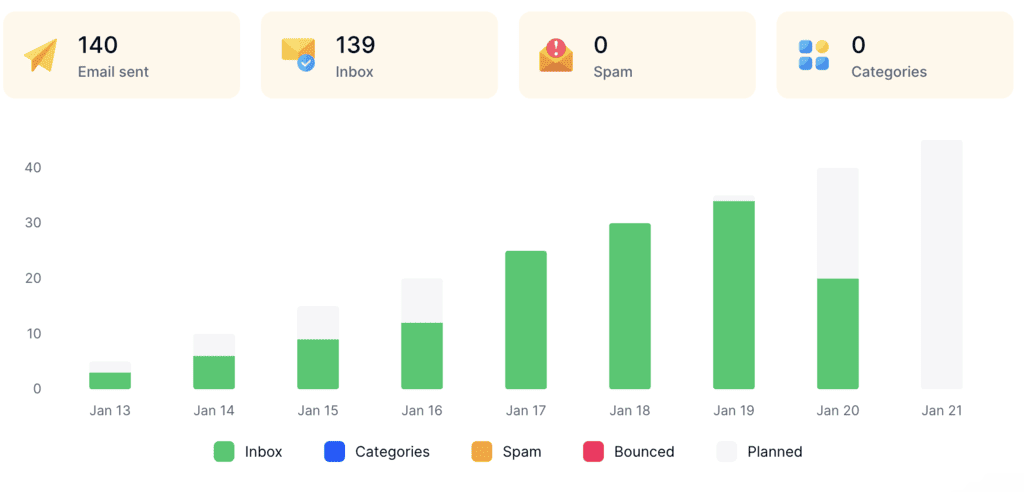
A clean email spam score is useful, but proper email authentication and a solid sender reputation are what actually ensure your emails get delivered and placed in your recipients’ inboxes.
Try MailToaster free for 7 days and let it build your sender reputation in the background!
Final thoughts
Two scores share the same name, so start there. If it’s your website, check the backlink profile, remove or disavow the toxic links, and build better links over time. If it’s email, fix authentication, clean up the message, warm up properly, and protect your sender reputation.
In both cases, the number is useful, but it’s not the finish line. For SEO, the real goal is a cleaner, healthier domain. For email, it’s inbox placement. And once you think about it that way, the whole spam score conversation becomes a lot less confusing.
FAQ
What is a good spam score?
For websites, anything under 30% on Moz is generally considered low-risk. For email, you want to get as close to 10/10 as possible in tools like Mail-Tester, which usually means a very low raw SpamAssassin score.
How do I check my domain spam score for free?
If you’re wondering how to check domain spam score, use Moz Link Explorer directly or a free third-party checker that pulls Moz data. Most of these tools let you run a quick domain spam score check, and some also support bulk checks if you’re reviewing multiple domains.
Does spam score affect Google rankings?
No. Moz spam score is a third-party metric, not a Google ranking signal. It can still help you review backlink quality and screen link-building opportunities, but don’t treat it like a message from Google.
What is the max Moz spam score you should have?
Try to keep it under 30%. A score above 31% doesn’t automatically mean disaster, but it does mean your backlink profile deserves a closer look.
Can a good email spam score still land in spam?
Yes, and this catches a lot of senders off guard. A strong email spam score helps, but it won’t save weak sender reputation, poor warm-up, high bounces, or low engagement. Inbox providers care about behavior over time, not just one test result.