

How to Improve Your Email Address Reputation in 2026 for Better Outreach
Your open rates dropped from 45% to 12% in two weeks, nothing changed in your copy, and your sending tool still shows every email as “delivered”. That pattern almost always means the same thing: your email reputation slipped, and Gmail or Outlook started filing your messages somewhere your prospects don’t look.
Below, we’ll cover what email address reputation is, how domain and IP reputation differ, how to check yours (including what changed in Google Postmaster Tools), and seven steps to improve it and keep it healthy as you scale.
What is email address reputation?
Email address reputation, often called sender reputation, is the level of trust mailbox providers like Gmail, Outlook, and Yahoo assign to you as a sender. It’s built from your sending history and decides whether your emails land in the inbox, the spam folder, or don’t get accepted at all.
There’s no single public score, since each provider keeps its own view of your sending domain, the IP addresses your mail goes out from, and, increasingly, the individual mailbox, and updates it with every campaign you send.
The stakes are bigger than most teams assume. Validity’s 2025 Email Deliverability Benchmark Report found that only 83.5% of emails sent in 2024 reached the inbox, with 6.7% going to spam and 9.8% going missing entirely. In other words, roughly one in six emails never reaches the inbox, and reputation is the main thing that decides which side of that line yours land on.
Domain reputation vs IP reputation
Your email reputation has two main layers, and which one matters more depends on how you send.
| Domain reputation | IP reputation | |
| Attached to | Your sending domain (yourcompany.com) | The server IP your email leaves from |
| Follows you when you | Change email providers or tools | Stay on the same infrastructure |
| Who controls it on Google Workspace / Microsoft 365 | You | Google or Microsoft (shared IPs) |
| Who controls it on a dedicated IP | You | You |
| Main tools to check it | Google Postmaster Tools, Talos, blocklist checks | Sender Score, Microsoft SNDS, Talos |
If you send outreach from Google Workspace or Microsoft 365 mailboxes, you’re sending from IP addresses shared with millions of other users, which the providers manage themselves. For you, the reputation that matters is your domain and your individual mailboxes, and that’s also where most modern filtering happens, since a domain is much harder to swap out than an IP.
IP reputation becomes your responsibility when you send through a dedicated IP on an email service provider, which usually only makes sense at hundreds of thousands of emails a month.
What affects your email reputation?
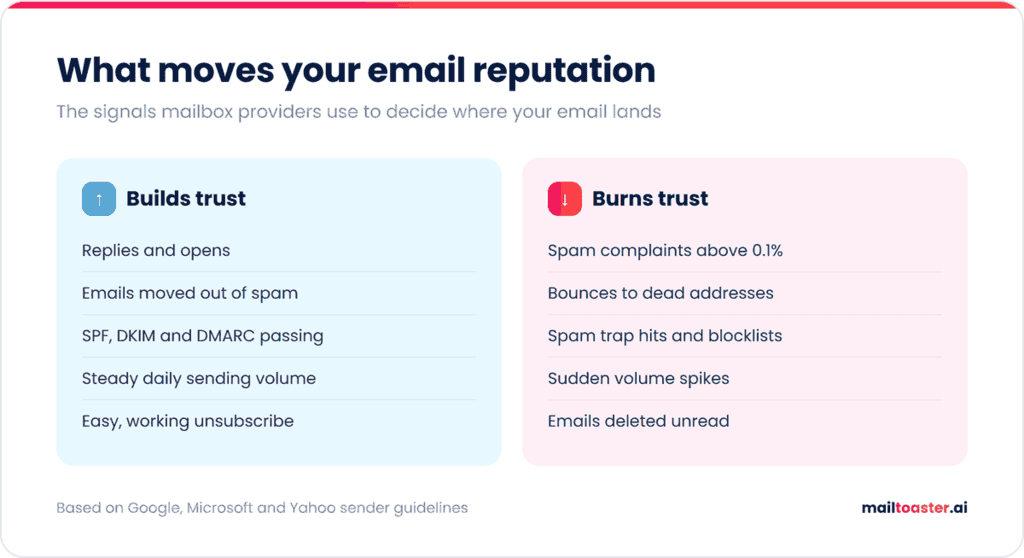
Mailbox providers don’t publish their formulas, but they do publish what they penalize, and the same handful of signals shows up in every provider’s guidelines.
- Spam complaints. The heaviest signal. Google asks senders to keep their user-reported spam rate below 0.1% and stops offering mitigation to anyone above 0.3%.
- Bounces. Sending to addresses that don’t exist tells providers you don’t know who’s on your list. A high bounce rate is one of the fastest ways to lose trust.
- Spam traps and blocklists. Hitting a trap address can get your domain or IP listed on a blocklist like Spamhaus, which many providers check before accepting mail.
- Engagement. Opens, replies, and emails moved out of spam push reputation up, while emails deleted unread push it down.
- Authentication. SPF, DKIM, and DMARC prove the email really comes from your domain, and without them, none of the positive signals can be credited to you.
- Consistency. Steady daily volume looks like a real sender, while sudden spikes look like a compromised account.
How to check your email address reputation
You check your email reputation by combining a few free tools, since no single one shows the full picture. Here’s what each one actually tells you:
| Tool | What it shows | Best for |
| Google Postmaster Tools | Spam rate, authentication, delivery errors, compliance status for Gmail | Anyone sending to Gmail at volume |
| Microsoft SNDS | Complaint rates and filter results per IP | Senders on a dedicated IP |
| Cisco Talos | Good / Neutral / Poor rating for a domain or IP | A quick overall health check |
| Sender Score (Validity) | 0-100 score for an IP address | Dedicated IP senders |
| MXToolbox blacklist check | Whether your domain or IP is on major blocklists | After a sudden drop in placement |
One important change most guides haven’t caught up with yet: Google has retired the Domain Reputation and IP Reputation dashboards in the new Postmaster Tools. According to Google, reputation data “is not easily actionable for most senders” and could be misleading, so the current version focuses on your spam rate and a Compliance dashboard that shows whether you meet its sender requirements. If a guide tells you to look up your “High / Medium / Low / Bad” domain reputation in Postmaster Tools, it’s describing a dashboard that no longer exists.
Authentication and blocklists are the quickest parts of reputation to rule out, since a broken SPF, DKIM, or DMARC record or a blocklist listing affects every other signal on this list. Our free email health checker runs all of them on your domain in one pass and tells you which fix to make first:
Email Health Checker
One domain, one score. Checks SPF, DKIM, DMARC, MX and blocklists in a single pass, then tells you what to fix first — ordered by how much each fix is actually worth.
What gets checked
- SPF — published, syntactically sound, and inside the 10-lookup limit. We follow every
include:chain recursively, because that limit counts nested lookups and it is where most SPF records quietly break. - DKIM — scanned across 26 selectors used by the big platforms, with the key size read from the record. Selectors are arbitrary strings, so a miss here is not proof of absence.
- DMARC — published, and more importantly enforcing. A
p=nonerecord is monitoring, not protection. - MX — mail servers resolve, with the platform identified and null MX handled properly.
- Reputation — the resolved mail-server IPs against 8 blocklists that answer public queries.
- Bonus — MTA-STS, TLS-RPT and BIMI. Not scored, because they are still uncommon, but each one is a real signal of a well-run domain.
Nothing is uploaded. Every lookup goes from your browser straight to a public DNS resolver.
How the score is weighted, and why
- DMARC carries the most weight (30). It is the only one of the three that actually tells receivers what to do, and it is the one Google and Yahoo now require from bulk senders. Publishing
p=noneearns a third of the points;p=rejectearns them all. - SPF and DKIM are 25 each. Both are prerequisites for DMARC to pass, and DKIM matters more than people think — it survives forwarding, where SPF breaks.
- MX is 15. A domain that cannot receive mail cannot receive replies, and reply handling is the whole point of outreach.
- Reputation is only 5 because a browser can check just the blocklists that answer public queries. Spamhaus refuses them, so a clean result here is good news but not the whole picture — check check.spamhaus.org too.
- A score is a summary, not a diagnosis. Use the dedicated SPF, DKIM, DMARC and MX checkers when you need the detail behind a number.
The order to fix things in
- Get SPF and DKIM right first. DMARC evaluates their results, so enforcing DMARC before they are correct will block your own mail.
- Publish DMARC at
p=nonewith aruaaddress. Change nothing else and read the reports for two weeks — you will find senders you had forgotten about. - Fix alignment. A tool that passes SPF on its own domain still fails DMARC for yours. This is the step that takes the longest.
- Move to
p=quarantine, thenp=reject. Give each step a week of clean reports. - Then the extras. MTA-STS and TLS-RPT harden transport; BIMI needs enforcement already in place, so it comes last by definition.
Signs your email reputation is dropping
Reputation problems rarely announce themselves. These are the early signs worth watching for:
- Open or reply rates fall suddenly, often at one provider first (Gmail or Outlook recipients go quiet while others don’t)
- Bounce messages with 4.7.x deferrals or 5.7.x policy rejections start appearing
- Your spam rate in Postmaster Tools climbs above 0.1%
- Emails that used to land in Primary show up in Promotions or spam in your own seed tests
- Your domain or IP appears on a blocklist
Most of these only show up after a campaign has already gone out, and none of the tools above show your actual inbox placement, mailbox by mailbox, day to day.
A warm-up tool like MailToaster fills that gap, since it reports every day how many of your warm-up emails reached the inbox, the spam folder, or a category tab for each connected mailbox, so a drop shows up before your next campaign does.
How to improve your email address reputation
Once you’ve confirmed reputation is the problem, here’s how to repair it, in the order that fixes the most damage fastest.
- Find out which provider is affected. Split your results by recipient domain (gmail.com, outlook.com, company domains on Microsoft 365). Most reputation problems start at one provider, and that tells you where to focus.
- Fix authentication. Make sure SPF, DKIM, and DMARC all pass and align with the domain in your From address. Microsoft rejects high-volume senders that fail with 550 5.7.15, and Google has been rejecting non-compliant mail since November 2025.
- Clean the list. Verify every address, remove hard bounces for good, and suppress contacts who haven’t engaged in 90 days or more.
- Send only to your most engaged contacts for a while. HubSpot’s repair plan, for example, starts with contacts who clicked in the last two weeks, then widens to four-week and six-week windows only once engagement holds at 20-25%.
- Cut volume, then ramp back up gradually. Drop to a fraction of your normal daily volume and increase it every few days, the same way you’d warm up a new account.
- Make unsubscribing easy. A visible unsubscribe link (and one-click unsubscribe for marketing email) turns a would-be spam complaint into a harmless opt-out.
- Keep positive engagement flowing. Warm-up running in the background adds a steady stream of opens and replies while your real campaign volume is low.
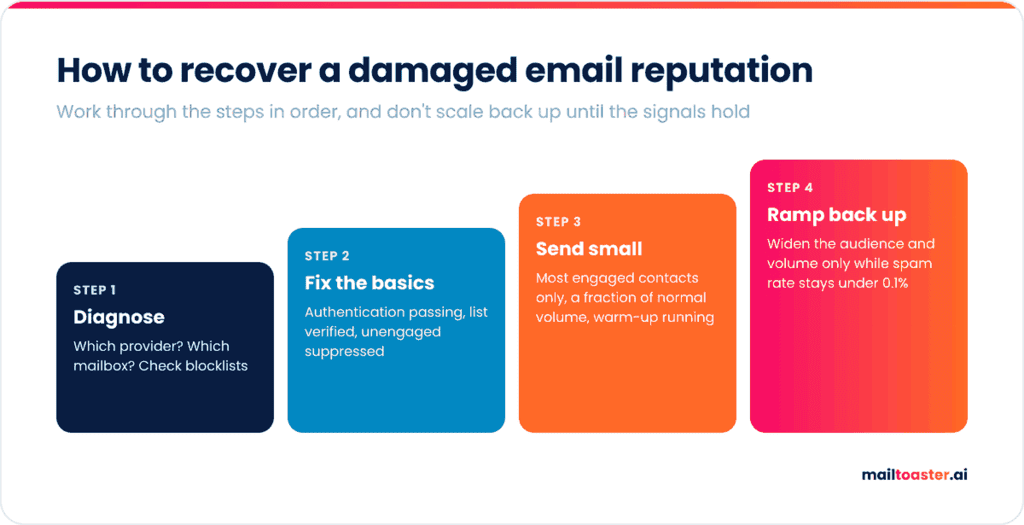
Expect recovery to take weeks, not days. Google, for example, only makes bulk senders eligible for mitigation again once their spam rate stays below 0.3% for 7 consecutive days, and regaining full inbox placement usually takes longer than that.
Protecting your reputation as you scale
Repairing a reputation takes far more effort than protecting one, so the habits that matter most are the ones you set up before volume grows. Most outreach teams send cold campaigns from a secondary domain (yourcompany.co alongside yourcompany.com), cap each mailbox at a moderate daily volume, and add mailboxes when they need to send more, which spreads risk across accounts. Outreach platforms like Reply.io make that easier by rotating sends across several mailboxes automatically.
Each of those mailboxes still needs its own history, which is what email warm-up builds and maintains.
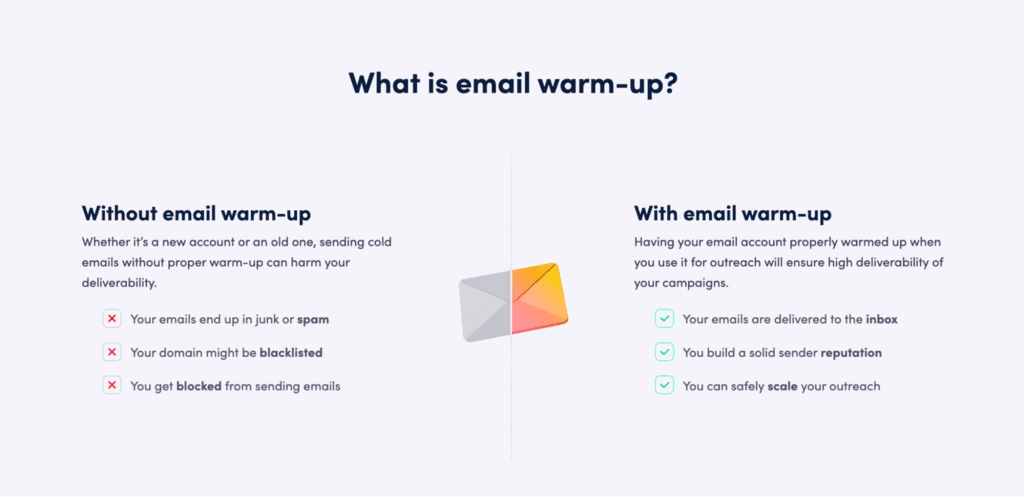
MailToaster connects to your Gmail, Outlook, or other mailboxes in a couple of clicks and runs warm-up across a peer-to-peer network of real inboxes, with no free or temporary accounts involved. Those inboxes open your emails, reply to them, mark them as important, and pull them out of spam, which is the positive engagement providers use to judge you.
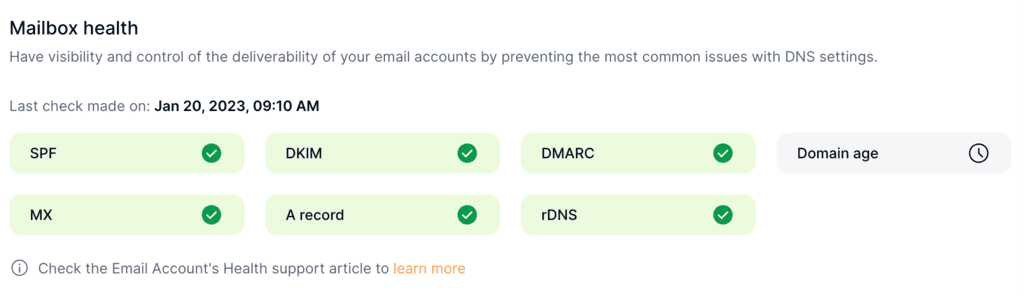
For mailboxes already sending campaigns, the Reputation Protect profile keeps that engagement steady underneath your outreach, and New Email Account builds reputation from zero on fresh mailboxes. MailToaster also checks your SPF, DKIM, and DMARC records automatically, so an authentication problem gets flagged before it starts costing you placement.
Final thoughts
Email address reputation is built from a few signals you fully control: complaints, bounces, authentication, engagement, and consistency. Check it with Postmaster Tools and a blocklist lookup at least monthly, and fix authentication and list quality before touching anything else when it drops.
And since protecting a reputation is far easier than rebuilding one, give every sending mailbox a steady base of positive engagement. Try MailToaster free for 7 days and keep your reputation healthy while you scale.
FAQ
How long does it take to fix a bad email reputation?
Usually 2 to 6 weeks, depending on how bad the damage is. Minor drops from a single bad campaign recover in a couple of weeks of clean, low-volume sending, while blocklist listings or sustained high complaint rates take longer, and some blocklists require a delisting request.
Does a new email address have a bad reputation?
No, it starts with no reputation at all, and mailbox providers are cautious with senders they have no history for. New accounts often start on lower sending quotas, which is why new mailboxes need warm-up before they carry campaigns.
How can I check if someone else’s email address is legitimate?
Use an email verification tool, which checks whether the domain has mail servers, whether the mailbox exists, and whether the address is disposable or role-based. That tells you whether it’s real and safe to send to, which is a different question from your own sender reputation.