

How to Lower Your Email Bounce Rate in 2026 for Better Outreach
Your campaign went out to 2,000 contacts, and 140 of them came straight back with a “delivery failed” notice. That’s a 7% bounce rate, which is enough for some email providers to put your account under review.
Email bounce rate is one of the few deliverability numbers you can see right away, and it’s also one of the easiest to fix, as long as you know what each bounce is actually telling you.
Below, we’ll cover how to calculate your bounce rate, what counts as a good one, how to read hard and soft bounce codes, and seven ways to bring the number down.
What is email bounce rate?
Email bounce rate is the percentage of sent emails that couldn’t be delivered and were returned by the recipient’s mail server. The formula is simple:
Bounce rate = (bounced emails ÷ emails sent) × 100
So if you send 1,000 emails and 30 bounce, your bounce rate is 3%. Calculate it per campaign and per sending mailbox, since one bad list or one misconfigured mailbox can hide inside a healthy account-wide average.
Keep in mind that email bounce rate has nothing to do with website bounce rate, which Google Analytics uses to measure visitors who leave a page without interacting. A 40% website bounce rate is normal, while a 40% email bounce rate would get most accounts suspended within a day, and that mix-up is behind a lot of the confusing advice around this topic.
What is a good email bounce rate?
A good email bounce rate is under 2%. Anything between 2% and 5% means your list has started to decay, and anything above 5% needs fixing before your next send.
The thresholds come straight from how sending providers police their own networks. Amazon SES, one of the largest sending infrastructures in the world, recommends staying below 2%, puts accounts under review at 5%, and may pause sending at 10%. Instantly’s 2026 Cold Email Benchmark Report uses the same 2% line for cold outreach.
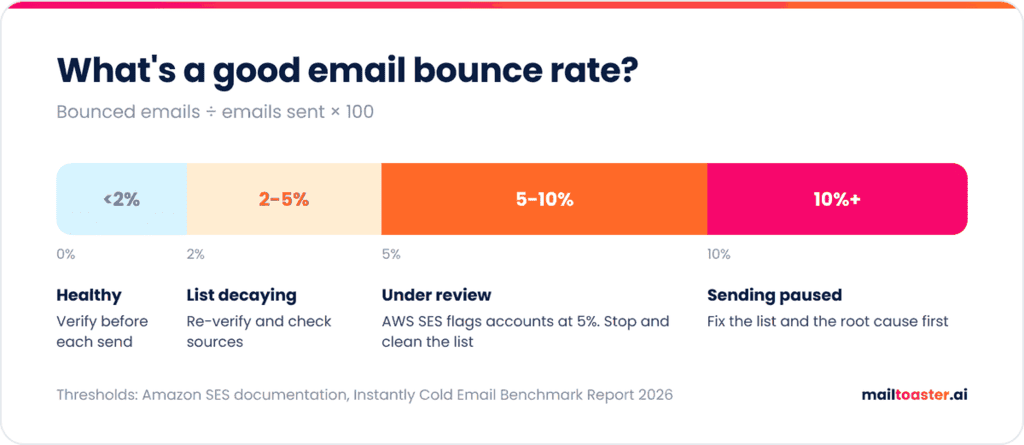
For cold outreach specifically, treat 2% as the hard ceiling. Prospect lists decay faster than opted-in subscriber lists, because people change jobs and their work addresses are deleted without any notice.
To see where your last campaign actually landed, plug its sent, hard bounce, and soft bounce numbers into our free bounce rate checker. It scores the result against the 2% and 5% lines and tells you roughly how many bad addresses would need to come out of the list to get back under 2%:
Bounce Rate Checker
Work out your bounce rate, see whether it is putting your sending domain at risk, and find out how many addresses would have to come out of the list to get back to safe.
Hard vs soft — and why only one of them really hurts
- A hard bounce is permanent. The address does not exist, or the domain does not accept mail. It will never work, and every one you send is a signal to the receiving provider that you did not check your list.
- A soft bounce is temporary. Full mailbox, oversized message, greylisting. Most resolve on retry and carry little reputation cost.
- The exception: soft bounces that are actually throttling or reputation blocks. Those are a warning that a provider is starting to distrust you — read the actual SMTP response rather than assuming “soft = fine”.
- Under 2% total is the goal, and hard bounces are what to watch. Above about 5% you should expect throttling; sustained, it can put the domain on a blocklist.
- Reputation damage outlives the campaign. It attaches to the sending domain and IP, not to the list you were using at the time — which is why cold outreach belongs on a separate domain from the one carrying your real conversations.
Getting the rate down before the next send
- Verify before you send, not after. Syntax, domain and MX checks remove the large majority of hard bounces at zero cost to reach.
- Never mail an unverified permutated list. Guessing an address format gives you candidates. Sending to all of them is the fastest way to a 20% bounce rate.
- Re-verify anything older than a quarter. B2B contact data decays quickly as people change roles.
- Suppress hard bounces permanently and immediately. Repeatedly mailing a known-dead address is the specific behaviour providers punish hardest.
- Warm up new domains gradually. High volume from a cold domain looks like a list problem even when the addresses are fine.
- Watch for catch-all domains. They accept everything, so they never bounce — your rate looks great while your engagement quietly collapses.
Hard bounces vs soft bounces
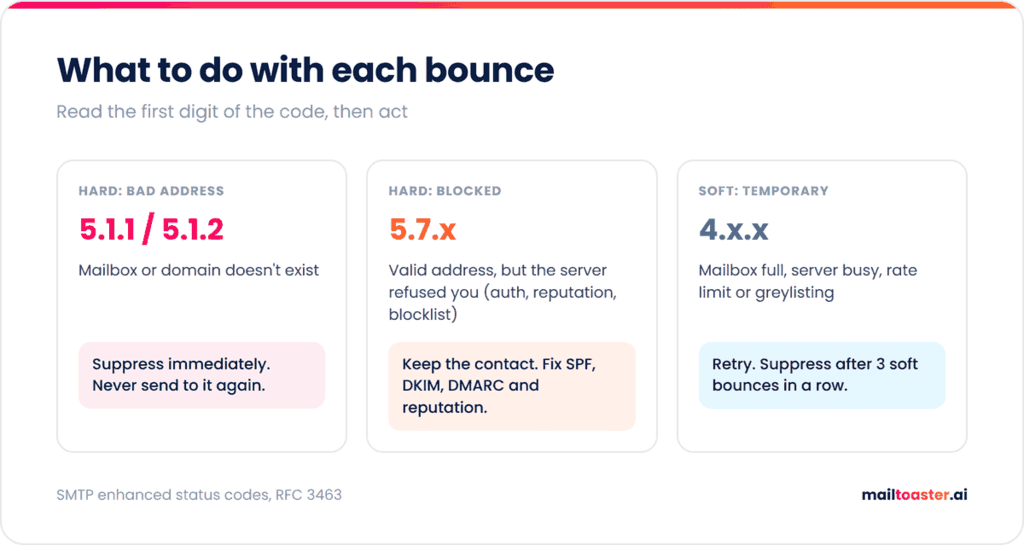
Every bounce comes with an SMTP response code, and the first digit tells you most of what you need to know. A code starting with 5 is a hard bounce (permanent failure), and a code starting with 4 is a soft bounce (temporary failure that may clear up on its own).
| Code | Type | What it usually means |
| 5.1.1 | Hard | The mailbox doesn’t exist (Gmail: “The email account that you tried to reach does not exist”) |
| 5.1.2 | Hard | The domain doesn’t exist or has no mail server |
| 5.7.x | Hard (block) | Rejected by policy: failed authentication, poor reputation, or a blocklist |
| 4.2.2 | Soft | The mailbox is full |
| 4.x.x (other) | Soft | Server busy, rate-limited, or greylisting (temporarily deferring an unfamiliar sender) |
To find the code, open the bounce notification itself. In Gmail it arrives from “Mail Delivery Subsystem”, and in Outlook as “Undeliverable”, and both include the original server response a few lines down, usually next to “Diagnostic-Code” or “Remote server returned”. Sending platforms show the same response in their bounce or activity log, so you rarely need to dig through raw headers.
Hard bounces from 5.1.1 and 5.1.2 are list problems, and the fix is removing the address. The 5.7 family is a different story, because those addresses are usually perfectly valid and the receiving server simply refused to accept mail from you.
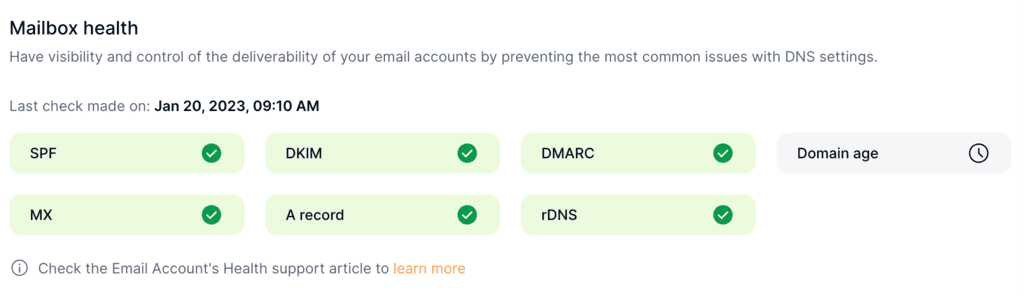
Gmail’s 5.7.26 bounce, for example, means the message failed authentication, and Microsoft rejects high-volume senders without SPF, DKIM, and DMARC with 550 5.7.15 since May 2025. That’s why block bounces point straight at your domain setup and sender reputation. A tool like MailToaster checks your SPF, DKIM, and DMARC records automatically on every connected mailbox, so a broken record shows up in a dashboard before it shows up as a wave of 5.7 bounces.
What causes a high email bounce rate?
Most high bounce rates trace back to one of five causes, and the first one affects every list eventually.
- List decay. ZeroBounce’s Email List Decay Report for 2026, based on more than 11 billion addresses checked in 2025, found that at least 23% of an email list degrades every year. People leave companies, domains expire, and mailboxes get abandoned, so a list that was clean in January won’t be clean in December.
- Bought or scraped lists. Purchased data is old by the time you get it and often includes spam traps, recycled addresses that exist specifically to catch senders who don’t verify.
- Typos at signup. Addresses like “[email protected]” come in through forms without verification and bounce on the first send.
- Catch-all domains. Some company servers accept mail for any address at the domain, so verification can’t confirm whether a specific person exists. The same ZeroBounce data puts catch-all addresses at more than 9% of everything it checked, and a share of them will bounce later.
- Sending too much, too soon. A new or cold mailbox that suddenly sends hundreds of emails gets throttled (4.x.x) or blocked (5.7.x), even when every address on the list is valid.
How to lower your email bounce rate
Here are seven ways to lower your email bounce rate, starting with the one that fixes the biggest share of the problem.
- Verify every list before you send. Run it through an email verification service and remove anything marked invalid, disposable, or unknown. Tools like ZeroBounce (we broke it down in our ZeroBounce review) or NeverBounce handle bulk lists. ZeroBounce’s pay-as-you-go pricing starts at $39 for 2,000 addresses, roughly 2 cents each, which is cheap compared to what a bounced campaign does to your sender reputation.
- Verify at the point of capture. Real-time verification on signup forms and double opt-in for newsletters stop typos and fake addresses from ever reaching your list.
- Suppress hard bounces immediately. Any 5.1.1 or 5.1.2 bounce should never receive another email. Most platforms do this automatically, but check that suppression lists carry over when you import contacts into a new tool.
- Give soft bounces a limit. Retry them, but suppress any address that soft-bounces three campaigns in a row, since a mailbox that’s been “full” for a month is most likely abandoned.
- Send to catch-all addresses in small batches. Verification can’t confirm them either way, so keep them in their own segment and send to them last, in smaller batches. If a batch bounces above 5%, drop the rest of that segment and keep the campaign’s overall rate intact.
- Authenticate your domain. Set up SPF, DKIM, and DMARC before any campaign, since missing or broken records are the main source of 5.7 block bounces.
- Re-verify older lists. At a 23% yearly decay rate, a list loses roughly 2% of its valid addresses every month, so re-verify anything that hasn’t been emailed in 90 days.
Why bounces cost you more than one campaign
A bounced email costs you more than the one send it failed on. Mailbox providers track how often your domain and mailboxes send to addresses that don’t exist, because it’s one of the clearest signs that a sender doesn’t know or care who’s on their list, and that history feeds directly into your email address reputation.
And that reputation decides where your next email lands for everyone else on the list, including the valid addresses. So a campaign that bounces at 8% doesn’t only lose 8% of its sends, it pushes a share of the other 92% toward spam as well.
Once the list is clean and the records are in place, what’s left is rebuilding and protecting that reputation, which is the job of email warm-up.
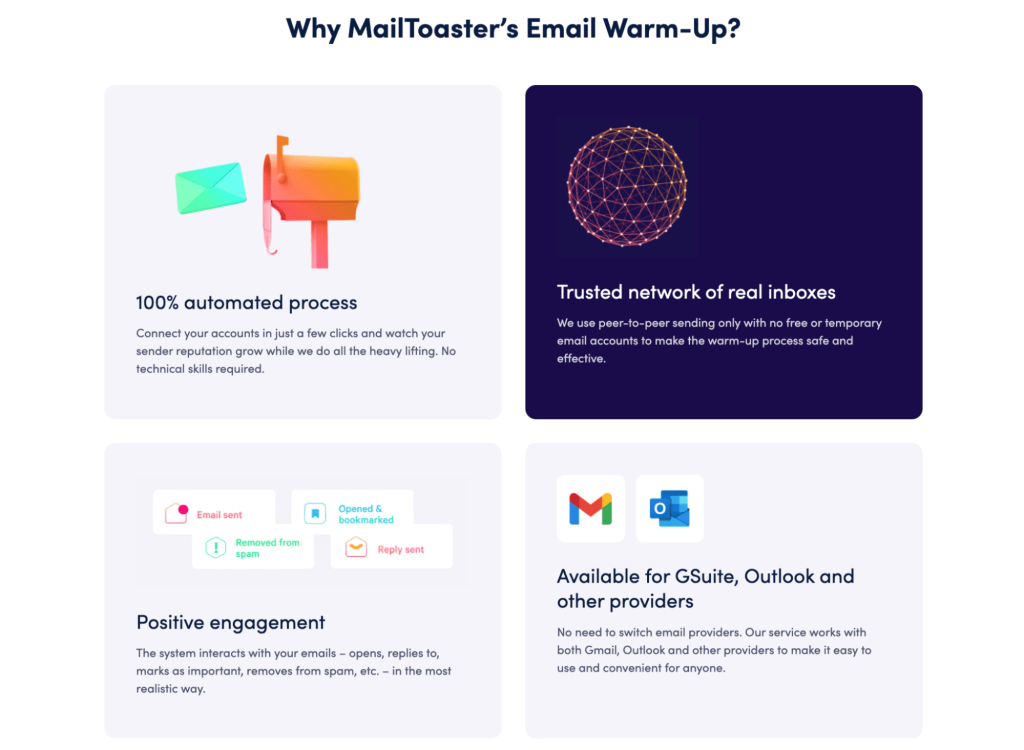
MailToaster connects to your Gmail, Outlook, or other mailbox in a couple of clicks and sends and receives emails across a peer-to-peer network of real inboxes, with no free or temporary accounts involved. Those inboxes open your emails, reply, mark them as important, and pull them out of spam, which is the kind of positive engagement that offsets a history of bounces over time.
You can pick the Reputation Protect profile for a mailbox that’s already sending, or New Email Account for one that’s starting from zero. Its reports then track emails sent, where they landed (inbox, spam, or a category tab), and how many bounced, so you can see whether a fix actually worked.
Final thoughts
Keeping your email bounce rate under 2% comes down to a few habits: verify every list before it goes out, suppress hard bounces for good, and treat any 5.7 code as a warning about your domain setup and reputation, not your list.
Pull the bounce report from your last campaign and sort it by code, since that tells you exactly which fix to start with. And if your domain’s reputation took a hit along the way, start rebuilding it with MailToaster’s 7-day free trial.
FAQ
Is a 20% bounce rate good?
Not for email, since a 20% email bounce rate means one in five addresses is invalid or blocking you, and most sending platforms would pause the account well before that. For a website, a 20% bounce rate is unusually low, which is why it’s worth checking which metric a benchmark is talking about.
Do soft bounces affect deliverability?
A few soft bounces don’t, since mailbox providers expect temporary failures. Repeated soft bounces to the same addresses do, because they look like a sender who keeps mailing abandoned inboxes. Suppress any address that soft-bounces three times in a row.
How do I stop emails from bouncing?
Verify your list before every campaign, remove hard bounces immediately, and make sure SPF, DKIM, and DMARC are set up correctly. If bounces carry 5.7 codes, the problem is authentication or reputation, so fixing the list alone won’t stop them.
What’s the difference between bounce rate and delivery rate?
Delivery rate is the percentage of emails the receiving server accepted, which is roughly 100% minus your bounce rate. Neither tells you whether the email reached the inbox or the spam folder, which is a separate metric called inbox placement.