

What Is Inbox Placement and How to Improve It
Your ESP says 98% delivered, yet your open rate is sub-10%. Both can be true, and both can still miss the main problem. After all, delivered just means the receiving server took the email. It does not guarantee that it was placed in the inbox.
Inbox placement is that missing layer between “accepted by the server” and “actually seen by a human.” Across all senders, the average is usually somewhere around 84%, which means roughly one in six emails never makes it to their intended inbox.
Below, we’ll go through what is inbox placement, how that number is calculated, what affects it in 2026, and what to fix when your placement starts looking ugly.
What is inbox placement?
Inbox placement is the percentage of delivered emails that land in the recipient’s primary inbox instead of spam, promotions, or another filtered folder.
The confusion usually starts because people confuse the following three very different terms:
- Email deliverability is the broader discipline: infrastructure, domain reputation, list quality, content, and all the other moving parts.
- Delivery rate tells you whether the receiving server accepted your email instead of bouncing it. Most senders sit around 97-99% here, which is why this number can look great while everything else is on fire.
- Inbox placement tells you what happened after the email was accepted.
The filtering process usually happens in a sequence. First, the receiving server checks authentication, then it looks at your domain reputation, then it estimates how the recipient is likely to react based on past behaviour. After that, it skims the content for any spam keywords, as well as formatting, links, and structure.
If you fail early on, the rest won’t matter. No subject line is going to save a domain that can’t pass DKIM.
And here’s the slightly annoying part — once the receiving server returns a 250 OK response, your ESP loses visibility, so it cannot see which folder the message landed in. No ESP can.
How to calculate inbox placement rate
There are two distinct formulas here to keep in mind:
Delivery rate \= (Emails sent – Bounced) ÷ Emails sent × 100
Inbox placement rate \= Emails in inbox ÷ Emails delivered × 100
Let’s use a simple campaign to see how to calculate inbox placement rate:
You send 1,000 emails. 50 bounce, so 950 are marked as delivered. Out of those 950, only 600 actually reach the inbox. Your delivery rate is 95%, but your inbox placement rate is only 63%, and that’s the gap where a lot of outbound performance quietly disappears.
What is the average inbox placement rate?
Validity’s benchmark data puts the global average at roughly 83-84%. The wider picture looks something like this:
| Benchmark | Rate | What it means |
|---|---|---|
| Global average, all senders | 83-84% | Roughly 1 in 6 emails misses the inbox |
| Good | 87%+ | Puts you in the top quarter of senders |
| Excellent | 93%+ | Well-maintained, permission-based programs |
| Warning zone | Below 80% | Reputation or infrastructure problem |
| Critical | Below 70% | Active filtering – stop scaling and diagnose |
Averages can hide a lot, though. Gmail tends to perform better at around 87%, and Yahoo is a close second, near 86%. Outlook is usually the painful one, often around 75-76%, which makes sense since Microsoft’s filtering is stricter.
What affects email inbox placement in 2026?
Filtering is no longer just about some static sender score sitting in the background. Email providers are using behavioural models, some of which are AI, that keep updating based on what recipients do with your emails over time.
Two big enforcement waves pushed this forward: Gmail and Yahoo’s bulk sender requirements in February 2024, then Microsoft’s version in May 2025. A lot of “best practices” became pass/fail requirements almost overnight.
Here’s what filters are weighing now:
- Authentication and alignment → SPF, DKIM, and DMARC need to pass, and they need to align with your From domain. Keep in mind that, since 5 May 2025, Microsoft rejects non-compliant mail from senders pushing more than 5,000 emails a day to Outlook.com, Hotmail.com, and Live.com addresses with a 550 5.7.515 error.
- Spam complaint rate → This is the one hard number providers actually publish. Keep it under 0.1%, and do not let it get to 0.3% — that’s Google’s limit. At 1,000 sends per day, one complaint already puts you right at the recommended ceiling.
- Sender reputation and history → Domain reputation matters more than IP reputation now, mostly because senders rotate IPs all the time, but domains follow you around. A fresh domain is not treated as clean by default — it’s treated as unproven, which usually means some level of caution.
- Engagement signals → Replies are the strongest positive signal you can influence. Opens are much weaker now, especially after Apple’s Mail Privacy Protection made open data unreliable. Deletes without opens and spam reports can pull the whole domain down fast, sometimes within days.
- List quality → Bounce rates above 2% and spam traps from scraped or purchased lists create damage that better copy will not fix.
- Volume patterns → Sudden spikes, months of silence followed by a big send, or random sending cadence all look suspicious, even when the actual email is good.
- Content and structure → Broken HTML can trigger filters before anyone reads a word, while link shorteners, image-heavy layouts, and identical templates sent at scale can push emails toward Promotions or spam.
How to improve inbox placement
Most placement issues are infrastructure issues first, behaviour issues second. Testing subject lines while authentication is broken is just burning time with extra steps.
So if you’re wondering how to improve inbox placement, start with the boring technical stuff.
Fix authentication before anything else
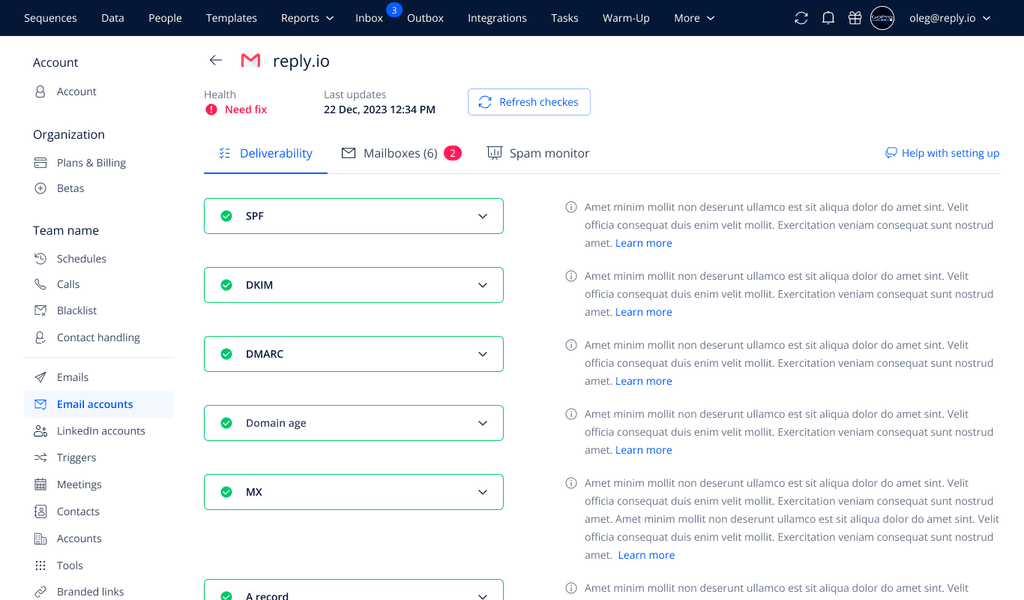
Publish SPF, DKIM, and DMARC, then confirm they are aligned, not just present. Start DMARC with p=none, read the reports for a few weeks, then move to quarantine and eventually reject once you know legitimate mail is not failing.
Check that your From domain matches the DKIM d= tag. Count your SPF lookups, and make sure reverse DNS resolves properly. Add one-click unsubscribe through the List-Unsubscribe header for bulk sending. Even cold outreach benefits from it, because making it hard to opt out is a bad signal to filters and, honestly, to humans too.
This can get quite complicated, but if you’re using outreach software like Reply.io to automate your email campaigns, these authentication settings are fully taken care of for you, and then maintained in the background.
Warm up every new domain and mailbox, then keep warming
A brand-new domain has no history, but providers don’t see that as a clean slate. They see it as “we don’t know you yet.”
A practical ramp looks like this: start with 5-10 emails per day per mailbox, add 3-5 more each day, and reach 30-50 daily over three to four weeks. Truly new domains usually need closer to four to six weeks, with no real cold outreach until around week three.
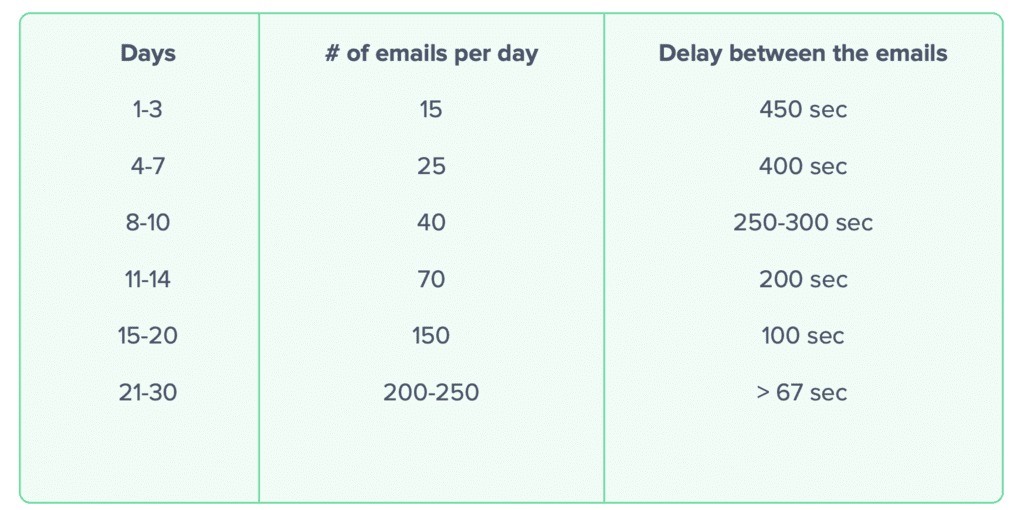
The mistake most teams make is treating email warm-up like a one-time setup task. Keep a maintenance volume running all the time, usually around 20-30% of daily sends, so consistent positive engagement offsets the silence cold outreach naturally creates.
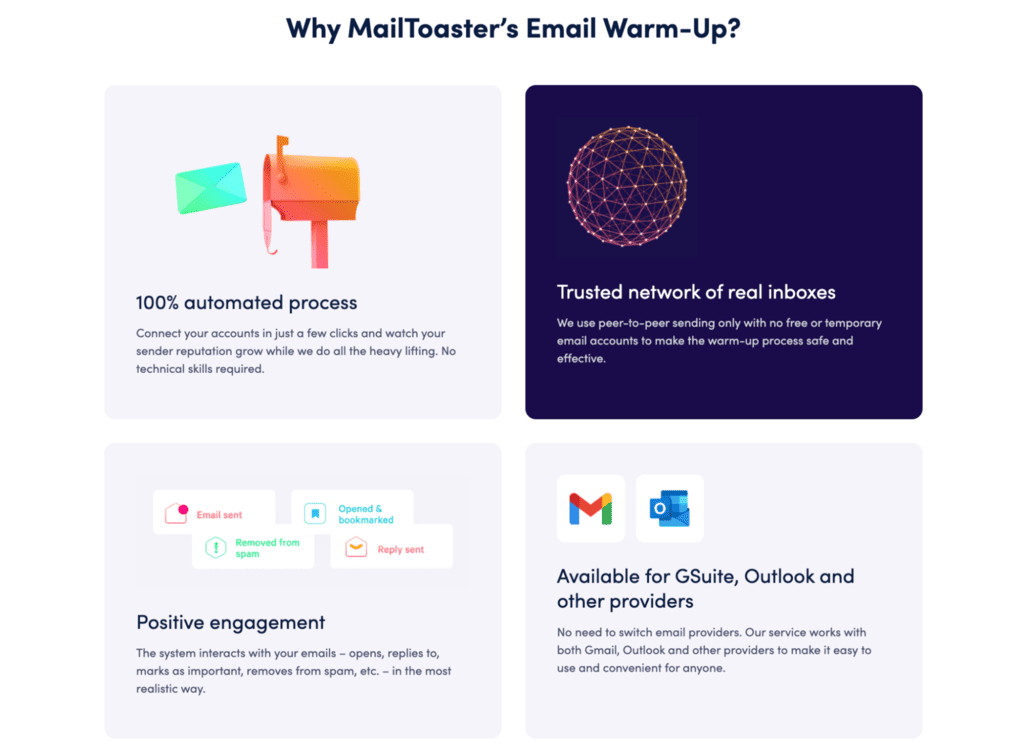
Doing that manually, let alone across multiple inboxes, gets messy fast, and that’s where an automated warm-up tool like MailToaster comes into play. It gradually ramps up your sending volume with ongoing natural engagement through a network of real inboxes, suitable for building a new sender reputation from scratch, as well as maintaining or recovering an existing one.
Clean the list before it costs you reputation
Verify every list before you launch email campaigns. B2B data goes stale faster than people think because contacts change jobs, teams restructure, domains change, and old addresses turn into traps.
Aim for a bounce rate under 2%, though teams verifying in real time can get closer to 0.3%, and those lists tend to perform much better on placement. Suppress contacts who have not engaged in 90-180 days, as dead addresses drag down your engagement averages over time.
And don’t buy lists. Really. Spam traps can do the kind of damage to your sender reputation that takes a lot of time and effort to recover.
Optimise for replies, not opens
Since MPP inflated open data, replies are the signal worth building around. That means asking one specific question, keeping the ask small enough to answer in a sentence, and writing HTML that looks like a real email instead of a campaign brochure.
Try to keep it mostly text, and opt for full URLs instead of shorteners. Validate the HTML, because broken nesting and missing attributes can trip parsing filters regardless of how good the message is. Rotate templates too — identical structure at volume is its own pattern, and filters are very good at spotting patterns.
Rotating by hand usually means three templates that say the same thing in the same order. Spintax varies it at the sentence level instead, so every send differs in wording without you writing a new email each time. Drop your best-performing version in and generate the variants.
Free Spintax Generator
Paste your email — we’ll auto-wrap common words, CTAs and sign-offs in {spintax|like|this} so each send feels human, not copy-pasted.
See the dictionary
Test and monitor placement instead of guessing
Run an inbox placement test before every important campaign and before increasing volume. Seed testing sends your email to monitored accounts and shows where each version lands: primary, promotions, spam, or blocked. They’re also useful for catching authentication failures and blocklisting.
Set a rule before you launch — if the test shows spam placement at Google or Microsoft, pause and fix it. Then add ongoing monitoring on top: Postmaster Tools for spam rates, authentication pass rates, and compliance status, plus blocklist checks and per-mailbox trends.
This is why more outreach platforms are pulling deliverability data into the campaign workflow itself. Reply.io, for example, integrated the Google Postmaster API so spam rates sit next to campaign performance instead of hiding in some separate tab nobody opens.
Inbox placement tools worth using
No single product covers testing, monitoring, and reputation building properly. Most teams end up using two or three tools together. The top solutions for B2B email inbox placement usually depend on the job you need done:
| Job to be done | Tool | What it gives you |
|---|---|---|
| Seed-list placement testing | GlockApps, Validity Everest | Where a specific email landed across Gmail, Outlook, Yahoo, Apple Mail, and regional providers |
| Free technical audit | Mail-Tester | Authentication, content, and header check with a 0-10 score |
| Gmail monitoring | Google Postmaster Tools | Spam rate, authentication pass rates, delivery errors, compliance status |
| Microsoft monitoring | Microsoft SNDS | Complaint data and trap hits for your sending IPs |
| Warm-up and sender reputation | MailToaster | Automated peer-to-peer warm-up, DNS record checks, inbox vs. spam reporting |
| List verification | ZeroBounce | Removes invalid addresses and spam traps before you send |
The stack logic is pretty straightforward: inbox placement tools tell you where you stand, while inbox placement monitoring monitors your email campaigns over time and tells you when something changes. Warm-up is the part that actually helps move the number.
Building inbox placement with MailToaster
Testing and monitoring are diagnostics. Sender reputation is the input you can actually work on, and warm-up is how you build it. That’s where MailToaster fits.
MailToaster is an automated email warm-up service built for one key job: building, protecting, or repairing sender reputation so more of your emails land in the inbox. You connect a Gmail, Outlook, or other provider account in a few clicks, and warm-up starts right away. No migration, no technical setup.
The important part is the network behind it — MailToaster uses peer-to-peer sending across real inboxes only, with no free or temporary accounts in the pool. The system opens your emails, replies to them, marks them as important, and pulls them out of spam. That’s the kind of behaviour real recipients create, and it’s exactly the type of engagement your recipient’s email providers measure.
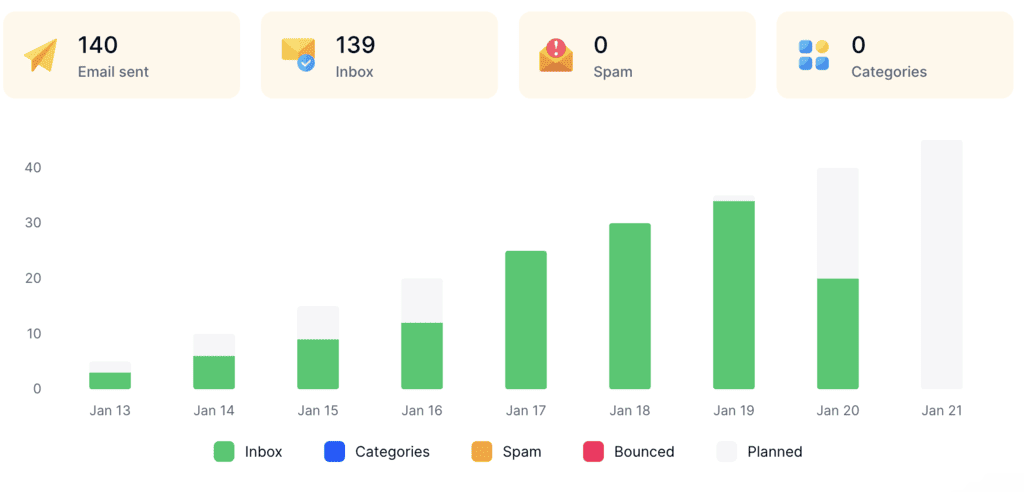
It also offers automatic DNS checks, along with SPF, DKIM, DMARC, as well as detailed reporting on the warm-up performance (how many landed in inbox, spam, categories, and bounces).
Getting your emails into the inbox
Delivered is just a server acknowledgement, but it’s inbox placement that decides whether your email actually reached the person you sent it to.
So measure it with a seed test, monitor your spam rates with Google’s Postmaster Tools, and make sure to set up clean authentication. Next, focus on only emailing verified email addresses and control your sending volume.
Warm-up sits underneath all of this because sender reputation is one of the few inputs that can change how providers treat your emails and domain as a whole.
And if you do not want to manage that manually, MailToaster handles the warm-up and reputation work while you can focus on the actual email outreach.
Inbox placement FAQ
What is a good inbox placement rate?
87% or higher is good and puts you roughly in the top quarter of senders. 93%+ is excellent. Anything below 80% usually points to a reputation or infrastructure problem you should fix before scaling. Cold outreach benchmarks are lower than opt-in marketing benchmarks, so compare your program against similar senders, not just the global average.
What’s the difference between email deliverability and inbox placement?
Deliverability is the broader discipline covering infrastructure, reputation, and list quality. Delivery rate tells you whether the receiving server accepted your message. Inbox placement tells you where that server put it. You can have a 99% delivery rate and still have half your emails sitting in spam.
Does landing in the Promotions tab count as inbox placement?
Technically, it is not spam. In practice, it is still a visibility problem. Gmail now sorts Promotions by engagement history rather than simple arrival time, so weak engagement can push you down even inside the tab. Most placement tools split Promotions from primary for exactly that reason.
How often should you run an inbox placement test?
Run a test before every major campaign, before every volume increase, and weekly if you’re running active outbound. Testing only after performance drops means you’re diagnosing damage that already happened to your domain.
How long does it take to fix poor inbox placement?
Usually two to eight weeks, depending on the cause. Authentication issues can improve quickly once fixed. Reputation damage takes longer because you need sustained low volume and consistent positive engagement. There is no real shortcut here, and increasing volume during recovery usually resets the clock.