

Best Email Deliverability Tools for Sales and Marketing
You’ve found the right leads to reach out to, you’ve crafted the perfect email sequence, and yet the number of replies falls flat. Maybe it’s the targeting, the messaging, or the timing, but it could also be simply because a chunk of those emails never reached their intended recipients in the first place.
Deliverability is the one part of outreach you can’t see without instrumentation. Validity’s 2026 Email Deliverability Benchmark Report puts the global inbox placement rate at 87.2%, and that average hides that for Outlook, that number sits at 75.6%.
If you’re sending hundreds or thousands of emails each month, those emails that never reach the inbox are all lost potential opportunities. And once you’ve damaged your email address reputation, it becomes a snowball effect that only makes things worse over time.
Below are nine email deliverability tools actually worth your budget, covering what each one does, what it costs, and which specific problem it solves for a sales or marketing team.
What are email deliverability tools (and how do they work)?
Email deliverability tools are software that measure and improve whether your emails reach the primary inbox rather than the spam folder, the Promotions tab, or a hard block at the gateway.
They work in different ways: some inspect your setup (DNS records, SPF/DKIM/DMARC authentication, blacklist listings) and tell you what’s misconfigured, others send test emails to a network of seed inboxes and report exactly where those messages landed.
One distinction to get straight before you spend anything is that delivery means the receiving server accepted your email. Deliverability means it reached the folder your recipient actually opens. A 99% delivery rate is meaningless if 40% of those messages are quietly sitting in spam, which is why inbox placement is the real number that matters.
The 4 types of email deliverability tools
“Deliverability tool” is a catch-all for four different jobs, and confusing them is how teams end up paying for something that doesn’t fix their problem, so make sure to understand the difference:
- Email warm-up and reputation tools gradually send and reply to emails on your behalf through a network of legitimate emails, designed to build a positive sending history before you scale. This is what you need for a brand-new domain or a mailbox that’s gone cold, and it’s exactly what helps email providers see your email domain as trustworthy.
- List verification tools check email addresses before you send, which otherwise would cause high bounce rates that damage your reputation faster than almost anything else, so this is the cheapest and quickest insurance available.
- Email deliverability test tools send a message to seed inboxes across Gmail, Outlook, Yahoo, and others, then report where each copy landed. Run one before a big campaign, while there’s still time to fix what it finds.
- Monitoring tools watch your blacklist status, DNS health, complaint rate, and DMARC reports continuously, and alert you when something breaks.
Most outreach teams need three of these four. No single product covers all of them honestly, and any vendor claiming otherwise is stretching.
Best email deliverability tools at a glance
Nine tools, one per job. Full breakdowns follow the table:
| Tool | Best for | Category | Starting price | Free option |
|---|---|---|---|---|
| MailToaster | Warming up outreach mailboxes | Warm-up + reputation | $29/mailbox/mo | 7-day trial |
| Google Postmaster Tools | Gmail spam rate + reputation | Monitoring | Free | Fully free |
| Microsoft SNDS | Outlook.com sender data | Monitoring | Free | Fully free |
| MXToolbox | Blacklist and DNS checks | Monitoring | $129/mo (Delivery Center) | Unlimited free lookups |
| EasyDMARC | SPF, DKIM, DMARC management | Authentication | \~$18/mo | Free tier |
| GlockApps | Seed-list placement testing | Testing | \~$59/mo | Limited free tests |
| Mail-Tester | Fast spam score check | Testing | $9.90/mo | 3 tests/day |
| ZeroBounce | Cleaning lists before send | Verification | \~$15/mo | 100 verifications/mo |
| Validity Everest | Enterprise marketing programs | Monitoring + testing | Quote-based | Demo only |
The 9 best email deliverability tools for sales and marketing
We ranked these tools by the problem each one solves, but you should always start with whichever matches your current biggest symptom (emails landing in spam folders, bounce rates, a blacklist hit, flat replies), then add the rest as volume grows.
1. MailToaster
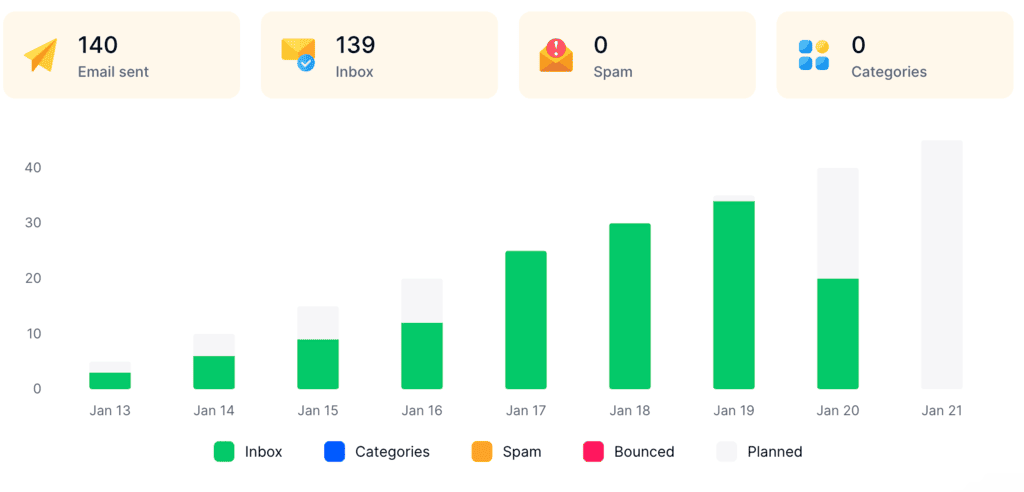
MailToaster is an email warm-up tool that builds and protects your sender reputation, fully automated. Connect a Gmail, Outlook, or other mailbox in just a few clicks, pick a profile (New Email Account to build reputation from zero, or Reputation Protect to maintain one you already have), and it handles the rest.
It starts sending runs across a peer-to-peer network of real inboxes, no free or temporary accounts involved, and creates real-life engagement patterns with opens, replies, marks as important, and pulls out of spam. MailToaster also monitors your email authentication settings, another key element that affects how likely your emails are to reach your recipients’ inboxes.
Key features:
- Two warm-up profiles for new and established mailboxes
- Peer-to-peer network of verified real inboxes
- Automatic SPF, DKIM, DMARC, and DNS record validation
- Detailed email deliverability report covering sends, inbox, spam, categories, and bounces
- AI-generated warm-up copy or your own templates, filed into a separate folder
Plenty of point tools warm mailboxes up and stop there, leaving you to run outreach elsewhere. For those who want to then automate their email campaigns with AI, MailToaster also ships inside Reply.io, an AI outreach platform with a native lead database, multichannel outreach, and a full suite of deliverability tools.
Pricing: $29 per email account per month, roughly 10% off on annual billing, with a 7-day free trial and no technical setup.
2. Google Postmaster Tools
Source: Suped
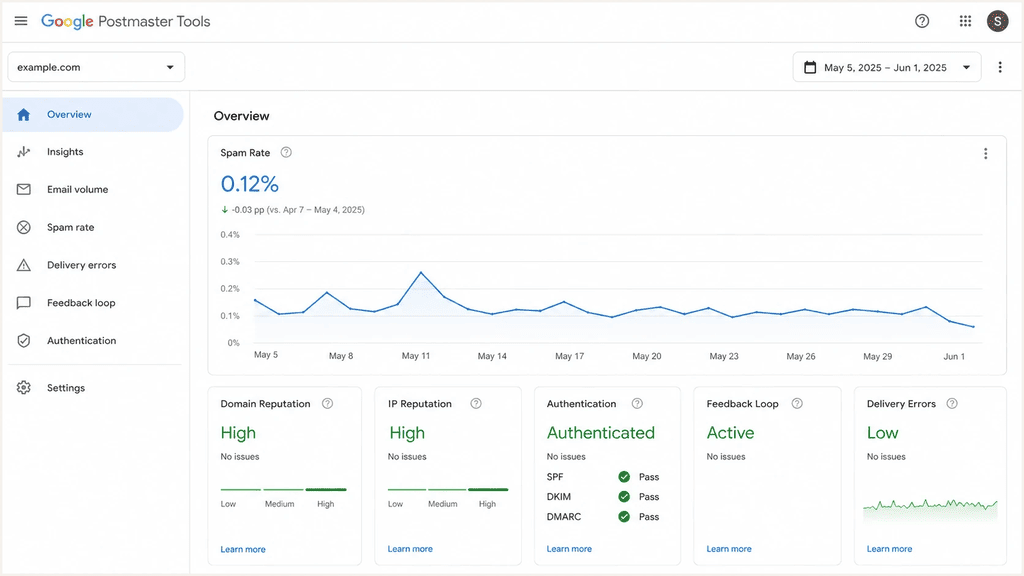
Among the best email deliverability tools for Gmail, nothing beats going straight to the source. Postmaster Tools reports your user-reported spam rate, domain and IP reputation, authentication pass rates, and delivery errors, all measured by Google rather than estimated by a third party.
Google’s own sender guidelines say to keep spam rates below 0.1% and never let them reach anywhere near 0.3%. Cross that line and you stay ineligible for mitigation until you’ve held under 0.3% for seven straight days.
Key features:
- User-reported spam rate, updated daily
- Domain and IP reputation ratings
- SPF, DKIM, and DMARC pass rates
- Delivery error breakdown by cause
- Data broken out by sending IP and by domain
Pricing: Free. The catch is coverage, as it only reports on Gmail, and low-volume senders often see an empty dashboard, because Google suppresses data below a daily volume threshold.
3. Microsoft SNDS
Source: Suped
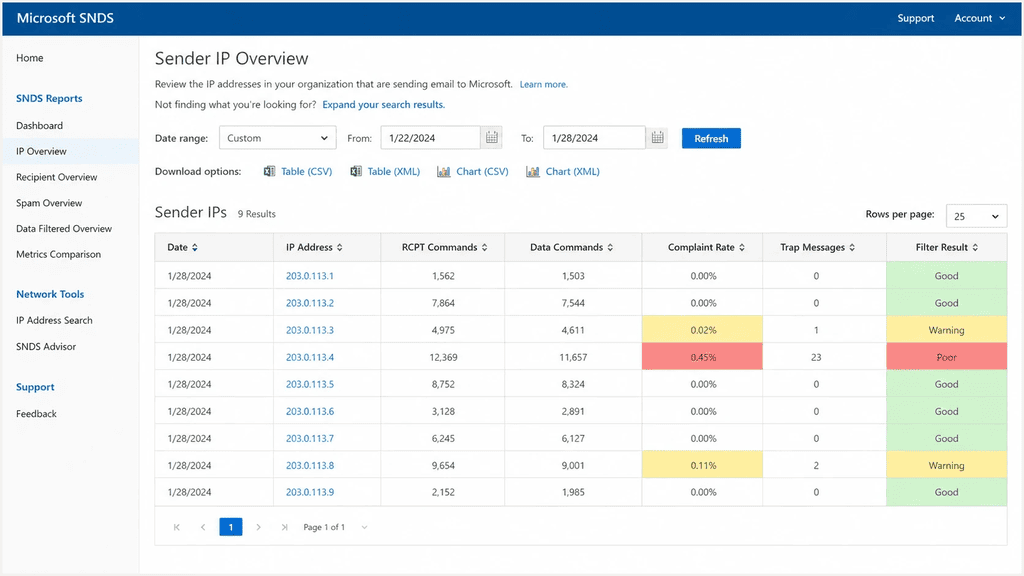
Microsoft’s Smart Network Data Services is the Outlook.com equivalent of Postmaster Tools, and it earns attention because Outlook is where outreach quietly dies. Validity’s benchmark puts it at 75.6% inbox placement, lowest of the major providers. SNDS reports on the IPs you send from: complaint rates, filter verdicts, traffic volume.
One housekeeping note: Microsoft moved SNDS to a new portal after the June 8, 2026 cutover, and trap hit counts dropped out of the Data Report on July 22, 2026.
Key features:
- Complaint rate per sending IP
- Filter verdict and message volume data
- Color-coded IP status (green, yellow, red)
- OAuth 2.0 API for automated pulls
- Free with a Microsoft account
Pricing: Free. The limitation is that SNDS is IP-based, so if you send through a shared ESP pool you’re looking at everyone’s traffic on it.
4. MXToolbox
Source: MXToolbox
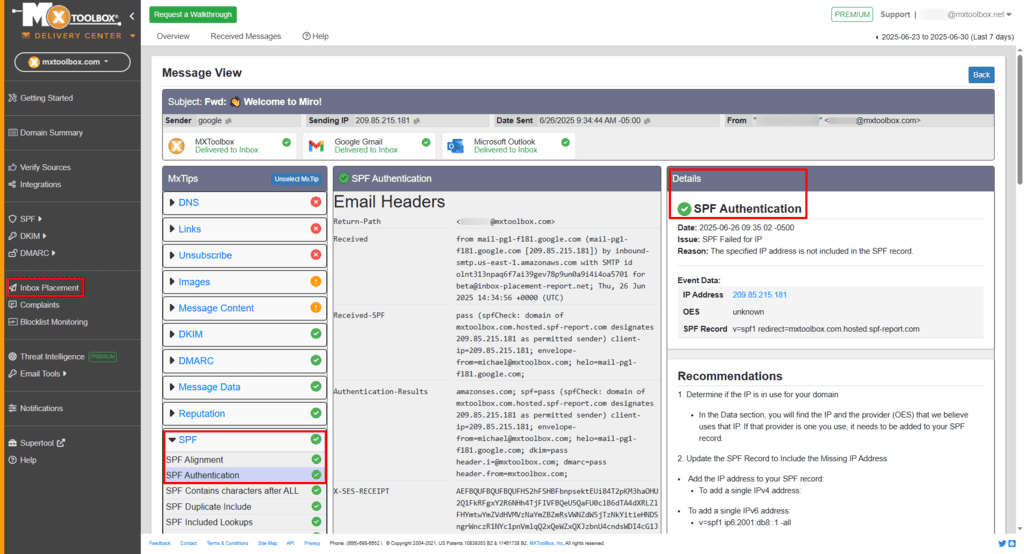
The MXToolbox email deliverability tool set answers the two questions that matter during an outage: whether you’re blacklisted, and whether your DNS is right. Free lookups check your domain or IP against dozens of blacklist databases in seconds, and validate MX, SPF, DKIM, and DMARC records without an account. Delivery Center is the paid layer that turns those one-off checks into continuous monitoring with alerting, header analysis, and SMTP diagnostics.
Key features:
- Blacklist checks against 80+ databases
- MX, SPF, DKIM, DMARC record validation
- Email header analyzer for diagnosing delivery paths
- Adaptive blacklist monitoring with alerts (paid)
- Inbox placement analysis and delivery reporting (paid)
Pricing: The simple lookups everyone uses are free and unlimited. Delivery Center starts at around $129 per month, which is steep unless you’re monitoring several domains at once.
5. EasyDMARC
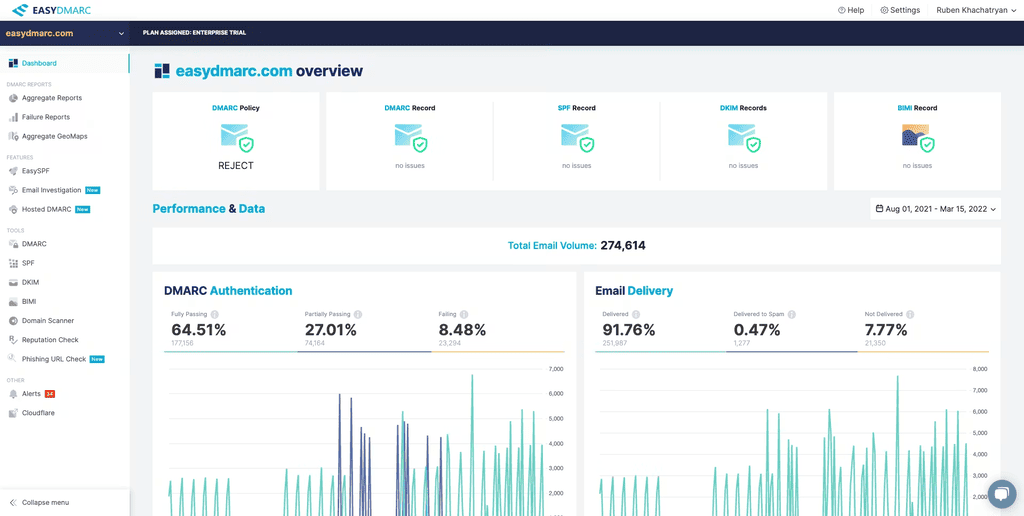
Authentication stopped being optional. Since May 5, 2025, Microsoft requires SPF, DKIM, and DMARC (with alignment, at minimum p=none) from any domain sending more than 5,000 messages a day to Outlook.com, and non-compliant mail is rejected outright rather than junked. EasyDMARC turns the raw XML aggregate reports DMARC generates into something readable, showing which sources send as your domain and which fail authentication.
Key features:
- DMARC aggregate and forensic report parsing
- SPF, DKIM, and DMARC record generators and lookups
- Managed SPF to get around the 10-lookup limit
- Source-level authentication breakdown
- Guided path from p=none to p=reject
Pricing: Plans start around $18 per month, with a free tier and a free trial. Pricing scales by domains monitored and report volume, and lower tiers cap data retention at three months.
6. GlockApps
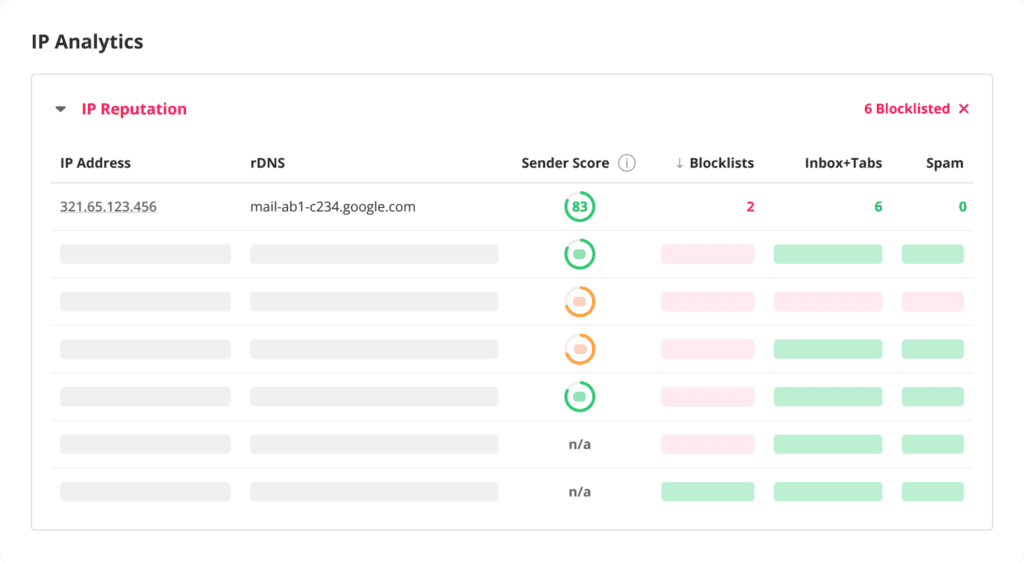
GlockApps is the email deliverability testing tool most outreach teams land on. Send a campaign to its seed list and it reports where each copy arrived across 70+ mailbox providers: Primary inbox, Promotions, spam, or blocked entirely. The same report scores your content against SpamAssassin, checks authentication, and runs your sending IP against blacklists. Testing before a large campaign costs far less than burning a domain on one.
Key features:
- Seed testing across 70+ mailbox providers
- Tab-level results (Primary vs Promotions vs spam)
- SpamAssassin content scoring
- Blacklist and authentication checks
- Scheduled recurring tests with alerts
Pricing: Bundles start around $59 per month, with credit packs from $16.99 for three tests. Watch the credits, though, as unused ones expire at the end of each billing month rather than rolling over.
7. Mail-Tester
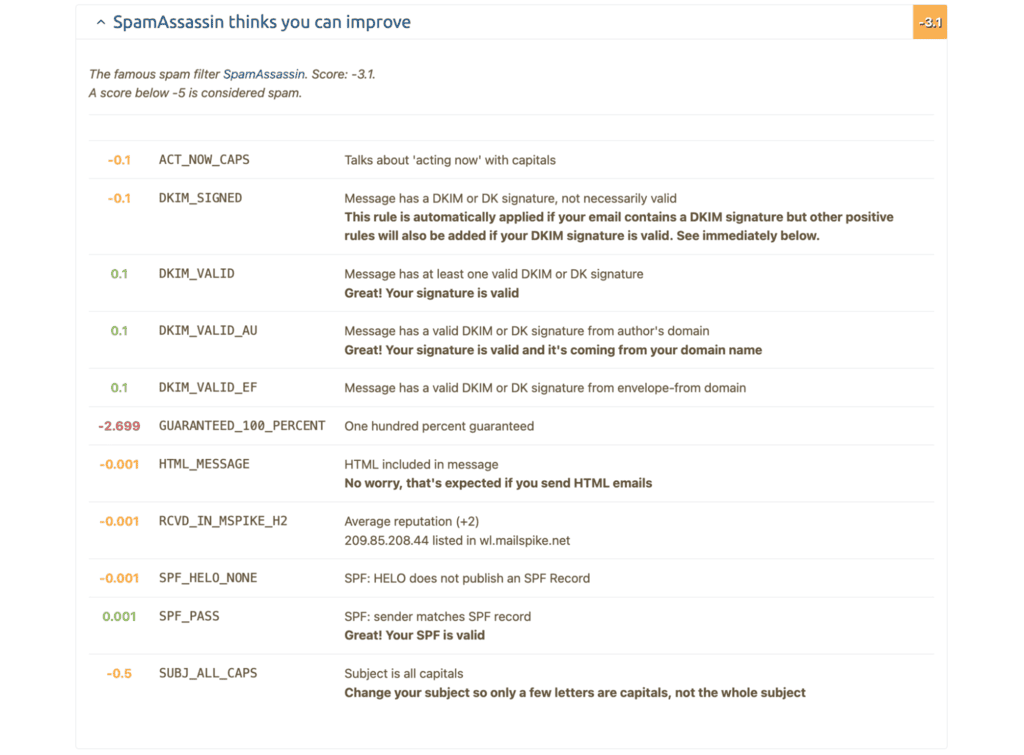
Mail-Tester is the source of the famous email rating that most people use to audit their emails. Send an email to the random address it generates, and it returns an email deliverability score out of 10, with a line-by-line breakdown of what cost you points: missing DKIM, a broken SPF record, trigger words, a bad text-to-image ratio, a listed IP. It’s the quickest sanity check in the category, and among the best email deliverability tools free of charge for occasional testing.
Key features:
- 10-point score with itemized deductions
- SPF, DKIM, DMARC, and rDNS validation
- SpamAssassin rule breakdown
- Broken link and image ratio checks
- Test history and JSON API on paid plans
Pricing: Three tests per day are free, resetting every 24 hours. Paid plans start at $9.90 per month for 1,000 tests, plus white-labeling and 30-day history. Important caveat: that score grades your configuration, not your inbox placement. A clean 10/10 and a spam-foldered campaign can absolutely coexist.
8. ZeroBounce
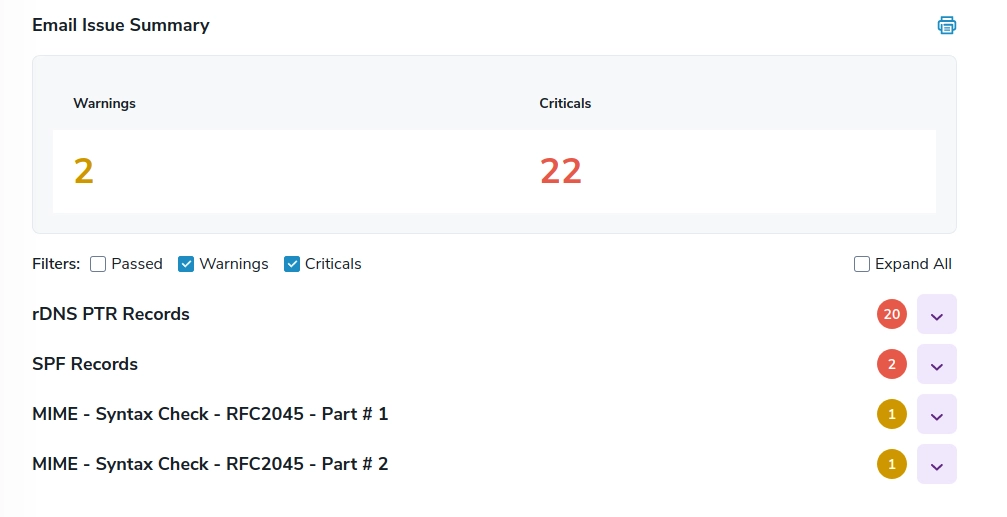
Bounces are the fastest way to wreck a sender reputation, and verification is the cheapest fix on this list. ZeroBounce validates addresses before you import them, flagging invalid mailboxes, catch-all domains, disposables, spam traps, and known complainers. For teams buying or scraping lists, verification before the first send is not optional. It’s the difference between a warm domain and a burned one, and we covered it in depth in our ZeroBounce review.
Key features:
- Bulk and real-time API validation
- Spam trap and abuse account detection
- Catch-all and disposable domain flagging
- Activity data showing whether an address is actually in use
- Integrations with major ESPs and CRMs
Pricing: 100 free verifications reset monthly. Subscriptions start around $15 per month for 2,000 validations, and pay-as-you-go credits start at $39 for 2,000 with no expiry.
9. Validity Everest
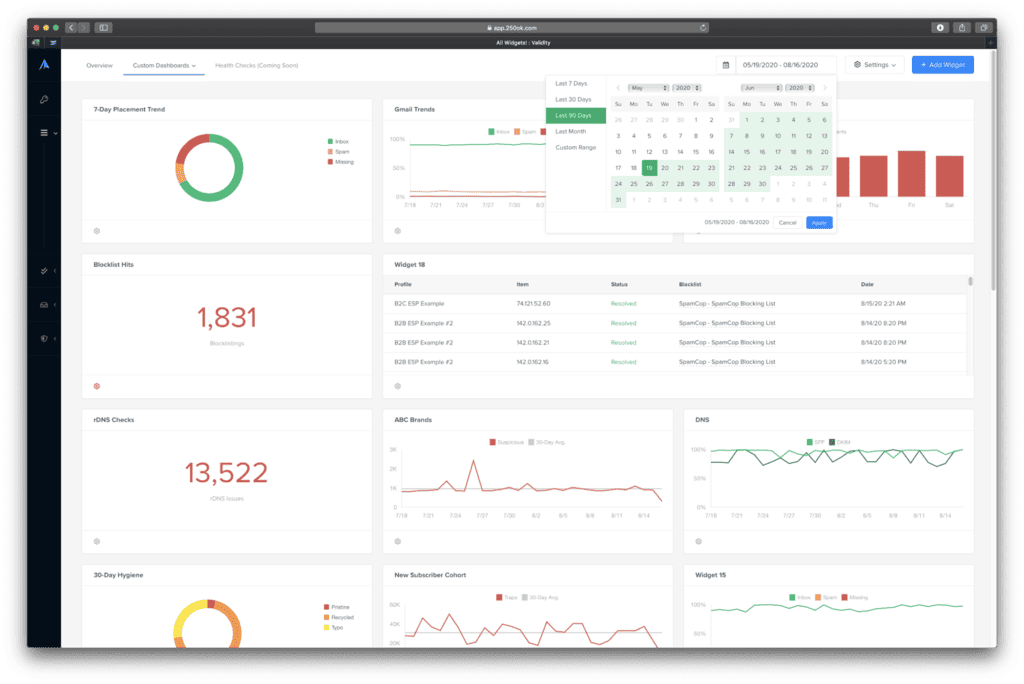
Everest is the enterprise end of the market, built for marketing teams with a dedicated deliverability function rather than simply help and protection while running lightweight email campaigns.
It combines seed testing across 70+ providers, Sender Score reputation data, DMARC parsing, competitive benchmarking, and a certification program that whitelists senders at Outlook, Yahoo, and AOL. Nothing else here matches its data depth, and for high-volume marketing programs, the email deliverability report quality justifies the spend.
Key features:
- Inbox placement testing across 70+ mailbox providers
- Sender Score and reputation trend monitoring
- Sender certification for Outlook, Yahoo, and AOL
- Competitive benchmarking against your category
- DMARC report parsing and list validation via BriteVerify
Pricing: Not published. Everest is quote-based and realistically starts in the four figures per year, with certification billed separately. Overkill for anything under serious sending volume.
How to improve your email deliverability
Tools tell you what’s wrong, but these six habits help fix it, and they matter just as much as any product you buy:
- Authenticate every sending domain → SPF, DKIM, and DMARC with alignment are hard requirements at Gmail, Yahoo, and Outlook now.
- Warm every new mailbox before it sends → a new domain firing 200 emails on day one gets flagged; ramping over two to four weeks doesn’t.
- Verify the list before every campaign → hard bounces signal you don’t know who you’re emailing, and that damage is slow to undo. Syntax errors, dead domains, role addresses and disposable providers are all detectable before the campaign goes out rather than after the bounce report comes back:
Free Email Validation Tool
Check one address or paste a whole list. Catches broken syntax, dead domains, disposable inboxes, role accounts and typos — and confirms each domain can actually receive mail. Runs in your browser; your list is never uploaded.
What each result means
- Deliverable — valid syntax and the domain has working mail servers. Safe to send to, as far as anything short of an SMTP check can tell.
- Role address —
info@,sales@,support@. A shared mailbox, not a person. They generate more spam complaints than any other category, and some ESPs block them outright. - Disposable — a throwaway inbox that likely stopped existing minutes after signup. Never mail these; they inflate your bounce rate and tell you nothing about the person.
- Free provider — a personal address. Perfectly valid, but in B2B it usually means you haven’t found their work address yet.
- Possible typo — the domain is one or two characters from a very common one.
gmial.com,hotmial.comandyaho.comare all real things people type. - Dead domain / No mail server — the domain doesn’t exist, or publishes no way to receive mail. These bounce every time.
Why bounce rate is worth protecting
- Keep hard bounces under 2%. Above that, mailbox providers start treating you as someone working from a scraped list — and that reputation follows the domain, not the campaign.
- Validate before every send, not once. B2B lists decay fast: people change jobs constantly, and an address that worked last quarter may be gone this one.
- Catch-all domains accept everything. They never bounce, so nothing looks wrong — right up until your engagement rates crater. If a domain accepts every address you invent, treat its addresses as unconfirmed.
- A clean list beats a big one. Removing dead addresses raises your open and reply rates and protects the sending domain that your real conversations depend on.
- Watch spam rate, not open rate → under 0.1% is the target. Open rates have been unreliable since Apple’s Mail Privacy Protection landed.
- Fix the content signals → heavy image-to-text ratios, multiple tracked links, all-caps subject lines, and trigger words all cost you.
- Split volume across mailboxes → fifty a day from four mailboxes beats 200 from one, and it limits the blast radius when a domain does get flagged.
Warm-up is the one item there you can’t do by hand — it needs weeks of consistent, human-looking engagement from real inboxes. That’s the gap MailToaster fills, quietly in the background, while you focus on the actual email campaigns.
Wrapping up
Pick your starting point by symptom. Spam folder trouble calls for Mail-Tester first, then a GlockApps seed test. A climbing bounce rate means verifying with ZeroBounce before the next send. Quiet Gmail replies mean opening Postmaster Tools and reading your spam rate. Nothing landing at all usually means a blacklist hit, and MXToolbox confirms that in seconds.
Underneath all of it sits your sender reputation, and no test result improves while yours is weak. Connect your mailboxes to MailToaster, give it two weeks, and launch your email campaigns with peace of mind.
FAQ
What tools can I use to test my email deliverability?
Mail-Tester for a fast spam score, GlockApps for real inbox placement across providers, MXToolbox for blacklist and DNS checks, and Google Postmaster Tools for Gmail-reported spam rates. Between those four, you can diagnose almost any deliverability problem, and three of them cost nothing.
How do I choose an email deliverability tool for cold outreach?
Match the tool to your symptom rather than picking from a generic email tool tester deliverability ranking. Cold outreach teams need warm-up and verification first, testing second, and monitoring third, in that order. Skip the enterprise platforms until you’re sending at real volume; they’re priced for marketing programs running millions of sends.
Are there any good free email deliverability tools?
Yes, and a few are better than anything you’d pay for. Google Postmaster Tools and Microsoft SNDS are free permanently and report provider-side data nothing else can access. MXToolbox lookups are unlimited, Mail-Tester gives three tests a day, and ZeroBounce includes 100 verifications monthly.
What is a good email deliverability score?
Aim for 9/10 or better on Mail-Tester, a user-reported spam rate under 0.1%, and inbox placement above 85%. Just remember what that score measures: your setup, meaning authentication, content, and IP status. Pair it with a seed test to find out where the mail actually lands.