
Zerobounce Review 2026: Improve Email Delivery for Better Replies
Every email verification tool promises a clean list and a lower bounce rate, and on a feature page they all look about the same. The differences show up in three places: how accurate the results really are, how the pricing scales once your list grows, and what the tool does with the addresses it can’t confirm.
In this ZeroBounce review, we’ll go through all three, along with what’s included in the free plan, the paid tiers at their current 2026 prices, the pros and cons users report most often, and the alternatives worth comparing it against.
ZeroBounce review: the short verdict
ZeroBounce is one of the most accurate and most complete email verification tools on the market, and one of the more expensive ones at low volume. It’s a strong fit for teams that verify lists regularly and want catch-all scoring, integrations, and 24/7 support in one place. Occasional senders with small lists can get similar core validation for less.
| ZeroBounce at a glance | |
| Best for | Teams verifying lists every month, sales and marketing ops |
| Free plan | 100 validation credits per month (business email domain) |
| Paid pricing | From $39 for 2,000 credits, or $99/month for ZeroBounce ONE |
| Accuracy | 99.6% guaranteed by ZeroBounce, 96.9% in an independent test |
| Speed | 100,000 emails in about 45 minutes |
| G2 rating | 4.7/5 from 1,370 reviews |
What is ZeroBounce?
ZeroBounce is an email validation and deliverability platform that checks whether the addresses on your list exist and are safe to email before you send to them. You upload a list or connect a tool through the API, and every address comes back tagged as valid, invalid, risky, or unknown.
Most teams use it for three jobs: cleaning a list before a campaign, verifying new signups or leads in real time as they enter a CRM, and scoring catch-all addresses that basic validation can’t confirm. Over the past couple of years, it has also added deliverability tools on top of that, which we’ll cover below.
ZeroBounce features
Email validation and what each result means
Validation is the core product, and it’s what most people are paying for. Each address costs one credit, and ZeroBounce doesn’t charge for results that come back as unknown or for duplicates it removes from your file.
The part worth understanding is what you do with each status, since a verification report only helps if you act on it the right way:
| Status | What it means | What to do |
| Valid | The mailbox exists and is safe to email | Send |
| Invalid | The mailbox or domain doesn’t exist | Remove |
| Catch-all | The server accepts everything, so the specific person can’t be confirmed | Score it, or send in small batches |
| Unknown | The server was offline or blocked the check | Re-verify later |
| Spamtrap / Abuse | Known traps or people who report emails as spam | Remove |
| Do not mail | Role-based (info@, sales@), disposable, or toxic addresses | Remove for cold outreach |
For cold outreach, the “do not mail” group matters more than it looks. Role-based addresses like sales@ or info@ rarely reply and get reported as spam more often, so removing them improves your reply rate as well as your bounce rate.
AI scoring for catch-all addresses
Catch-all domains are the weak spot of every verification tool, because the server says “yes” to any address, including ones that don’t exist. ZeroBounce’s answer is AI Scoring, which rates each catch-all address from 0 to 10 based on activity signals and historical data, so you can send to the high scorers and hold back the rest.
It costs one extra credit per scored address, and it’s a genuinely useful feature on B2B lists, where a large share of company domains are set up as catch-all.
ZeroBounce ONE extras
The ZeroBounce ONE subscription bundles verification credits with a set of deliverability tools: inbox placement tests, blacklist monitoring (scanned every 8 hours), DMARC monitoring, email server tests, Email Finder, and warmup seeds.
They’re convenient if you want one bill, but each one is a lighter version of a tool that exists on its own. Warm-up is a good example, since building sender reputation depends on the quality of the inbox network behind it, which is why many outreach teams run a dedicated warm-up tool like MailToaster alongside their verifier.
How accurate is ZeroBounce?
ZeroBounce is accurate enough to trust for list cleaning, with real-world results a little below its marketing claim. The company guarantees 99.6% validation accuracy.
The best independent data point comes from Sparkle.io’s hands-on review published in August 2026, which ran 563 addresses through ZeroBounce, sent a campaign, and measured the bounces. Two addresses marked valid bounced, which works out to 96.9% observed accuracy. In the same test, ZeroBounce’s scoring placed 12 of 25 catch-all addresses in the unsafe band, which is a cautious approach that protects your bounce rate but also holds back some real contacts.
User reviews tell a similar story. On G2, ZeroBounce holds 4.7 out of 5 from 1,370 reviews, where accuracy and ease of use are the most praised points, and occasional misclassification of valid business addresses is one of the most common complaints.
ZeroBounce pricing in 2026
There are three ways to pay for ZeroBounce: a free plan, pay-as-you-go credits, and the ZeroBounce ONE subscription. We checked every price below on ZeroBounce’s live calculator in September 2026.
| Credits (pay-as-you-go) | Price | Cost per email |
| 2,000 (minimum) | $39 | $0.0195 |
| 5,000 | $69 | $0.0138 |
| 10,000 | $129 | $0.0129 |
| 100,000 | $649 | $0.0065 |
| 1,000,000 | $3,199 | $0.0032 |
ZeroBounce ONE starts at $99 a month for 10,000 credits, with 20% off on annual billing, 15% off any extra pay-as-you-go credits, and unused credits rolling over as long as the subscription stays active. The free plan gives you 100 validation credits every month, plus one inbox test, one server test, and one blacklist monitor, but you need to sign up with a business email domain to get it.
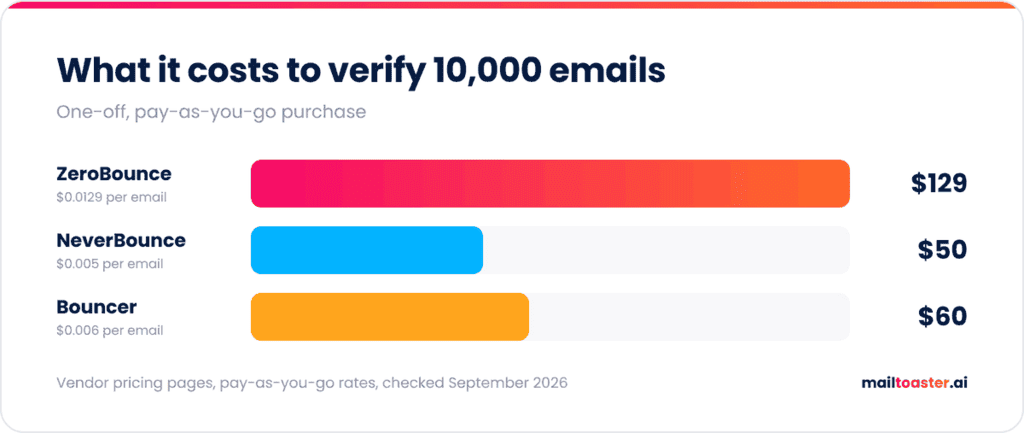
The one thing to watch is the price at small volume. At 10,000 emails a month, ZeroBounce costs $129 on pay-as-you-go, compared with $50 on NeverBounce and $60 on Bouncer.
Before you buy credits, it’s worth knowing what’s actually in your list. Paste it into our free list checker to see how many duplicates, dead domains, disposable inboxes, and role accounts it contains, along with the minimum bounce rate you’re already committed to, so you only pay to verify what’s worth keeping:
Email List Checker
Paste a whole list and find out whether it is safe to send to — duplicates, dead domains, disposable inboxes, role accounts and the bounce rate you are already committed to.
How this differs from validating each address
- A validator answers “is this address deliverable?” row by row. Useful when you have one address, or when you want a per-row verdict to filter on.
- This answers “should I send to this list at all?” — which is a different question, and usually the one that matters before a campaign.
- Composition tells you about the source. A list that is 60% free providers was probably scraped rather than researched. One that is 20% role addresses came from a company directory, not from people.
- Domain concentration predicts throttling. If a third of your list sits behind one receiver, sending it all at once looks like a burst attack regardless of how clean the addresses are.
- Duplicates are quietly expensive. They inflate your volume, and mailing the same person twice in a sequence is the fastest way to get a complaint.
Why we call it a bounce “floor”
The estimate counts only failures that can be proven without sending anything: broken syntax, domains that do not exist or refuse mail, and known disposable providers. Every one of those is a guaranteed bounce.
- What stays invisible is whether an individual mailbox exists. Proving that needs an SMTP conversation on port 25, which no browser can open — any tool claiming otherwise has a server doing it.
- Real bounce rates run higher than this floor, particularly on B2B data older than a quarter. People change jobs; the domain stays alive while the mailbox disappears.
- Catch-all domains hide the problem. They accept every address, so nothing bounces and the list looks perfect while engagement quietly collapses.
- Use the floor as a go/no-go gate. If it is already over 2% before you have sent anything, the list is not ready.
ZeroBounce pros and cons
Pros:
- High accuracy, with a 99.6% guarantee and 96.9% observed in independent testing
- AI Scoring that makes catch-all addresses usable on B2B lists
- No charge for unknown results or duplicates
- 24/7 live chat support with human agents, praised consistently in reviews
- Data deleted within 30 days of upload
Cons:
- Among the most expensive options below 25,000 emails a month
- Conservative scoring can flag real business contacts as risky
- Pay-as-you-go credits may expire unless you’re on ZeroBounce ONE
- A dense interface that takes a while to learn
ZeroBounce alternatives
The closest ZeroBounce alternatives are NeverBounce and Bouncer, and both undercut it on price at small and mid volume.
| Tool | Pay-as-you-go price | Monthly plan | Free credits | Best for |
| ZeroBounce | $129 per 10,000 | $99/month (ONE) | 100 per month | Regular verification plus catch-all scoring |
| NeverBounce | $50 per 10,000 ($8 per 1,000 below that) | $49/month up to 10,000 | Free test credits | CRM auto-sync and low cost at volume |
| Bouncer | $60 per 10,000 | Deliverability kit from $25/month | 100 on signup | Occasional verification, credits never expire |
NeverBounce, part of ZoomInfo since DiscoverOrg acquired it in 2019, is the most direct swap and the question most people ask when comparing the two. We covered it in detail in our NeverBounce review. Bouncer lands close to NeverBounce on price ($400 per 100,000 emails, the same as NeverBounce at that volume), and its credits never expire, which suits teams that verify in irregular batches.
Verification is only half of deliverability
A verified list tells you every address exists. It says nothing about whether your email will land in the inbox or the spam folder once it gets there.
That second part depends on your sender reputation and authentication, and ZeroBounce’s own data shows why verification can’t be a one-time job either: its Email List Decay Report for 2026 found that at least 23% of a list degrades every year. So the workflow that actually protects your email bounce rate and your inbox placement has two halves, one for the list and one for the mailbox sending to it.
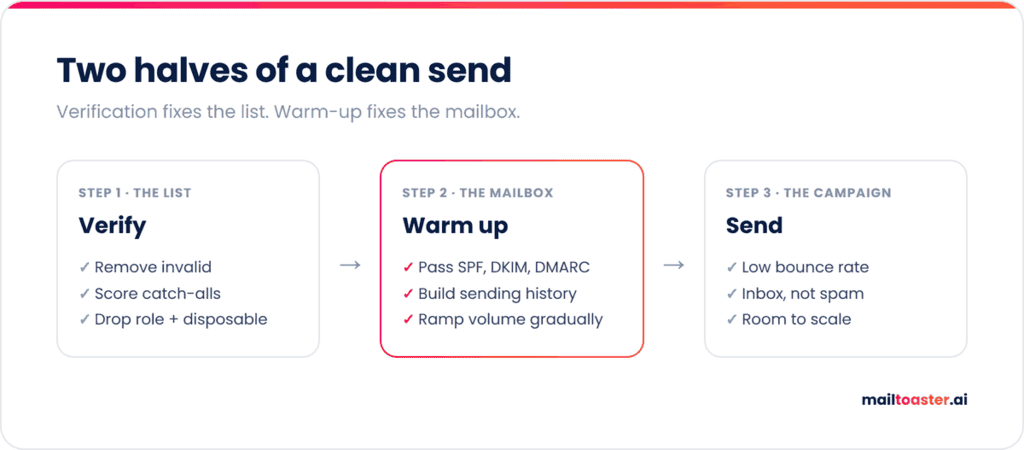
The mailbox half is email warm-up, which builds a sending history that Gmail and Outlook trust before you scale volume.
MailToaster connects your Gmail, Outlook, or other mailbox in a couple of clicks and runs it through a peer-to-peer network of real inboxes (no free or temporary accounts), which open your emails, reply, mark them as important, and pull them out of spam.
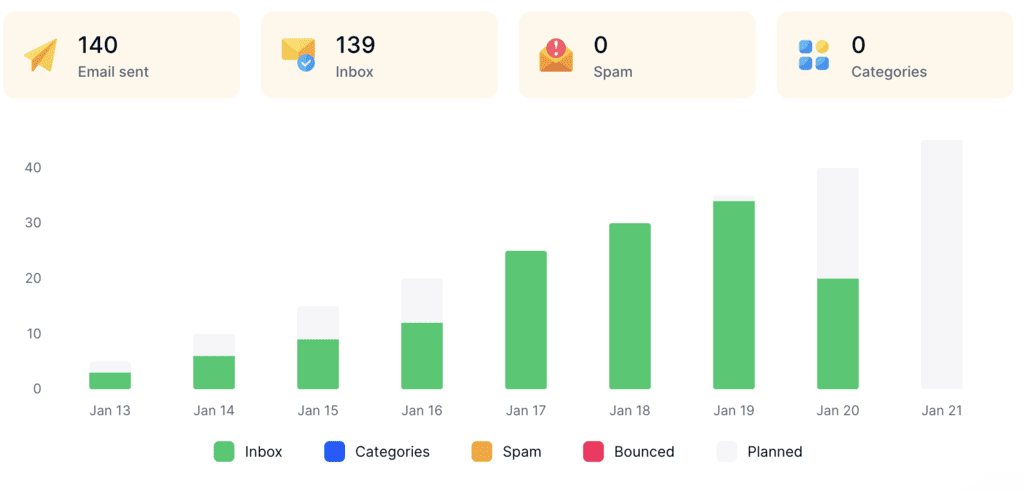
You choose a profile based on where the mailbox is: New Email Account to build a reputation from scratch, or Reputation Protect to keep an established one healthy at volume. It also checks your SPF, DKIM, and DMARC records automatically and reports daily how many warm-up emails reached the inbox, spam, or a category tab.
Final thoughts
Accuracy, catch-all scoring, and support are where ZeroBounce earns its reputation, and it’s an easy recommendation for teams that verify lists every month. If you verify occasionally or on a tight budget, NeverBounce or Bouncer will cover the core job for less, so start with ZeroBounce’s 100 free monthly credits and compare the results on your own list.
Whichever verifier you pick, pair it with a mailbox that’s ready to send. Try MailToaster free for 7 days and warm up your sending account before your next campaign goes out.
FAQ
Is ZeroBounce free?
Yes, there’s a free plan with 100 validation credits every month, one inbox placement test, one email server test, and one blacklist monitor. You need to sign up with a business email domain, and paid credits start at $39 for 2,000.
Is ZeroBounce or NeverBounce better?
ZeroBounce is better for teams that need catch-all scoring and extra deliverability tools, while NeverBounce is cheaper for straightforward list cleaning ($50 for 10,000 emails) and has a simpler $49/month plan with CRM sync. Both are accurate enough for cold outreach lists.
Does ZeroBounce guarantee my emails reach the inbox?
No, since verification only confirms that an address exists and is safe to email. Whether the message lands in the inbox depends on your authentication, sender reputation, and content, which verification doesn’t touch.