

NeverBounce Review 2026: Pricing, Accuracy, and Alternatives
NeverBounce has been one of the default names in email verification for a decade, and most outreach teams have run a list through it at some point. But the product and its pricing have both changed since ZoomInfo took over, and a lot of the reviews still ranking describe a tool that no longer quite exists.
In this NeverBounce review, we’ll cover what it does today, how accurate it really is, what it costs at every volume in 2026, where users are unhappy, and how it compares to ZeroBounce.
NeverBounce review: the short verdict
NeverBounce is a fast, simple, and well-priced email verification tool that does its core job reliably, especially for teams that want their CRM cleaned automatically. It’s lighter on extras than ZeroBounce and has picked up some negative reviews around support and credit policies since the ZoomInfo acquisition, but on price per email at volume it’s one of the cheapest established options.
| NeverBounce at a glance | |
| Best for | Outreach and RevOps teams cleaning lists and CRMs on a schedule |
| Free option | Free test credits and a free list analysis |
| Paid pricing | $8 per 1,000 credits, dropping to $0.005 per email from 10,000 |
| Subscription | Growth from $49/month for up to 10,000 emails |
| Speed | 10,000 emails in about 3 minutes (NeverBounce’s figure) |
| G2 rating | 4.1/5 from 145 reviews |
| Owner | ZoomInfo (via DiscoverOrg’s 2019 acquisition) |
What is NeverBounce and how does it work?
NeverBounce is an email verification service that checks whether the addresses on your list are real and safe to send to, so you can remove the ones that would bounce before a campaign goes out. It’s owned by ZoomInfo and used by more than 96,000 customers, according to the company.
It works in three steps: first, it checks each address’s syntax and fixes obvious typos (for example, “gmai” becomes “gmail”). Then it confirms that the domain exists and has working mail servers. Finally, it talks to the recipient’s mail server to check whether that specific mailbox exists, without actually sending an email.
That last step is also why verification is so useful for prospecting. If you only know someone’s name and company, the usual approach is to generate the likely address formats (first.last@, first@, flast@) and let a verifier tell you which one exists. You can generate those variations for any name and domain here:
Free Email Permutator
Turn a name and a company domain into every address format that company might be using — ordered so the likeliest guesses come first. Works one person at a time or in bulk.
Each line can be First Last, First Last, domain.com, or First,Last,domain.com. Lines without their own domain use the one below.
Possible addresses
How to work out which one is real
A permutator gives you the candidates; it can’t tell you which one lands. Narrow it down like this:
- Find one known address at the company first. Press pages, job posts, GitHub commits, WHOIS records and PDF metadata all leak them. One confirmed address reveals the pattern for everyone else — companies almost never mix formats.
- Start with the top three.
first.lastandflastaccount for the majority of corporate domains between them. - Check the domain accepts mail. The badge under the domain field tells you whether MX records exist at all — no MX means every guess bounces.
- Never blast all 18 at once. Sending to a pile of invalid addresses is the fastest way to wreck your sender reputation. Verify first, then send to the one that survives.
- Watch for catch-all domains. Some accept every address, so nothing bounces and every guess looks valid. Those need a different approach — usually a verified source or a reply.
NeverBounce features
Clean: bulk list verification
Clean is the core product. You upload a CSV or connect a source, NeverBounce verifies every address, and you download the results with your original columns intact. Every address comes back in one of five categories:
| Result | What it means | What to do |
| Valid | The mailbox exists and accepts mail | Send |
| Invalid | The mailbox or domain doesn’t exist | Remove |
| Disposable | A temporary or throwaway address | Remove |
| Catch-all (accept-all) | The domain accepts all mail, so the specific mailbox can’t be confirmed | Send carefully, in small batches |
| Unknown | The server didn’t respond or blocked the check | Re-verify later |
Unlike ZeroBounce, NeverBounce doesn’t score catch-all addresses, so on B2B lists with a lot of accept-all domains, you’ll need your own rules for what to do with that segment.
Verify: real-time API
The real-time API checks addresses the moment they’re entered into a signup form, lead page, or CRM, with ready-made code for cURL, Node.js, PHP, Python, Ruby, Go, Java, and .NET. It’s the easiest way to stop bad addresses from reaching your database in the first place, which is cheaper than cleaning them out later.
Sync and the Growth plan
Sync connects NeverBounce to your CRM or email platform (there are 80+ integrations, including HubSpot, Mailchimp, Zapier, and n8n) and verifies new contacts automatically, charging only for new, unique emails. It’s part of the Growth subscription, which in 2026 also bundles 200 AI-picked leads per month, AI scoring of contacts by likelihood to convert, and “GTM Guard”, a feature that screens data before it reaches AI agents and automated workflows.
NeverBounce handles one half of deliverability, which is making sure you only email real people. It doesn’t do anything for the reputation of the mailbox those emails come from, which is the job of a warm-up tool like MailToaster. We’ll come back to that below.
How accurate is NeverBounce?
NeverBounce is accurate enough for cold outreach, with independent results a few points below its marketing claims. The company says you can “deliver up to 99.9% of your emails” after cleaning.
The most useful independent data comes from Sparkle.io’s hands-on review, which verified 1,003 addresses. Of the 795 marked valid, only 3 bounced when emailed, a 0.38% bounce rate, well under the 2% ceiling most senders aim for. Sparkle put overall observed accuracy at 93-95%, mostly because of how the catch-all and unknown results played out.
Reviews on G2 are more mixed than they used to be. The current “NeverBounce – Powered by ZoomInfo” listing sits at 4.1 out of 5 from 145 reviews, where users praise the interface and speed, but several long-time customers complain about price increases, credits that now expire, and slower support since the acquisition.
If you want to judge accuracy on your own data, the free test credits are enough for a quick check. Take a few hundred addresses from a list you’ve already emailed, run them through NeverBounce, and compare its results against the bounces you actually got. That tells you more about how it handles your specific market than any published test.
NeverBounce pricing in 2026
NeverBounce has two ways to pay: pay-as-you-go credits and the Growth subscription. We checked every figure below on NeverBounce’s live pricing calculator in September 2026.
| Credits (pay-as-you-go) | Cost per email | Total |
| 1,000-5,000 | $0.008 | $8-$40 |
| 10,000-50,000 | $0.005 | $50-$250 |
| 100,000 | $0.004 | $400 |
| 250,000-500,000 | $0.003 | $750-$1,500 |
| 1,000,000 | $0.0025 | $2,500 |
Pay-as-you-go credits expire 12 months after purchase, so buying a large pack to get a lower rate only pays off if you’ll actually use it within the year.
The Growth plan costs $49/month for up to 10,000 emails, $99 for 50,000, $159 for 100,000, and $249 for 250,000. If you verify the same kind of volume every month, that’s a much better deal than buying credits:
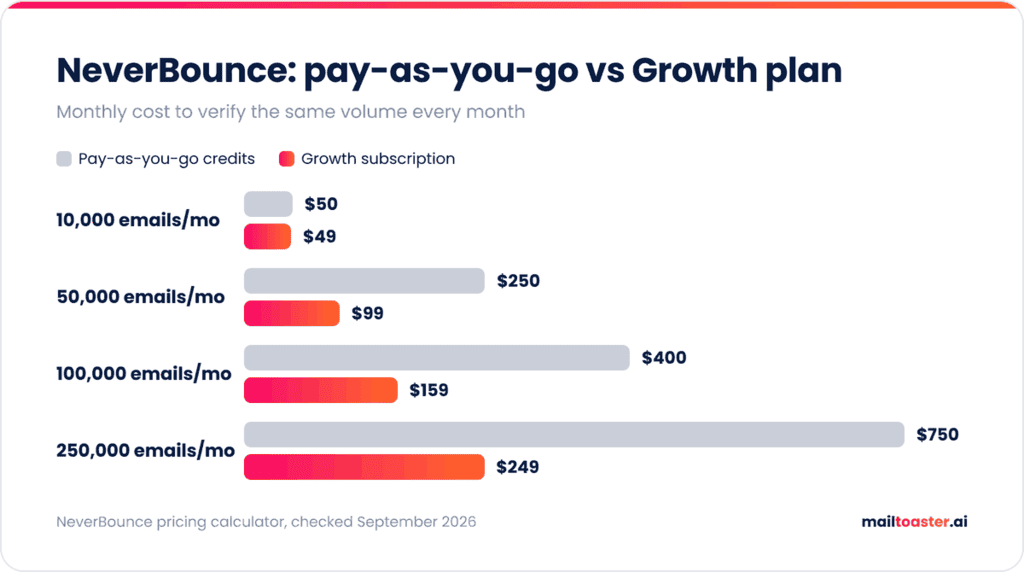
At 50,000 emails a month, Growth costs $99 compared with $250 in credits, and at 250,000 it’s $249 against $750. Pay-as-you-go only makes sense for one-off cleanups or irregular volume.
NeverBounce pros and cons
Pros:
- Low cost per email at volume, from $0.005 at 10,000 credits
- Fast bulk processing and a clean, simple interface
- Real-time API with code samples for 8 languages
- 80+ integrations and automatic CRM cleaning with Sync
- Duplicates are free on the Growth plan
Cons:
- No scoring for catch-all addresses
- Pay-as-you-go credits expire after 12 months
- G2 reviews report slower support since the ZoomInfo acquisition
- Fewer deliverability extras than ZeroBounce (no inbox placement tests or blacklist monitoring)
NeverBounce vs ZeroBounce
These two are the most common head-to-head comparison in email verification, and the right choice depends on what you need beyond basic validation.
| NeverBounce | ZeroBounce | |
| 10,000 emails (pay-as-you-go) | $50 | $129 |
| Monthly plan | $49 for 10,000 | $99 for 10,000 (ZeroBounce ONE) |
| Catch-all scoring | No | Yes (AI Scoring) |
| Extra deliverability tools | No | Inbox tests, blacklist and DMARC monitoring |
| Free option | Test credits | 100 credits every month |
| Credit expiry | 12 months | Never, on ZeroBounce ONE |
NeverBounce is better value if you mainly need clean lists and CRM sync. ZeroBounce is the better pick for B2B lists heavy on catch-all domains, or if you want monitoring tools in the same account, as we covered in our ZeroBounce review.
Other NeverBounce alternatives
If neither fits, Bouncer is the other established option worth testing. It charges $60 per 10,000 emails and $400 per 100,000 (the same as NeverBounce at that volume), and its credits never expire, which suits teams that verify in irregular batches.
Who should use NeverBounce?
NeverBounce is a good fit if you:
- Run outreach or email marketing on a regular schedule and want the CRM cleaned automatically
- Verify 50,000 or more emails a month, where the Growth plan’s pricing pulls well ahead
- Want a verifier that non-technical teammates can use without training
It’s a weaker fit if most of your list sits on catch-all B2B domains, since you’ll get a lot of “accept-all” results with no score attached, or if you verify a small list once a year and would rather not have credits expire.
A clean list still needs a trusted mailbox
Verification lowers your email bounce rate, and that protects your reputation. But a perfectly clean list sent from a brand-new or cold mailbox can still land in spam, because providers also judge the sender’s own history.
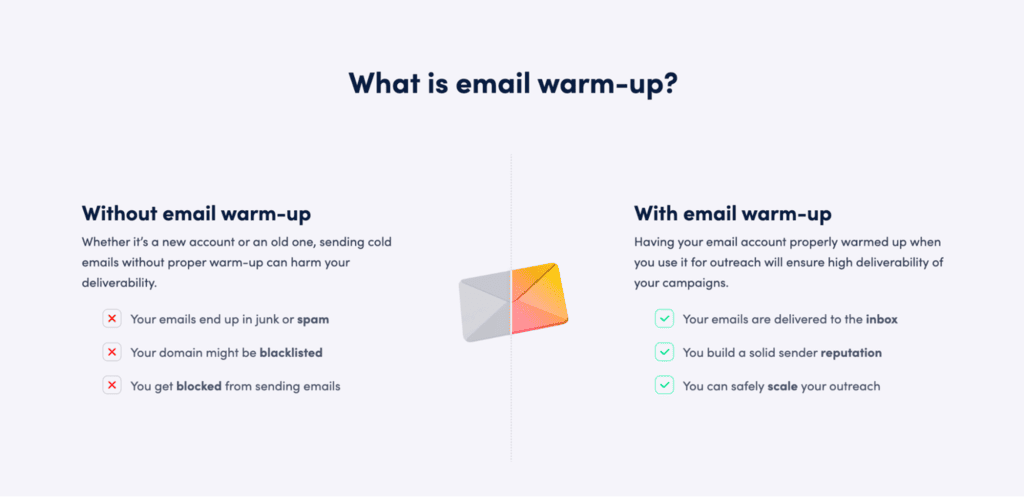
That history is what email warm-up builds.
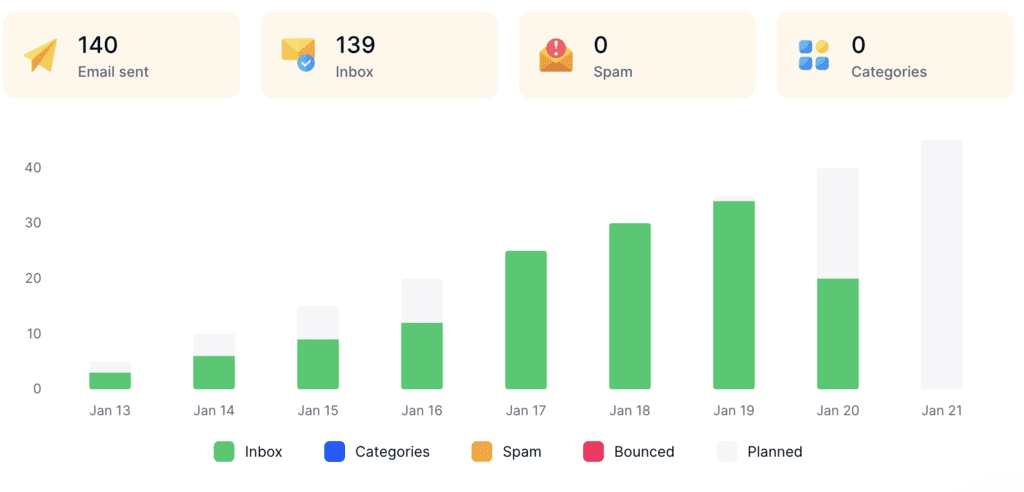
MailToaster connects to Gmail, Outlook, and other mailboxes in a couple of clicks and runs warm-up through a peer-to-peer network of real inboxes, with no free or temporary accounts involved, which open your emails, reply, mark them as important, and pull them out of spam. You can choose the New Email Account profile for fresh mailboxes or Reputation Protect for ones already sending campaigns, and it checks your SPF, DKIM, and DMARC records automatically along the way.
Final thoughts
NeverBounce is still one of the best-value email verifiers available, especially on the Growth plan, and its core validation is accurate enough for cold outreach. If you need catch-all scoring or extra deliverability tools, ZeroBounce is worth the higher price. Otherwise, start with NeverBounce’s free test credits and check the results against your own bounce data.
Then make sure the mailbox sending to that clean list is ready too. Start a 7-day MailToaster trial and warm it up before your next campaign.
FAQ
Is NeverBounce safe and legit?
Yes, NeverBounce is a legitimate company owned by ZoomInfo, with more than 96,000 customers. Verification works without sending emails to your contacts, and it’s one of the longest-running tools in the category.
How much does NeverBounce cost?
Pay-as-you-go credits cost $0.008 per email for small lists and drop to $0.005 from 10,000 credits, so 10,000 verifications cost $50. The Growth subscription starts at $49/month for up to 10,000 emails and includes automatic CRM cleaning.
Is NeverBounce free?
Only as a trial, since NeverBounce gives new users free test credits and a free list analysis, but ongoing verification requires credits or a Growth subscription.