

Email Warmup: How to Warm Up an Email Account the Right Way
You set up a new domain, created three mailboxes, loaded your first campaign, and by day two half of it was sitting in spam. Nothing was wrong with the copy or the list. The mailboxes simply had no history, and Gmail and Outlook treat a sender with no history as a risk.
Email warmup is how you build that history before it costs you a campaign. Below, we’ll cover what warm-up is, when you need it, a week-by-week schedule, how long it takes, manual vs automated warm-up, and the mistakes that undo it.
What is email warmup?
Email warmup is the process of gradually increasing the number of emails a new or inactive mailbox sends, while generating positive engagement like opens and replies, so that mailbox providers learn to trust it before you use it for campaigns at volume.
It works because Gmail, Outlook, and Yahoo judge every sender on its track record. They look at how much you send and how steadily, how recipients respond to your emails, how many people mark them as spam, and whether your domain passes authentication. A new mailbox has no track record at all, so the first few hundred emails it sends carry more weight than any others.
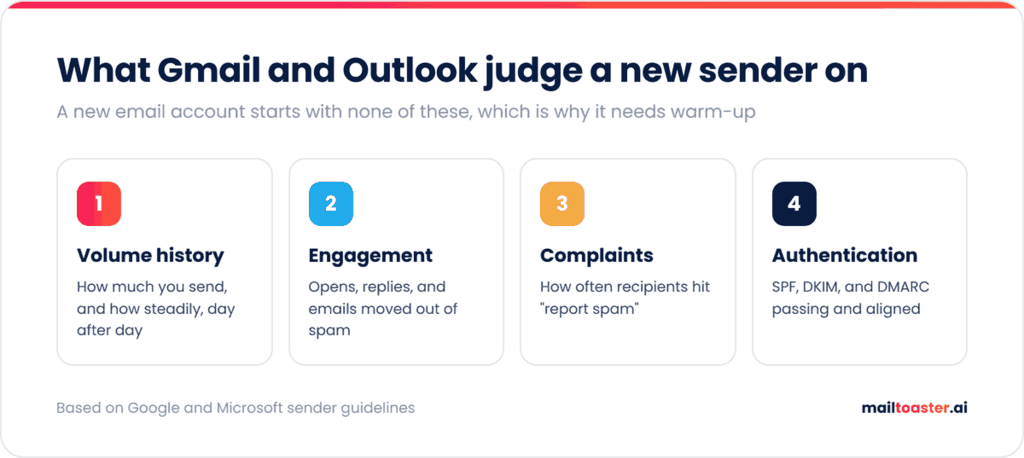
Google says as much in its own sender guidelines, which recommend that you “start with a low sending volume to engaged users, and slowly increase the volume over time,” and that you avoid sending email in bursts. That sentence is essentially a description of warm-up.
Why email warmup matters in 2026
The penalty for skipping warm-up has grown over the last two years, because all three major providers now enforce rules that used to be recommendations.
Since February 2024, Google has required bulk senders to authenticate with SPF, DKIM, and DMARC and keep their user-reported spam rate under 0.3%, and according to its sender guidelines FAQ, starting November 2025, non-compliant messages face temporary and permanent rejections. Microsoft followed with the same authentication requirements for Outlook.com, Hotmail, and Live on 5 May 2025. Microsoft’s own sending limits page also says that new accounts start with a low sending quota, which is only raised “as soon as you establish credibility in the system.”
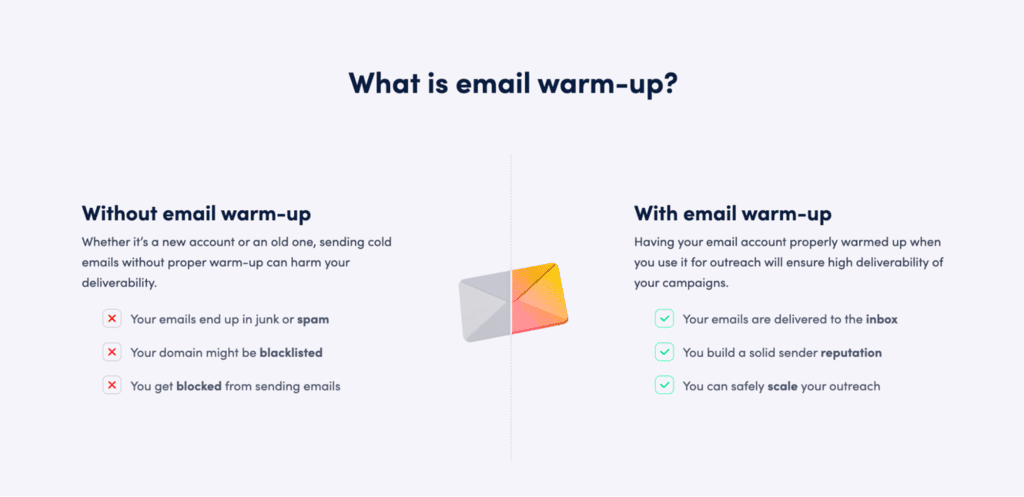
So a brand-new email account starts with a smaller allowance and less trust, and a sudden spike in volume from it looks exactly like a compromised account. Warm-up closes that gap with a steady, engaged sending history, which is what an email warm-up tool like MailToaster automates for you in the background.
When do you need to warm up an email account?
You need to warm up any email account that’s about to send more than it’s used to. In practice, that covers five situations:
- A new domain, which has no history at all, so warm-up takes longest here.
- A new email account on an existing domain, where the domain has some reputation but the account itself doesn’t.
- An account that’s been quiet for a month or more, since reputation fades when sending stops.
- After a reputation hit, like a spam complaint spike, a blocklist listing, or a campaign that bounced badly.
- Before a big jump in volume, since going from 20 to 150 emails a day gets noticed even on a healthy account.
If you only send a handful of one-to-one emails a day from an address that’s been active for years, you don’t need a formal warm-up. Your normal correspondence is already doing the job.
How to warm up an email account, step by step
Here’s the full process, from setting up the domain to launching your first campaign.
- Authenticate the domain first. Publish SPF, DKIM, and DMARC records before the mailbox sends a single email. In Google Workspace, DKIM for your own domain has to be generated in the Admin console (Google recommends a 2048-bit key) and published as a TXT record, and in Microsoft 365 it has to be enabled per domain in the Defender portal. Warming up an unauthenticated mailbox wastes the entire effort, because the engagement you generate can’t be tied back to your domain.
DMARC is the record most new domains are missing, and it’s the one Google and Microsoft both require for bulk senders. The safe starting point is a p=none policy with reporting switched on, so you can see who’s sending as your domain before you enforce anything. Generate yours here and paste it into your DNS:
Free DMARC Record Generator
Build a valid DMARC record in seconds. Pick a rollout preset or customize every tag — we’ll validate as you type.
What is DMARC and how should I roll it out?
DMARC tells receiving mail servers what to do with messages from your domain that fail SPF or DKIM checks — and where to send reports about those failures. It’s the third leg of email auth (SPF + DKIM + DMARC).
The recommended rollout is a slow ramp:
- Monitor (
p=none) for 1–2 weeks. No mail is blocked. You collect reports to find every legitimate sender. - Quarantine a small percentage (
pct=10), then 50%, then 100%. Failing mail goes to spam. - Reject at the same gradual percentages. Failing mail is bounced at the SMTP layer.
You publish DMARC at _dmarc.yourdomain.com as a TXT record (not at the apex like SPF).
Advanced settings (forensic reports, alignment, subdomain policy)
Your DMARC record
_dmarcHow to publish this record
- Sign in to your DNS provider (Cloudflare, GoDaddy, Namecheap, Route 53, etc.).
- Add a new record with: Type =
TXT, Host/Name =_dmarc, Value = the DMARC record above. - If a TXT record already exists at
_dmarc, replace it — only one DMARC record per domain. - Save. Verify with
dig TXT _dmarc.yourdomain.comor any DMARC checker. - If you set
rua, expect XML aggregate reports within 24 hours from major providers.
2. Set up the mailbox like a real person uses it. Add a name, a profile photo, and an email signature, and send a few genuine emails to colleagues or partners who will reply. An account with a real identity behind it gets treated differently from a blank one.
3. Start low. Send 5 to 10 emails a day in the first week, which matches the starting range in Instantly’s 2026 Cold Email Benchmark Report. Keep them conversational, with no links, attachments, or tracking pixels.
4. Ramp up gradually and consistently. Increase daily volume every few days, and send every day. Google’s guidelines note that you can ramp up faster when you send daily than when you send weekly, because consistency is part of what’s being measured.
5. Generate real engagement. Opens, replies, messages marked as important, and emails moved out of spam are the strongest positive signals an account can receive. This is the part that’s hardest to do by hand.
6. Add campaign volume slowly. From the third week, start mixing in real outreach, beginning with your best-fit, most engaged contacts, while warm-up keeps running alongside.
7. Keep warming after launch. Warm-up doesn’t have an end date for an account that sends outreach every day. A lower maintenance level keeps a steady stream of positive engagement under your campaigns.
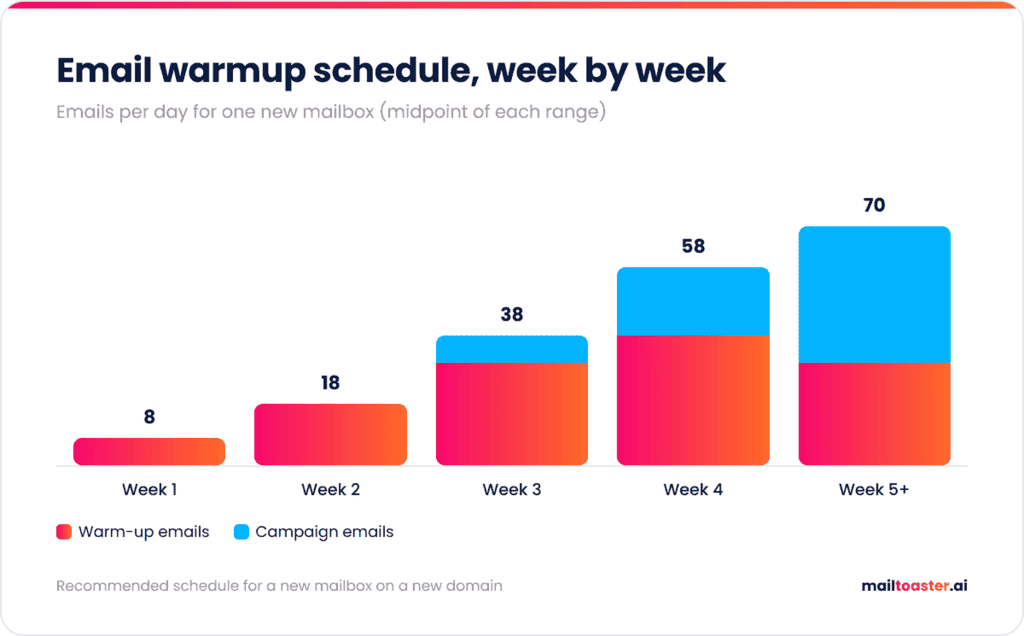
Here’s a schedule that works for a new mailbox on a new domain, with warm-up emails and campaign emails counted separately:
| Week | Warm-up emails per day | Campaign emails per day | Focus |
| 1 | 5-10 | 0 | Establish activity |
| 2 | 15-20 | 0 | Build consistency |
| 3 | 25-35 | 5-10 | First real sends, best-fit contacts only |
| 4 | 35-40 | 15-25 | Watch placement and bounces daily |
| 5+ | 20-40 (ongoing) | 30-50 | Maintain and scale slowly |
How long does email warmup take?
Email warmup takes 2 to 3 weeks for a new mailbox on an established domain, and 4 to 6 weeks for a mailbox on a brand-new domain before it’s ready for full campaign volume. Re-warming a dormant or damaged account usually falls somewhere in between, depending on how long it was inactive or how bad the damage was.
The calendar matters less than the signals, though. A mailbox is ready to carry campaigns when warm-up emails consistently land in the inbox (not spam or Promotions), bounces stay under 2%, and your spam rate in Google Postmaster Tools stays below 0.1%. If any of those slip when you add campaign volume, drop back a week in the schedule.
Manual vs automated email warmup
You can warm up a mailbox by hand, but it only works well for one or two mailboxes and a lot of patience.
| Manual warm-up | Automated warm-up | |
| How it works | You email real contacts and ask them to reply | A tool sends and replies across a network of real inboxes |
| Time per mailbox | 20-30 minutes a day | A few minutes to set up, then none |
| Engagement signals | Limited to people who actually reply | Opens, replies, marked as important, moved out of spam |
| Consistency | Drops the moment you get busy | Every day, at a controlled volume |
| Scales to | 1-2 mailboxes | As many as you connect |
The consistency row is usually what decides it. Manual warm-up tends to fall apart in week two, and an irregular sending pattern is exactly what the whole process is trying to avoid.
Automated email warmup with MailToaster
MailToaster was built for this job. You connect a Gmail, Outlook, or other mailbox in a couple of clicks, pick a warm-up profile, and it runs every day in the background.
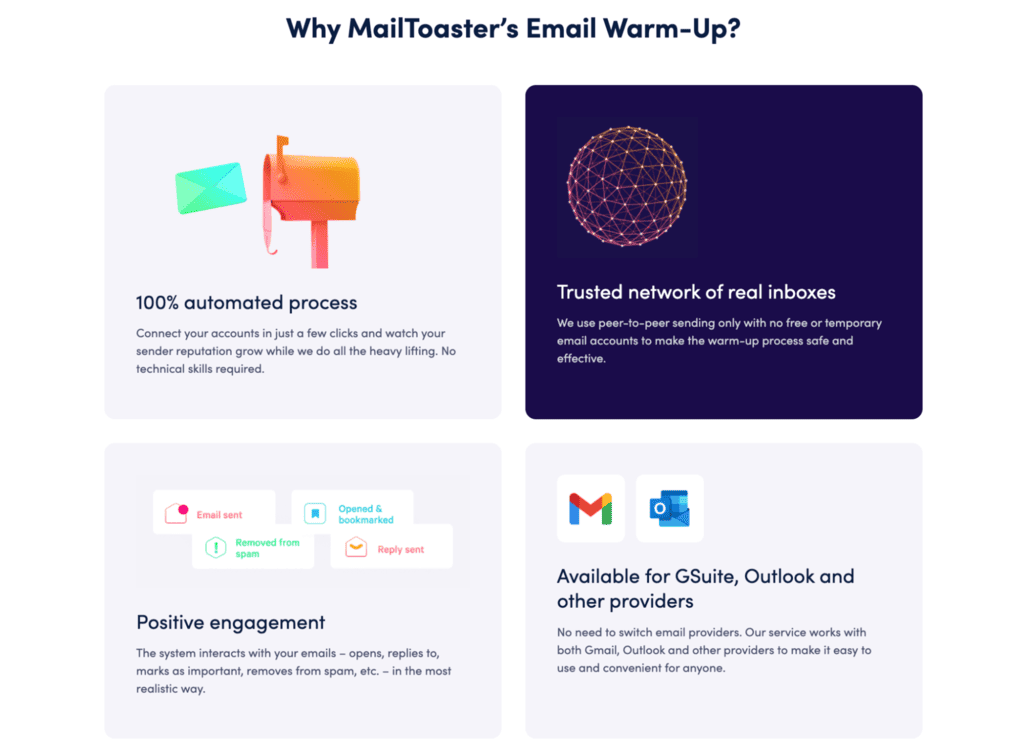
The New Email Account profile builds reputation from zero on a fresh mailbox, and Reputation Protect keeps an established one healthy once it’s sending campaigns. Warm-up emails go out across a peer-to-peer network of real inboxes, with no free or temporary accounts padding the numbers, and those inboxes open your messages, reply to them, mark them as important, and pull them out of spam.
The emails themselves are either written by MailToaster’s AI assistant or taken from your own templates, and they’re filed into a separate folder so your inbox stays usable. On top of that, MailToaster checks your SPF, DKIM, and DMARC records automatically and tracks how many warm-up emails landed in the inbox, spam, or a category tab each day, which is the number that maps to your real inbox placement.
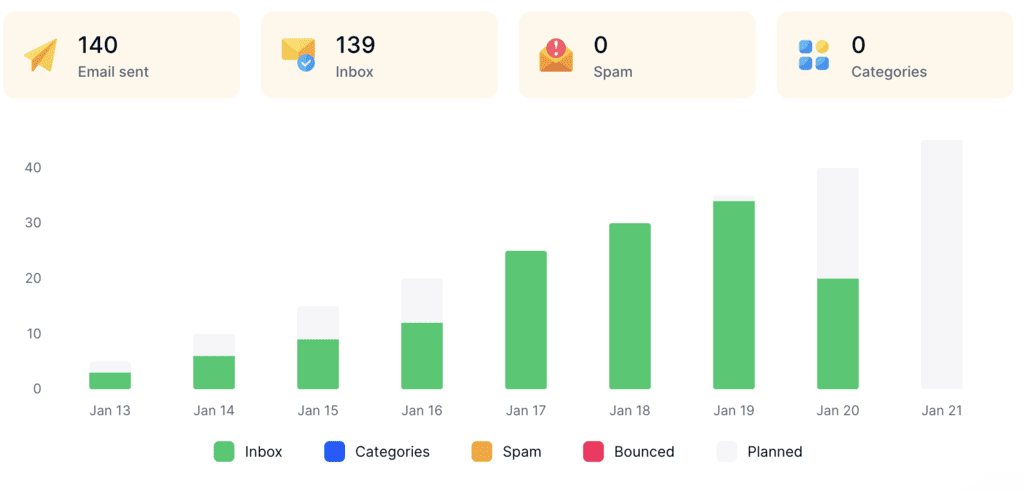
MailToaster is just $29 per email account per month, with 10% off on annual billing and a 7-day free trial to get started right away.
Common email warmup mistakes
Most failed warm-ups come down to one of these five mistakes:
- Ramping too fast. Jumping from 10 to 100 emails a day in a week looks like a hijacked account, which is the opposite of what you’re trying to show.
- Stopping warm-up the day campaigns start. The account loses its steady source of positive engagement at the exact moment it starts sending to strangers, who reply far less often.
- Warming an unauthenticated domain. Engagement without SPF, DKIM, and DMARC in place builds very little, and Microsoft rejects high-volume senders without them outright.
- Sending from a warmed account to an unverified list. A few weeks of warm-up can be undone by one campaign with a high bounce rate, so verify every list before it goes out.
- Using your main company domain for cold outreach. Most outreach teams send from a secondary domain (for example, yourcompany.co alongside yourcompany.com), so that any damage from cold campaigns stays away from the domain your customers and invoices depend on.
Does email warmup actually work?
Yes, email warmup works for what it’s designed to do: giving a new or recovering mailbox a consistent sending history and positive engagement, which is what providers use to decide how much to trust it.
What it can’t do is cancel out problems elsewhere. Warm-up won’t save a campaign sent to a bought list, it won’t offset a high spam complaint rate, and it won’t fix email copy that recipients simply don’t want. Think of it as the foundation of your email address reputation, with list quality and relevant copy doing the rest.
Final thoughts
Email warmup comes down to three things: authenticate the domain before you send anything, grow volume slowly and every day, and keep warming after the campaigns start. Skip any one of them and the other two won’t be enough on their own.
If you’re setting up new mailboxes or reviving old ones, give them a few weeks before they carry real campaigns. Start warming up your mailbox with MailToaster’s 7-day free trial and let it build the history for you.
FAQ
How do I warm up an email for free?
Manually, by sending a small number of real emails every day to colleagues, partners, and friends who will reply, and increasing volume slowly over 3 to 4 weeks. It works for one or two mailboxes, but most free warm-up tools are trials, since a network of real inboxes costs money to run.
Can I send cold emails while my mailbox is warming up?
Not in the first two weeks. From week three, you can start with 5 to 10 campaign emails a day to your best-fit contacts, as long as warm-up keeps running and your inbox placement holds.
How many emails can I send per day after warmup?
Most outreach teams cap each mailbox at around 30 to 50 cold emails a day, even after warm-up, and add more mailboxes when they need more volume. Pushing a single mailbox much higher raises the risk that one bad day of complaints damages its reputation.
What’s the difference between warming up a domain and a mailbox?
Domain reputation belongs to everything sent from yourcompany.com, while each mailbox also builds its own history. A new mailbox on an established domain warms up faster, and a new domain needs its first mailboxes warmed more slowly, since there’s nothing to borrow trust from.