
Spam Keywords: Words and Phrases That Can Hurt Email Deliverability
Take the word “free” as an example. Put it in a sentence like “happy to do a free audit if useful” and it costs you nothing. Put it in a subject line as “FREE AUDIT!!!”, and you’ve got yourself a potential problem.
Another part of the equation (that’s so often overlooked) is that the same word, in the same email, can trigger spam filters for one sender and not another, and that’s because the domain sending it plays a role too.
So this guide covers both halves, from which words and phrases still carry dead spam weight in 2026, and the far more important question of when they actually matter.
What are spam keywords?
Spam keywords are words and phrases that appear disproportionately often in known spam, so email providers set filters that flag these signals (among many other factors) when deciding where your email lands in your recipient’s inbox, or gets placed in spam.
No mailbox provider publishes a full banned word list. What does exist instead is probability, calculated across billions of messages that users have marked as spam versus messages they’ve read and replied to. A word earns its risk level statistically, and that level keeps moving.
This is why many lists you find online age badly. “Crypto” wasn’t a spam keyword in 2015, but it’s a fairly heavy one now, purely because spammers adopted it at volume. Any word can become a spam keyword if enough bad senders use it, and a few will quietly stop being one as spammers move on.
It’s also worth separating two things that often get lumped together:
- Spam filter keywords → the actual words that trigger mailbox providers’ spam filters, and are a small piece of a much larger scoring system.
- Spam signals → are much broader, and have to do with your email deliverability setup: authentication, sender reputation, and how your recipients’ response patterns over time.
MailToaster is designed exactly for that — it helps you warm up your new or existing email domain to build a solid sender reputation, while also taking care of authentication and email outreach reports.
As a result, your emails become much more likely to reach your recipients’ inboxes (and not spam), you build a solid sender reputation, and you can safely scale your outreach.
How email providers flag spam keywords
Early 2000s filters were rule-based: if a mailbox provider sees “free money,” it’s moved to junk.
Then came Bayesian filtering, which calculated spam probability from word frequency across known-spam and known-good corpora. Gmail deployed TensorFlow-based machine learning in 2015, which let it weigh hundreds of features at once rather than tallying words.
Today Gmail and Outlook run transformer models, which is the same architecture behind modern language models, that read sentence intent rather than flagging any potential spam words.
In short, this means context does most of the work now. “Free consultation with our team next week” and “GET IT FREE!!!” share a word and score nothing alike, because the model isn’t looking at the word in isolation. It’s reading the sentence.
The obfuscation trap
This one catches a lot of experienced senders, and it’s worth its own paragraph.
The old workaround for a flagged word was to disguise it. Write “fr33” or “F-R-E-E” or “$$$aving” and slip past the pattern match. That worked against 2005-era filters, but it does the exact opposite now.
Google’s RETVec, rolled out across Gmail, reads text the way a human does — as a visual pattern rather than a character string. Typos, leetspeak, homoglyphs, and emoji substitutions no longer break recognition. Worse, the attempt itself is a red flag signal. Legitimate senders don’t write “fr33”, but spammers do. So the obfuscation scores higher than the plain word would have.
If a word is risky, spell it normally or cut it. Never disguise it.
Where spam keywords sit in the scoring stack
This is the part that reframes everything else in this article:
| Signal | Weight | What it measures |
|---|---|---|
| Sender reputation (domain + IP) | 🔴 Very high | Sending history, complaint rates, engagement over time |
| Authentication (SPF, DKIM, DMARC) | 🔴 Very high | Whether your domain is verified and aligned |
| Recipient engagement history | 🟠 High | Whether your recipients have been opening or replying to you before |
| Content patterns | 🟡 Medium | Structure, link density, HTML complexity, image ratio |
| Individual spam keywords | 🟢 Low–medium | Specific flagged terms in the subject or body |
Gmail and Microsoft keep their exact weights private, but SpamAssassin (the open-source engine underneath most spam score checkers and a lot of shared hosting) publishes its scoring in a file called 50_scores.cf.
Messages score across rules, where anything above 5.0 is treated as spam, and the numbers are revealing: a missing DKIM signature alone adds 2.0+ points. A trigger spam word adds a fraction of that. Here’s a test email we sent to show you its scoring logic:
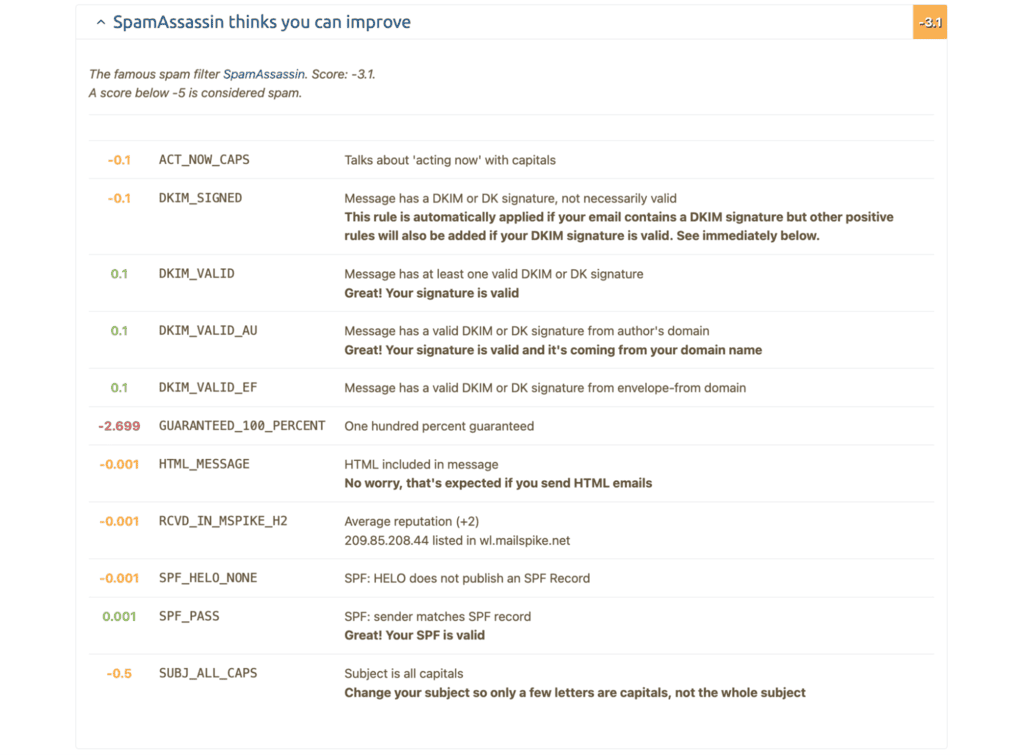
Which gives us the honest summary — a spam keyword almost never sends an email to spam by itself. It does, however, tip the scales for an email that was already borderline due to poor deliverability.
Spam keywords list: words and phrases that still carry risk in 2026
Now comes the list of spam keywords to avoid. We’ve kept it curated rather than exhaustive, because a 600-word dump doesn’t help anyone. What follows are the categories that still move the needle, with the reasoning attached, so you can judge new cases yourself.
| Category | Examples | Risk | Why filters flag it |
|---|---|---|---|
| Financial claims | make money, earn $5,000/week, cash bonus, double your income, risk-free investment, no credit check | 🔴 High | Highest correlation of any category with phishing and outright fraud |
| Urgency and pressure | act now, urgent, expires today, last chance, don’t delete, apply now, limited time only | 🔴 High | Scammers need you to decide before you think. Real B2B rarely has to shout |
| Guarantees and hype | 100% guaranteed, no risk, satisfaction guaranteed, miracle, unbelievable, once in a lifetime | 🟠 Medium–high | Unverifiable promises are a fraud fingerprint |
| Free and giveaway | free, free gift, no cost, giveaway, winner, congratulations, you’ve been selected | 🟡 Context-dependent | The most-flagged family, and the most misunderstood. “Free trial” in plain text is fine. “FREE” in caps is not |
| CTA boilerplate | click here, buy now, order now, call now, subscribe now, dear friend, this is not spam | 🟡 Medium | Generic phrasing that correlates with bulk template mail. “This is not spam” is a genuine classic — nobody who isn’t spamming writes it |
Structural patterns that outrank any word
These matter more than anything in the table above, and they’re where we recommend focusing your attention:
- ❌ ALL CAPS in the subject line
- ❌ Multiple exclamation marks, or “??!” combinations
- ❌ Fake Re: or Fwd: prefixes on a first-touch email (also a CAN-SPAM problem)
- ❌ $$$, or other currency figures framed as earnings
- ❌ Three or more links in the body
- ❌ Image-heavy HTML with little text
- ❌ Attachments on the first email → triggers enterprise security scanning at Proofpoint and Mimecast regardless of what’s inside
- ❌ URL shorteners
One trigger word in a natural sentence is close to harmless. What kills is stacking. A few spam words/phrases and a few spam triggers as outlined above, and it’s a pattern, and email models have become excellent at recognizing patterns.
How spam keywords actually hurt deliverability
Emails landing in spam create a snowball effect that very few talk about.
A stacked email raises its spam content score and tips into Promotions or Spam, so fewer people see it, and then opens and replies drop. Gmail’s model reads that silence as confirmation and trains its filters against your domain going forward. Next, your engagement metrics fall, your domain reputation slides, and now perfectly fine emails start missing too.
You end up in a loop that gets harder to exit the longer it runs, and repairing a burned email address reputation takes far longer than damaging it did.
The stakes are set in stone — Gmail and Yahoo enforce a 0.3% spam complaint threshold, but you should aim for under 0.1% to be safe. Microsoft has been rejecting unauthenticated mail from senders doing 5,000+/day to consumer addresses since May 2025, with a 550 5.7.515 bounce rather than a quiet trip to spam.
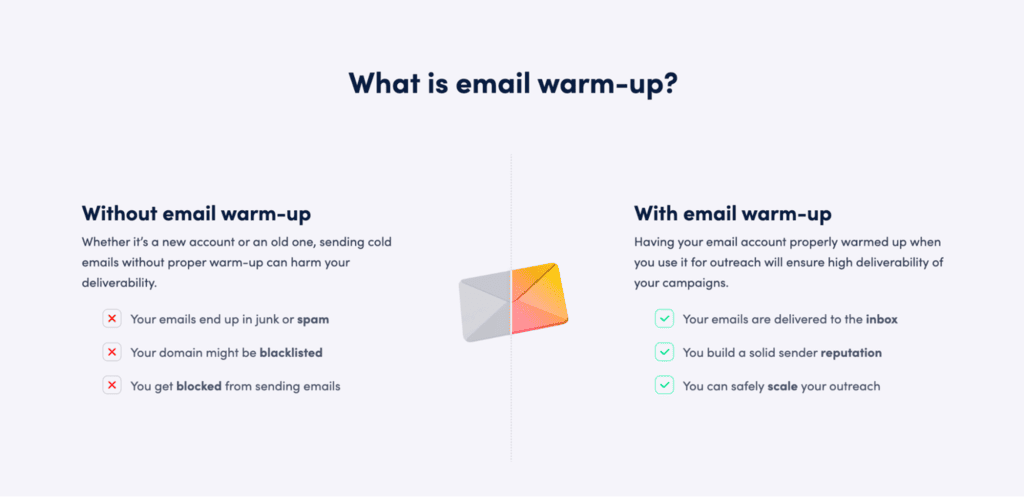
If you’re doing any type of email outreach at volume, it’s equally important to warm up your email domain, which signals to your recipients’ email providers that your domain is legitimate and safe.
Warming up with MailToaster
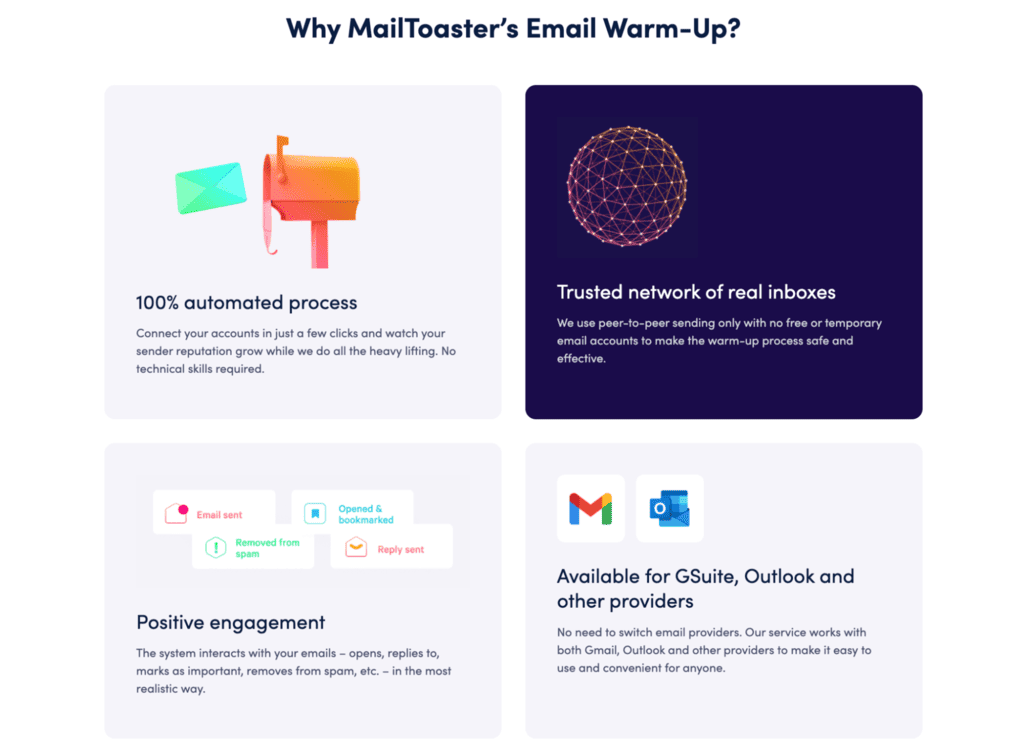
MailToaster builds, maintains, and repairs sender reputation automatically — the layer everything above depends on.
It runs peer-to-peer through a network of real inboxes, with no free or temporary accounts in the mix, which matters because the warm-up traffic has to look like traffic. The system opens your emails, replies to them, marks them as important, and pulls them out of spam — the exact engagement signals that build tolerance with Gmail and Outlook.
There’s a built-in DNS check for SPF, DKIM, and DMARC validity, which ties directly back to that scoring table, since those are the signals carrying the heaviest weight.
And the reports show sent, landed in inbox, landed in spam, categories, and bounced, so you can watch the tolerance get built rather than assume it.
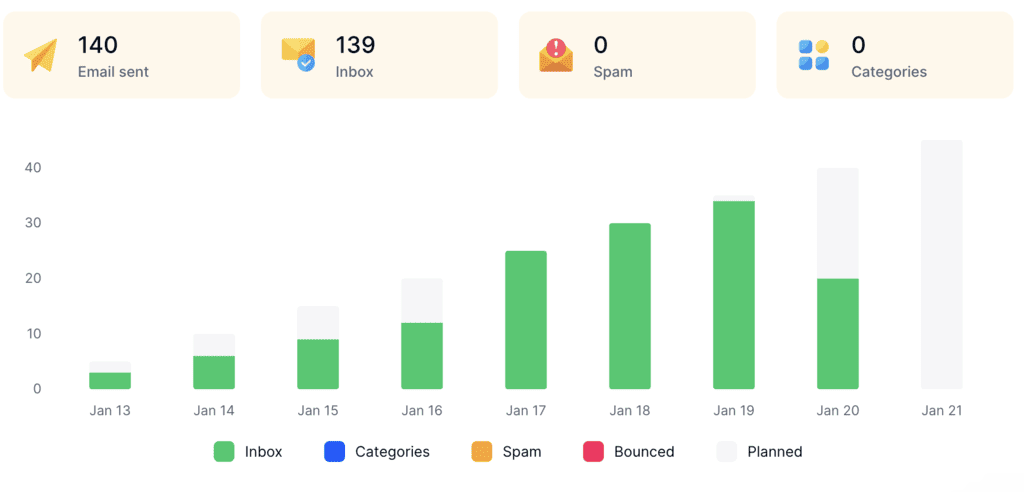
Pricing is $29 per email account per month with a 7-day free trial. Set against a burned domain — which costs weeks of email warmup to rebuild, assuming it recovers at all — that’s not a close call.
How to avoid spam keywords in content
- Rewrite the claim, not the risky word → removing “guaranteed” while keeping the same unverifiable promise changes nothing. Filters read intent, not vocabulary. “Guaranteed 3x pipeline” becomes safer as “clients in your segment typically see X within Y.” Specificity makes the claim sound legitimate.
- Fix patterns before words → keep the subject under 50 characters, avoid caps, and use no more than one exclamation mark. On the first touch, use zero or one link, plain text over HTML, and no attachments. A simple opt-out like “not relevant? reply and I’ll drop you” is better than a formal unsubscribe block, which adds newsletter signals to cold outreach. Every one of these matters more than a single word.
- Never obfuscate → covered above, but it bears repeating because the instinct is so common: “fr33” is a stronger spam signal than “free.” Spell it or cut it.
- Test before you send, don’t guess → a spam score checker runs SpamAssassin-style rules across your copy, HTML, headers, and authentication. Under 2.5 is generally safe; 5.0+ is spam territory. Mail-Tester is the free standard, while Google Postmaster Tools shows how Gmail views your domain. One important caveat: an email spam checker scores the message, not the sender.
- Don’t confuse Moz Spam Score with email spam score → same name, different metric. Moz’s 0-17 score predicts search penalties and has no effect on inbox placement. A Moz Spam Score of 8 with a High Postmaster reputation still lands in the inbox.
You don’t have to leave the page for the first pass, though. Paste the draft below and the trigger words get highlighted where they sit, which is the distinction that matters — one word in ordinary context, or three stacked in a subject line.
Free Email Spam Checker
Paste your subject line and copy to see what a spam filter sees — every trigger word highlighted in place, scored, with the fix for each one. Nothing is uploaded; the analysis runs in your browser.
Your copy, with every trigger marked
What this score does and doesn’t tell you
Content is only part of why email goes to spam — and honestly, not the biggest part. This tool checks the part you control while writing.
- What it checks: trigger vocabulary, structure, formatting, links, personalisation and the patterns filters are trained on.
- What it can’t check: your sending domain’s reputation, whether SPF, DKIM and DMARC are set up, how warmed up the mailbox is, your bounce and complaint rates, and whether the recipient has engaged with you before. Those matter more than wording — a perfect email from a cold domain with no authentication still lands in spam.
- A single trigger word almost never gets you filtered. Modern filters score the whole message. Concentration is what hurts, which is why density is scored separately here.
- Clichés are scored gently on purpose. “Hope this email finds you well” won’t send you to spam — it will just get your email ignored, which costs you the same meeting.
Fix the infrastructure too
If your email is landing in spam despite clean copy, the cause is almost always authentication or reputation:
- Publish SPF, DKIM and DMARC on the sending domain. Google and Yahoo now require all three from bulk senders — without them you’re throttled or rejected before anyone reads a word.
- Warm up new domains and mailboxes over several weeks. A brand-new domain sending hundreds of cold emails on day one is the single fastest way to get blocked.
- Keep your bounce rate under 2–3% by verifying addresses before you send. High bounce rates tell providers you’re working from a scraped list.
- Keep complaints under 0.3%. One person hitting “report spam” costs you more than a hundred deletions.
- Send from a separate domain for cold outreach so a bad campaign can’t damage the reputation of the domain your invoices and support replies go out on.
On a domain with strong reputation and real warm-up history, filters absorb a stray trigger word without blinking. On a cold, thin-history domain, that same word is the deciding vote. Reputation buys you tolerance. Copy tweaks don’t.
Write for people, send from a domain that’s earned it
Spam email keywords are worth a few hours of your time, not an entire strategy. Scan your last emails/campaigns for stacked patterns like caps, exclamation marks, link pile-ups, or first-touch attachments. Clean them out, and move on to the things that actually decide placement: authentication, list quality, and sending history.
Then ask the harder question. When a filter does hesitate over your next email, does your domain have the reputation to tip the scales in your favor? If the answer’s unclear, that’s where the work is.
FAQ
Do spam keywords still matter in 2026?
Yes, but less than most guides suggest and less than they did a decade ago. They’re a low-to-medium weight input in a scoring system where sender reputation and authentication carry the heaviest weight. Fix those first.
How many spam keywords does it take to land in spam?
There’s no threshold, because it isn’t additive in the way people assume. One trigger word in natural context on a healthy domain is almost never the cause. Three stacked in a subject line on a cold domain very well might be.
What is a good spam score?
On the SpamAssassin scale that most checkers use, under 2.5 is safe and 5.0+ is treated as spam. Aim as close to 0 as you reasonably can, but don’t mistake a clean score for a delivery guarantee.
Can a spam score checker tell me if I’ll land in the inbox?
No. It tells you whether your *message* has content problems. It says nothing about whether your *domain* has the reputation to deliver it. Use Google Postmaster Tools for the second question.
Does the word “free” send emails to spam?
On its own, in a normal sentence, from a warmed domain — no. In all caps, in a subject line, next to two other trigger words, from a fresh domain — very possibly. The word isn’t the variable.