AI Email Deliverability: How AI Can Help Your Emails Reach the Inbox
Before a prospect reads a single word of your email, a machine learning model has already scored it and decided where it goes. At Gmail, Outlook, and Apple Mail, that decision now runs through several layers of AI, and the newest ones decide whether your email gets seen at all once it lands.
At the same time, most sales and marketing teams now use AI on their own side to write and send more personalized emails at scale, faster. That combination is where a lot of deliverability problems start, because the AI judging you rewards trust and consistency over raw volume.
Below, we’ll break down how AI email deliverability works on both sides, whether AI-written emails are more likely to go to spam, where AI helps the most, and what it can’t fix.
What is AI email deliverability?
AI email deliverability is the use of artificial intelligence on both ends of an email — by mailbox providers, to decide whether your message reaches the inbox, and by senders, to improve the odds that it does. The first side sets the rules, and the second can only work within them.
| Receiver-side AI | Sender-side AI | |
|---|---|---|
| Who runs it | Gmail, Outlook, Yahoo, Apple Mail | You, your email platform, or your outreach tool |
| What it does | Scores every incoming email and routes it to the inbox, a tab, or spam, or rejects it | Writes copy, verifies lists, times sends, monitors reputation, warms up mailboxes |
| What it looks at | Authentication, sending history, volume patterns, recipient reactions, content | Your own data: contact lists, past campaigns, engagement, DNS records |
| Examples | Gmail’s RETVec and LLM spam filters, Gmail AI Inbox, Apple Priority Messages | ZeroBounce, Mailchimp send-time optimization, AI writing assistants, warm-up tools |
Adoption on the sender side is moving fast. The Sinch Mailgun 2026 Email Impact Report found that 79% of senders already use or plan to use AI in their email programs, yet only 25% run inbox placement tests. In other words, most teams are changing how they send emails only without ensuring those emails end up in the inbox.
How mailbox providers use AI to filter your email
Every major email provider runs AI spam filters. Gmail, Outlook, and Yahoo all use machine learning models that score each incoming message against patterns learned from billions of others, and those models keep learning from how users react to email every day.
From keyword rules to machine learning
Early spam filters ran on fixed rules, so a subject line with “FREE!!!”, or a body full of “act now” or any other spam keywords were enough to get you flagged. Those rules were easy to follow, and modern filters have moved well past them.
Google’s own numbers show how far they’ve come. In 2023, Gmail switched to a new text model called RETVec, which their security team says improved spam detection by 38% over the previous baseline while cutting false positives by 19.4%. Then in December 2024, Google announced an LLM-based defense that blocks 20% more spam and reviews 1,000 times more user-reported spam every day.
The practical takeaway is that filters now read meaning and patterns across the whole message, so swapping “free” for “complimentary” won’t fool a model trained on how millions of people react to similar emails.
The signals AI filters actually weigh
Providers don’t publish how their models weigh each factor, but their sender guidelines make the main inputs clear:
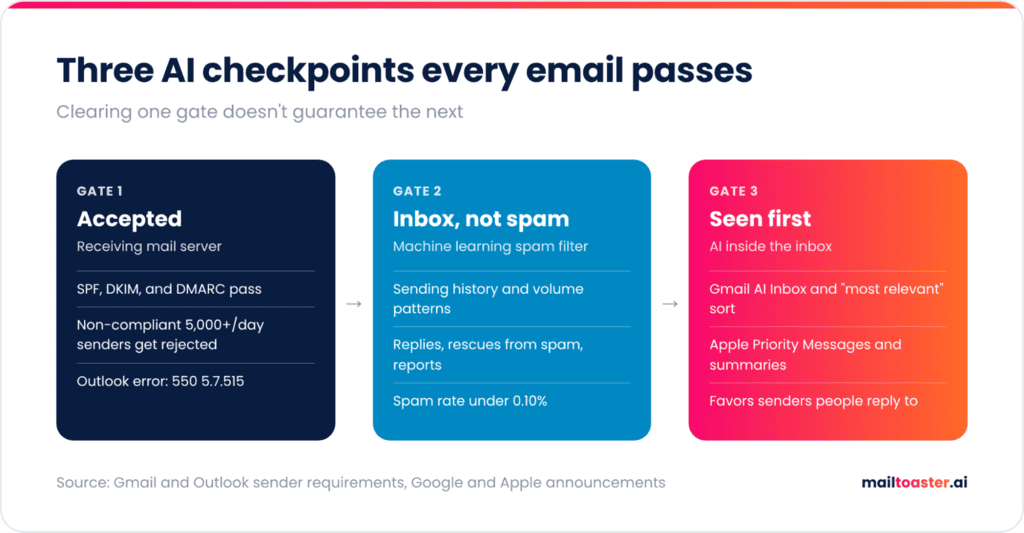
- Authentication → SPF, DKIM, and DMARC prove you are who you say you are. Gmail requires SPF or DKIM from every sender, and all three from anyone sending 5,000+ emails a day.
- Sending history → How long your domain and mailbox have been sending, and how recipients have reacted over that time.
- Volume patterns → Steady, predictable sending looks like a real business, while sudden spikes look like a hacked account or a spammer.
- Recipient reactions → Replies, emails moved out of spam, and saved contacts count in your favor, while deletes without opening and “Report spam” clicks count against you.
- List quality → Bounces and spam trap hits signal that you don’t know who’s on your list.
Of these, spam complaints carry the most weight, and Google tells senders to keep their user-reported spam rate below 0.10% and never let it reach 0.30%. In practice, this means just one complaint per 1,000 emails is already the safe ceiling.
Why the same email lands in different places
Inbox placement is personal, because these models learn from each recipient’s behavior. The same campaign can land in the primary inbox for a prospect who replied to you last month, in Promotions for someone who never opens your emails, and in spam for someone who has reported a similar message.
That’s why a “delivered” status in your sending tool never tells the whole story. Your reputation is built across every recipient, and each one adds to it, or takes away from it, with every email you send.
This also explains why brand-new mailboxes struggle even with perfect copy and authentication. A new domain or inbox has no history for the model to judge, so providers treat it with caution until it earns trust.
Warm-up exists to build that history before your real campaigns depend on it, and MailToaster does it automatically by exchanging AI-written emails with a network of real inboxes that open, reply to, and rescue your messages from spam, so filters see a positive engagement record before your first campaign goes out.
Inbox placement isn’t the finish line anymore
Landing in the inbox used to mean the job was done, whereas now a second layer of AI sits inside the inbox itself and decides which emails people see first, and in what form:
- Gmail Promotions got a “most relevant” sort in September 2025, which pushes emails from the brands a user engages with most to the top.
- Gmail AI Inbox turns the inbox into a prioritized to-do list. Google previewed it in early 2026, first for AI Ultra subscribers, and started rolling it out to AI Plus and Pro subscribers in the US later that year, ranking messages with signals like the people you email most often and your contacts.
- AI Overviews in Gmail summarize long threads, so recipients may read a summary of your email instead of the email itself.
- Apple Intelligence adds a Priority Messages section to the top of the Mail inbox and shows summaries in place of preview text.
Do AI-generated emails go to spam?
No, AI-generated emails don’t go to spam simply for being written by AI. Mailbox providers judge who sent a message, how it was sent, and how recipients react to it, and none of them has said it detects or penalizes AI authorship.
Detecting AI copy wouldn’t help filters much anyway, since spammers adopted it first, and research shows that over 50% of spam emails are already generated by AI. Filters had to learn that clean, polished writing proves nothing about a sender, which put even more weight on sender reputation and engagement behavior.
So it’s perfectly fine to send AI-generated emails, but there are a few instances where AI copy does hurt deliverability indirectly:
- Sameness at scale → Thousands of emails built on one identical structure look like a template blast, even with a first name swapped in.
- Generic copy → Emails that could go to anyone get no replies, and low engagement drags your reputation down over time.
- Made-up personalization → A wrong company detail or an invented “congrats on the funding round” is the fastest way to earn a spam report.
The safe way to use AI for copy is to treat its output as a first draft — edit it for one specific reader, vary the structure across segments instead of just swapping words, keep links and images to a minimum, and check the final version before it goes out. AI drafts also pick up trigger words and salesy phrasing more often than you’d expect, so paste your next one in and see what gets flagged.
Free Email Spam Checker
Paste your subject line and copy to see what a spam filter sees — every trigger word highlighted in place, scored, with the fix for each one. Nothing is uploaded; the analysis runs in your browser.
Your copy, with every trigger marked
What this score does and doesn’t tell you
Content is only part of why email goes to spam — and honestly, not the biggest part. This tool checks the part you control while writing.
- What it checks: trigger vocabulary, structure, formatting, links, personalisation and the patterns filters are trained on.
- What it can’t check: your sending domain’s reputation, whether SPF, DKIM and DMARC are set up, how warmed up the mailbox is, your bounce and complaint rates, and whether the recipient has engaged with you before. Those matter more than wording — a perfect email from a cold domain with no authentication still lands in spam.
- A single trigger word almost never gets you filtered. Modern filters score the whole message. Concentration is what hurts, which is why density is scored separately here.
- Clichés are scored gently on purpose. “Hope this email finds you well” won’t send you to spam — it will just get your email ignored, which costs you the same meeting.
Fix the infrastructure too
If your email is landing in spam despite clean copy, the cause is almost always authentication or reputation:
- Publish SPF, DKIM and DMARC on the sending domain. Google and Yahoo now require all three from bulk senders — without them you’re throttled or rejected before anyone reads a word.
- Warm up new domains and mailboxes over several weeks. A brand-new domain sending hundreds of cold emails on day one is the single fastest way to get blocked.
- Keep your bounce rate under 2–3% by verifying addresses before you send. High bounce rates tell providers you’re working from a scraped list.
- Keep complaints under 0.3%. One person hitting “report spam” costs you more than a hundred deletions.
- Send from a separate domain for cold outreach so a bad campaign can’t damage the reputation of the domain your invoices and support replies go out on.
How AI can help your emails reach the inbox
Used in the right places, AI makes deliverability work faster and more consistently. Here’s how AI can improve email deliverability in practice, along with where each use stops being useful.
1. Spot reputation drops before they cost you
AI monitoring tools watch your spam rate, bounces, deferrals, and blocklist status around the clock, and flag anomalies before you’d notice them in campaign results. Google Postmaster Tools and Microsoft SNDS supply the raw data, while platforms like Validity Everest and GlockApps add alerts on top. Keep in mind that an alert only tells you something broke, and Google itself notes that improvements in spam rate take time to show up in how your mail gets classified.
2. Verify lists before every send
Verification tools like ZeroBounce, NeverBounce, and Kickbox flag invalid, disposable, and role-based addresses before they bounce, and ZeroBounce’s AI scoring goes further by rating catch-all addresses that standard checks can’t confirm. Keeping your bounce rate low protects reputation directly, but the limitation here is that verification only confirms an address exists, but a real address can still belong to someone who never asked or wants to hear from you.
3. Pressure-test copy before it ships
AI content checkers score drafts for spam-like phrasing, link and image density, and mismatches between the subject line and the body. They’re most useful for catching what a human editor misses after the fifth revision. For senders with a clean reputation, though, content is usually a minor factor, so a perfect content score won’t rescue a domain with a high complaint rate.
4. Time sends to each recipient
Send-time optimization in tools like Mailchimp, ActiveCampaign, and Klaviyo predicts when each contact is most likely to engage and delivers the email then, which strengthens early engagement signals. For cold outreach, the same logic applies to pacing, so spread sends across the day and across mailboxes instead of firing one burst at 9 am. Since Apple Mail Privacy Protection preloads tracking pixels, the open data these models learn from is noisier than it looks, and replies are a far more reliable signal.
5. Triage replies, unsubscribes, and bounces fast
AI classifiers sort incoming replies into interested, not now, out of office, unsubscribe, and bounce, and act on each one automatically. And every ignored opt-out request is a potential future spam complaint, since Gmail requires one-click unsubscribe from bulk marketing senders and recommends honoring unsubscribe requests within 48 hours, which is easy to miss when replies pile up across several mailboxes.
What AI can’t fix (and where it makes deliverability worse)
AI can optimize almost everything around a send, but a few problems sit completely outside its reach, and one of them gets worse the more AI you use.
- Authentication is the first, because no AI model can fix a missing DNS record. Outlook.com rejects mail from domains sending 5,000+ emails a day that fail its SPF, DKIM, and DMARC requirements, and Gmail started ramping up enforcement with temporary and permanent rejections of non-compliant mail.
- The second problem is consent and where your list came from. AI can write a better email to a scraped or purchased list, but it can’t make those the right people to reach out to in the first place, and complaints follow the list no matter how good the copy is.
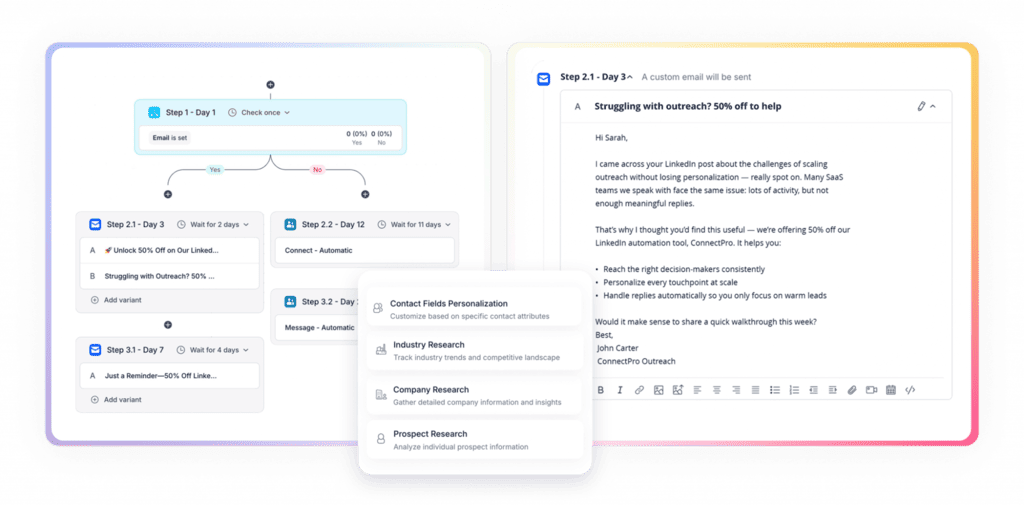
Volume is the biggest risk for sales and marketing teams, which is why an AI outreach platform like Reply.io or an AI sales agent like Jason AI is non-negotiable.
These tools find targeted leads for your business, research them for additional context, use that data to craft truly personalized emails and LinkedIn messages, all while controlling deliverability, monitoring spam rates, and enforcing sending limits on your campaigns.
If your emails suddenly started going to spam, the cause is almost always in this table:
| Problem | Can AI help? | What actually fixes it |
|---|---|---|
| Failing SPF, DKIM, or DMARC | No | Correct DNS records, rechecked after adding any new sending tool |
| High bounce rate | Yes | AI-assisted verification before every send |
| Spam complaints above 0.10% | Partly | Tighter targeting, easy unsubscribe, fast opt-out handling |
| New domain or mailbox with no history | No | Time, plus gradual warm-up with engaged recipients |
| Sudden volume spike | No, AI often causes it | Gradual ramp-up, more mailboxes, steady daily volume |
AI only amplifies the reputation you already have
Put the two sides together and you start seeing a clear pattern. Most sender-side AI helps you produce and send more, and receiver-side AI decides how much of that output to trust based on your history. On a sender with a strong reputation, AI multiplies results, but on a new or damaged one, it only multiplies the problems.
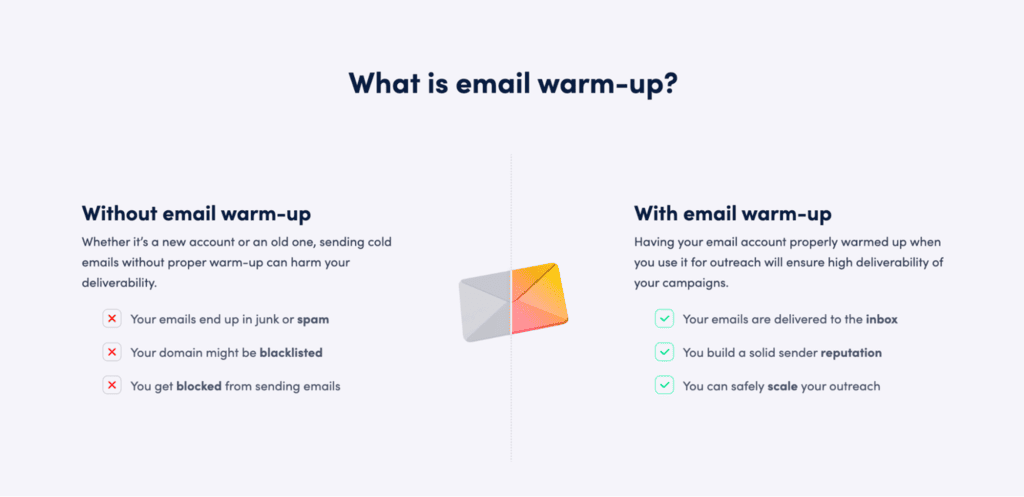
Google’s own guidance points to the fix: “Start with a low sending volume to engaged users, and slowly increase the volume over time.” That’s exactly what email warm-up does, building a record of replies and emails rescued from spam that filters can see before your campaigns rely on it.
How MailToaster builds the reputation AI filters look for
MailToaster is an email warm-up tool that builds and protects your sender reputation automatically, giving receiver-side AI the positive history it needs to trust your mailboxes and all the emails sent from it.
AI-written warm-up emails that read like real conversations
Warm-up only works if the emails look like normal business mail, and MailToaster’s AI assistant writes unique copy for each warm-up email, so filters never see the same message going out over and over.
Engagement from real inboxes
Every warm-up email goes to a peer-to-peer network of real inboxes, with no free or temporary accounts involved. Those inboxes open your emails, reply, mark them as important, and move them out of spam, which are the same signals AI filters reward. Pick the New Email Account profile to build reputation from scratch, or Reputation Protect to keep an established mailbox healthy while you scale.
See where your emails land
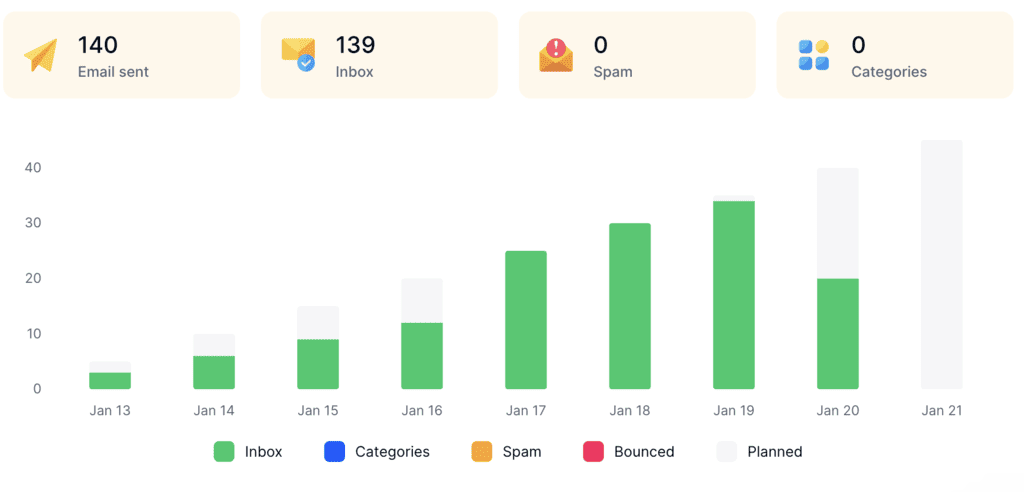
Detailed reports show how many warm-up emails reached the inbox, spam, or a category tab, plus bounces, so you notice a drop before your next campaign does. MailToaster also checks your SPF, DKIM, and DMARC records, and works with Gmail, Google Workspace, Outlook, and other providers. Plans start at $29 per email account per month, with a 7-day free trial.
Final thoughts
AI now decides where your email lands and whether anyone sees it once it gets there. Use your own AI where it pays off, like verifying lists, researching prospects and accounts, crafting personalized copy, pacing sends, and handling replies and opt-outs fast. Then make sure the mailboxes doing the sending have the history to back it up, because AI filters trust behavior over polish every time.
Start with authentication and a clean list, and build reputation before you scale. Try MailToaster free for 7 days and give every sending mailbox the track record AI filters look for.
FAQ
Can you tell if an email is AI-generated?
Not reliably, because well-edited AI drafts are very hard to tell apart from human writing and AI detectors produce frequent false positives. Mailbox providers don’t try to detect it for filtering either, since they judge the sender’s behavior and recipients’ reactions instead of who or what wrote the copy.
How long does it take to fix email deliverability?
Authentication fixes take effect as soon as your DNS records update, usually within hours. Reputation takes longer: expect 2 to 6 weeks of steady, low-volume sending to engaged recipients to recover from a spike in complaints or bounces, and around 2 to 3 weeks of warm-up for a brand-new mailbox.
Can AI fix email deliverability on its own?
AI can’t fix deliverability on its own. It catches problems faster and removes a lot of manual work, but it can’t publish your DNS records, earn consent from your list, or create sending history that doesn’t exist yet. Treat it as a layer that works on top of solid deliverability fundamentals.