How to Send a Mass Email That Gets Real Replies
You wrote one email, loaded 1,000 contacts, hit send, and three days later the only replies in your inbox are two out-of-office messages and an unsubscribe.
Sending a mass email is the easy part, since Gmail, Outlook, and any email platform will happily push it out. Getting it into inboxes and getting people to write back is where most campaigns quietly fall apart.
Below, we’ll cover the four ways to send a mass email, the sending limits and sender rules that decide where it lands, and what actually moves the reply rate once it’s there.
What is a mass email?
A mass email is a single message sent to a large list of recipients at once, whether that’s 50 people or 50,000. It’s the same content going out to everyone, with or without personalization fields like first name or company.
In practice, there are two very different kinds. A marketing blast (newsletter, product update, promotion) goes to people who subscribed and is sent through an email marketing platform. Personal outreach at scale (sales prospecting, recruiting, partnerships, follow-ups) goes out from a regular mailbox, one email per recipient, so each one looks and reads like it was written for that person.
The method you pick depends on which of the two you’re sending. And if the goal is replies, you’re almost always sending the second kind.
How to send a mass email: 4 methods compared
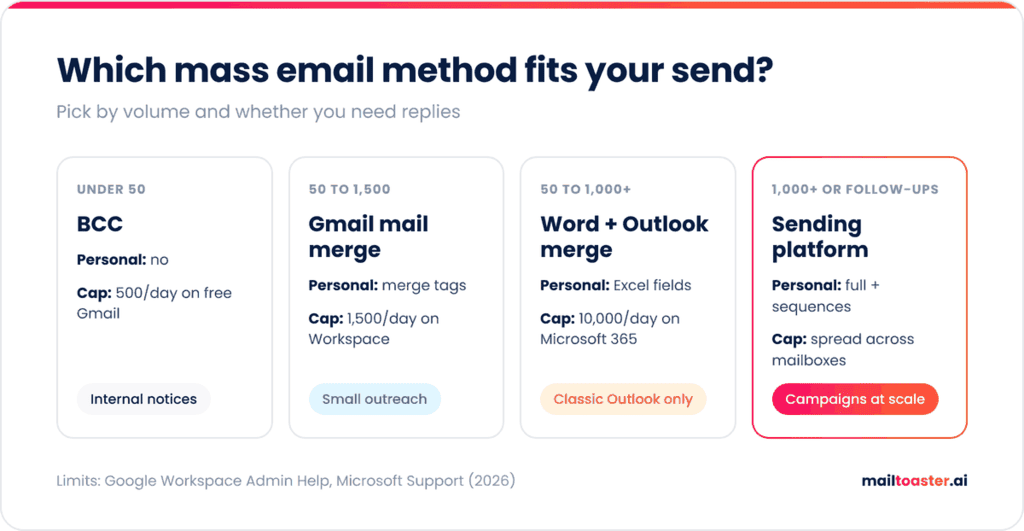
There are four realistic ways to send the same email to a large list, and each one comes with its own personalization ceiling and daily cap.
| Method | Personalization | Daily cap | Best for |
| BCC in Gmail or Outlook | None | 500 recipients (personal Gmail) | Quick internal notices to people who know you |
| Gmail mail merge | Merge tags (@firstname, sheet columns) | 1,500 recipients (Workspace) | Personal outreach to a few hundred people |
| Outlook + Word mail merge | Merge fields from Excel | 5,000 (Outlook.com), 10,000 (Microsoft 365) | Microsoft shops sending individual emails |
| Sending or outreach platform | Full, plus sequences and follow-ups | Plan-based, across many mailboxes | Newsletters at volume, or outbound campaigns |
BCC is the method everyone tries first, and it’s the weakest one. Every recipient gets an email addressed to nobody, with no name and no personalization, which reads exactly like what it is. Use it for a quick note to your own customers or team, and skip it for anything where you want a response.
How to send a mass email in Gmail
Gmail has a built-in mail merge, available on Google Workspace Individual, Business Standard, Business Plus, Enterprise, and Education Standard/Plus plans. Free personal Gmail accounts don’t have it.
- Put your contacts in a Google Sheet (first tab, one column per field) or group them under a Google Contacts label.
- Click Compose, then click the mail merge icon to the right of the “To” line and turn on Mail merge.
- Click Add from a spreadsheet, pick the sheet, and select the email and name columns.
- Write the email and type @ to insert merge tags like @firstname, @fullname, or any column header from your sheet.
- Send yourself a test, then send.
Each recipient gets their own individual email, and Gmail automatically adds a unique unsubscribe link at the bottom of every message. The limit is 1,500 recipients per mail merge and 1,500 per day, so for sending 100 emails at once in Gmail, mail merge is the right tool and BCC isn’t.
On a free Gmail account, you’re capped at 500 recipients per day and 500 per message, and hitting that locks sending for anywhere from 1 to 24 hours.
How to send a mass email in Outlook
Outlook doesn’t have its own mail merge, so it borrows one from Word:
- Put your list in Excel, with a column for email address and one for each field you want to merge (first name, company).
- In Word, go to Mailings → Start Mail Merge → E-mail Messages.
- Choose Select Recipients → Use an Existing List and open your Excel file.
- Write the email and add fields with Insert Merge Field or Greeting Line.
- Click Preview Results to check a few recipients.
- Choose Finish & Merge → Send Email Messages, set the “To” field to your email column, add a subject line, and send.
This also answers how to send a mass email in Outlook without showing addresses, because every recipient gets a separate email with only their own address in the “To” field.
The catch is that Word mail merge depends on MAPI, which only classic Outlook for Windows supports. As of the latest Microsoft update, new Outlook still doesn’t handle it, so Word will try to open classic Outlook instead. If you’ve switched, turn off “Try the new Outlook” in settings before you start.
When you need a dedicated sending platform
Mail merge works well up to a few hundred recipients. Past that, or the moment you need follow-ups, you’ve outgrown it.
Email marketing platforms like Mailchimp, Brevo, and MailerLite handle newsletters and promotional mass emails to opted-in subscribers, and most of them have a free plan to start with. They send from shared infrastructure and look like marketing, which is fine for a newsletter and a problem for a sales email.
For outreach, an outreach platform like Reply.io sends from your own mailboxes, rotates volume across several of them, and stops the sequence automatically when someone replies. That last part matters more than it sounds, since sending a follow-up to someone who already answered is the fastest way to lose them.
Sending limits and sender rules that decide where it lands
Every mailbox provider caps how much one account can send, and those caps are the first thing that breaks a mass email.
| Account | Daily limit | Per message | Worth knowing |
| Gmail (personal) | 500 recipients | 500 recipients | Locked for 1-24 hours when exceeded |
| Google Workspace | 2,000 messages | 500 external recipients | Mail merge capped at 1,500/day, trials at 500/day |
| Outlook.com (Microsoft 365 subscriber) | 5,000 recipients | 500 recipients | Only 1,000/day to people you’ve never emailed |
| Microsoft 365 business | 10,000 recipients | 1,000 recipients (default) | Throttled to 30 messages per minute |
Limits only tell you how much you can send, while the sender rules decide what gets through. Since February 2024, Google has required anyone sending 5,000+ messages a day to Gmail addresses to have SPF, DKIM, and DMARC set up, plus one-click unsubscribe on marketing mail. Microsoft introduced the same requirements for Outlook.com, Hotmail, and Live on 5 May 2025.
And enforcement has since gotten stricter. According to Google’s sender guidelines FAQ, starting November 2025, messages that fail these requirements face temporary and even permanent rejections, which is a step beyond landing in spam. Google also asks senders to keep their user-reported spam rate below 0.1%, and anyone above 0.3% loses eligibility for mitigation entirely.
There’s one more line on Microsoft’s own limits page that’s easy to miss. New accounts start with a low sending quota that only rises once the account “establishes credibility in the system.” A brand-new mailbox that fires off 1,000 emails on day one has no history to establish anything with, which is why teams warm new mailboxes with a tool like MailToaster before the first real campaign. All of these rules feed into your inbox placement, which is a different number from “sent” and the one that decides whether a reply is even possible.
How to get replies to a mass email
Once your emails are landing in the inbox, the reply rate comes down to who you’re sending to and what they read. Instantly’s 2026 Cold Email Benchmark Report, based on campaigns sent throughout 2025, puts the average reply rate at 3.43%, with top performers above 10%. The gap between those two numbers mostly comes down to the five habits below.
- Verify the list before you send. Invalid addresses bounce, and a high bounce rate tells providers you’re mailing a list you don’t know. Remove anything that fails verification, plus role addresses like info@ and support@ that rarely reply.
- Segment, even roughly. Splitting a list by role, industry, or company size lets you change the first two lines of the email for each group, and those two lines decide whether anyone keeps reading.
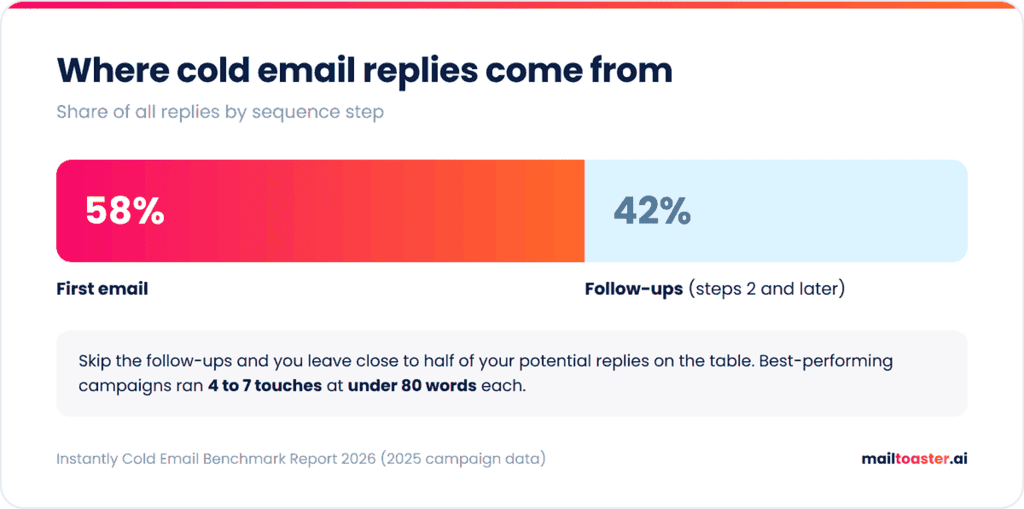
- Keep it under 80 words with one ask. The best-performing campaigns in Instantly’s report stay under 80 words. One clear question (“worth a quick call next week?”) gets more replies than a paragraph listing three options.
- Personalize past the first name. Everyone uses {{first_name}}. A line that references the recipient’s company, role, or something recent they did is what makes a mass email read like a personal one.
- Plan the follow-ups before the first send. In the same report, 58% of replies came from the first email and 42% came from follow-ups. Skip follow-ups and you give up close to half of your potential replies.
There’s also a deliverability side to the copy itself. A thousand identical email bodies going out from the same mailbox is a recognizable pattern, and it’s one that filters pick up on. Writing a few natural variations of your opening line and CTA keeps each message a little different without changing what you’re saying. You can turn your draft into ready-to-use variations here:
Free Spintax Generator
Paste your email — we’ll auto-wrap common words, CTAs and sign-offs in {spintax|like|this} so each send feels human, not copy-pasted.
See the dictionary
Warm up the mailbox before you scale
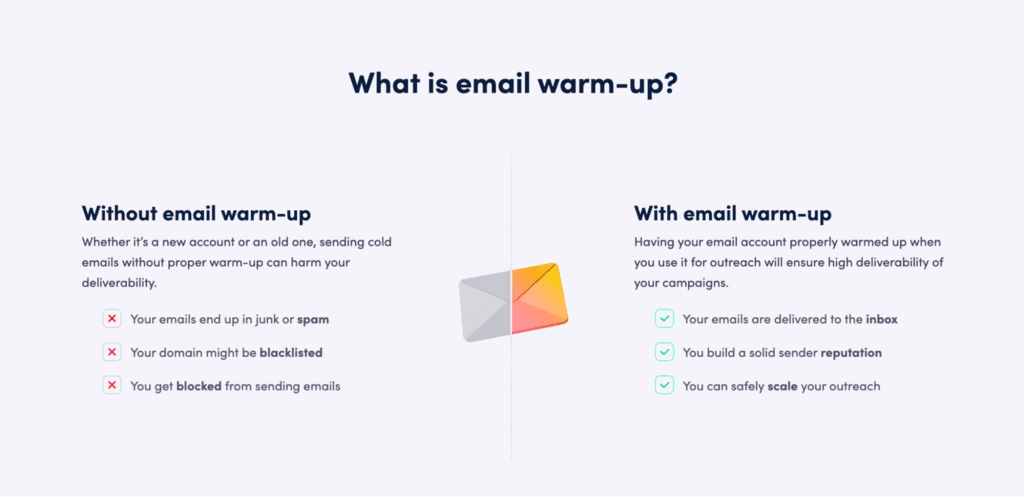
All of the above assumes the mailbox you’re sending from already has a sending history that Gmail and Outlook trust. For a new domain, a new mailbox, or one that’s been quiet for months, it doesn’t, and a mass email from that account is the fastest way to land in spam and stay there.
Building that trust is exactly what email warm-up does, by gradually increasing your sending volume and generating real engagement before you ask the mailbox to carry a real campaign.
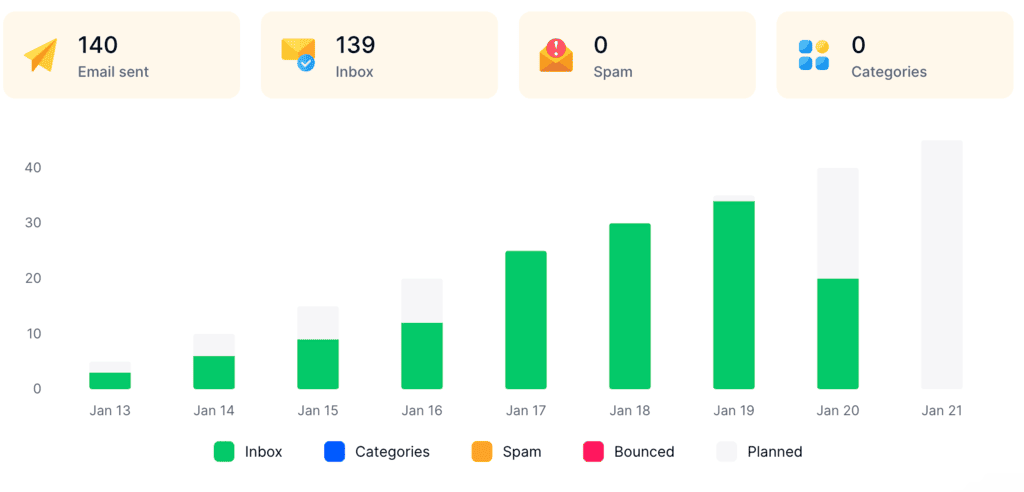
MailToaster automates that whole process for you. You connect a Gmail, Outlook, or other mailbox in a couple of clicks and pick a profile: New Email Account to build reputation from zero, or Reputation Protect to keep an established mailbox healthy while it sends at volume. From there, it sends and receives emails across a peer-to-peer network of real inboxes (no free or temporary accounts), which open your messages, reply to them, mark them as important, and pull them out of spam.
It also checks your SPF, DKIM, and DMARC records automatically, so the sender rules from earlier are covered, and reports how many emails reached the inbox, spam, or a category tab every day.
Is mass emailing legal?
Yes, sending a mass email is legal, as long as you follow the email laws of the country your recipients are in. In the US, that’s the CAN-SPAM Act, which requires accurate sender information, a subject line that matches the content, your physical postal address, and a clear way to opt out. Opt-out requests have to be honored within 10 business days, and the FTC puts the penalty at up to $53,088 per violating email.
In the EU and UK, GDPR is stricter. Marketing emails to individuals generally need prior consent, while B2B outreach usually relies on legitimate interest, which means the email has to be relevant to the person’s role and easy to opt out of. If your list includes EU contacts, document where each one came from.
Final thoughts
Picking the method is the easy decision: mail merge for a few hundred personal emails, a marketing platform for newsletters, and an outreach platform once you need follow-ups at volume. The replies depend on everything around it, from a verified list and short, personal copy to a mailbox with enough history to reach the inbox in the first place.
So before your next mass email, check the limits of the account you’re sending from and make sure your authentication records pass. If that mailbox is new, warm it up with MailToaster’s 7-day free trial before it carries a real campaign.
FAQ
How do I send a mass email but individually?
Use mail merge, since Gmail’s built-in mail merge (on Workspace) and Word mail merge with classic Outlook both send each recipient their own copy, addressed only to them, with personalized fields like first name. Outreach platforms do the same thing at higher volume.
How do I send a mass email without showing all the recipients?
BCC hides the recipient list, but every email arrives with no personalization and often an empty or generic “To” field. Mail merge is the better option, because each person receives a separate email with only their own address visible.
Is there a free mass email service?
Yes, Brevo’s free plan allows 300 emails a day, and Gmail’s mail merge is included in eligible Google Workspace plans at no extra cost. Free plans are fine for testing and small lists, but daily caps make them hard to use for regular campaigns.
How do I email 1,000 people at once?
Not from a single personal Gmail account, which caps you at 500 recipients a day. You’d need a Workspace account with mail merge (1,500 per day), a Microsoft 365 business account, or a sending platform that spreads volume across several warmed-up mailboxes.