How to End an Email: Best Email Sign-Off Examples for Every Situation
With so many emails written daily, many of us wonder: what’s the best way to end an email? Is “Best” or “Best regards” the better sign-off for this particular email? It may seem minor, but in certain situations, the ending of your email may very well decide whether anyone replies. Knowing how to end an email comes down to three small decisions: what you ask for, how you sign off, and what sits in your signature.
Below, we’ll cover each part, along with 40+ email sign-off examples for every situation, which endings to avoid, and how the bottom of your email affects whether it reaches the inbox.
How to end an email: the 3 parts of a strong ending
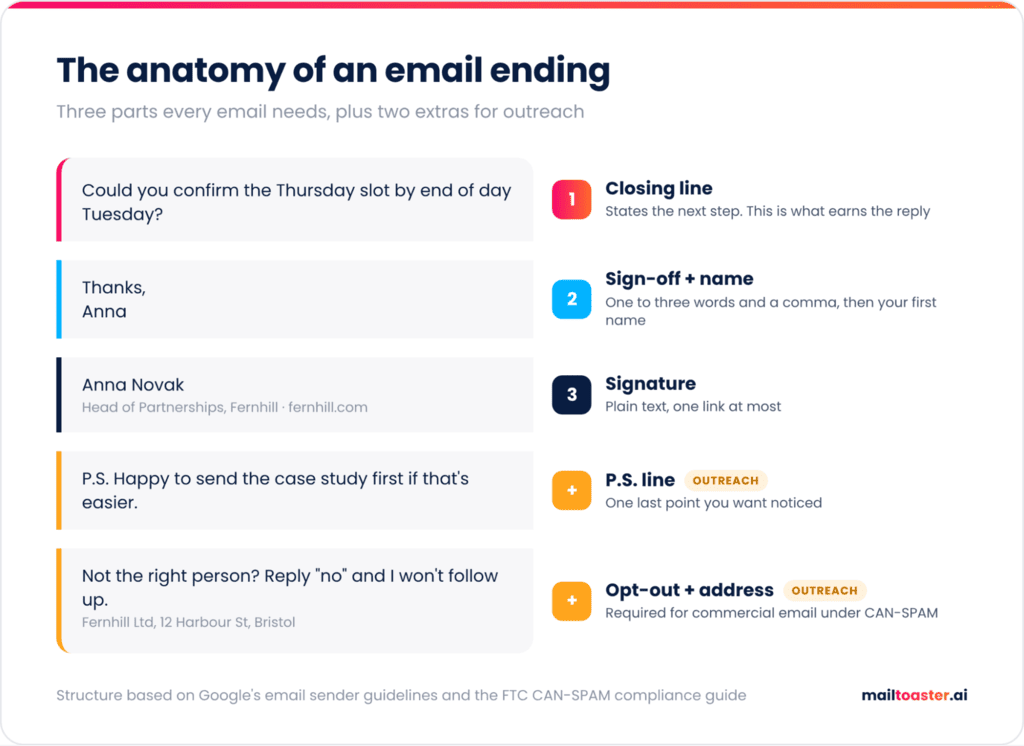
To end an email well, write a closing line that tells the reader what happens next, add a short sign-off like “Thanks” or “Best regards”, and finish with your name and a signature block. Each part has its own job, and most weak endings fail because one of them is missing or is trying to do another part’s work.
- Closing line → the last sentence of the body, which states the next step or the one thing you need. For example: “Could you confirm the Thursday slot by the end of day Tuesday?”
- Sign-off → the one-to-three-word phrase that sets the tone, followed by a comma. For example: “Thanks,”
- Signature → your name plus what people need to place you and reach you, usually your title, company, and one contact method like a phone number or website.
Outreach and marketing emails often carry two extra pieces at the bottom: a P.S. line for one last point you want noticed, and an opt-out line that lets recipients stop hearing from you. Both come with their own rules, which we’ll get to in the deliverability section.
How to sign off an email professionally
To sign off an email professionally, match the sign-off to your relationship with the recipient and to what you’re asking for, keep it to one to three words, and default to “Best regards” or “Thanks” when you’re unsure. Of all the ways to end an email professionally, these five rules cover nearly every work situation:
- Mirror the recipient → If a client signs off with “Kind regards”, answer in kind. If your manager just writes “Thx”, a formal “Sincerely” will come across as cold, or even sarcastic.
- Match the sign-off to the ask → A thank-you sign-off fits naturally when you’re asking for a favor or a decision, while a status update or an FYI doesn’t need one.
- Keep the format clean → Capitalize only the first word, add a comma, and put your name on the next line, so “Best regards,” followed by “John”.
- Shorten it as the thread goes on → The first email gets a full sign-off and signature, but by the 5th reply in a quick back-and-forth, your first name (or nothing at all) is perfectly fine.
- Have a safe default → For strangers, senior people, and anything formal, “Best regards” never offends anyone, and for everyone else, “Thanks” works in most cases.
Interestingly enough, people read sign-offs as a tone signal. In Preply’s survey of 1,005 Americans, 46% said they can tell a coworker’s mood from their email greetings and sign-offs, so a sudden switch from “Thanks!” to “Regards” won’t go unnoticed.
Does your email sign-off affect reply rates?
Yes, sign-offs that thank the reader get noticeably more replies than neutral ones. When Boomerang analyzed the closings of over 350,000 email threads, those ending with “Thanks in advance” got a reply 65.7% of the time, “Thanks” 63%, and “Thank you” 57.9%, against a 47.5% baseline across all emails in the sample.
That works out to roughly a third more replies for the three gratitude closings. The neutral favorites sat much closer to the average, with “Best regards” at 52.9% and plain “Best” at 51.2%, the lowest of the eight closings Boomerang measured.
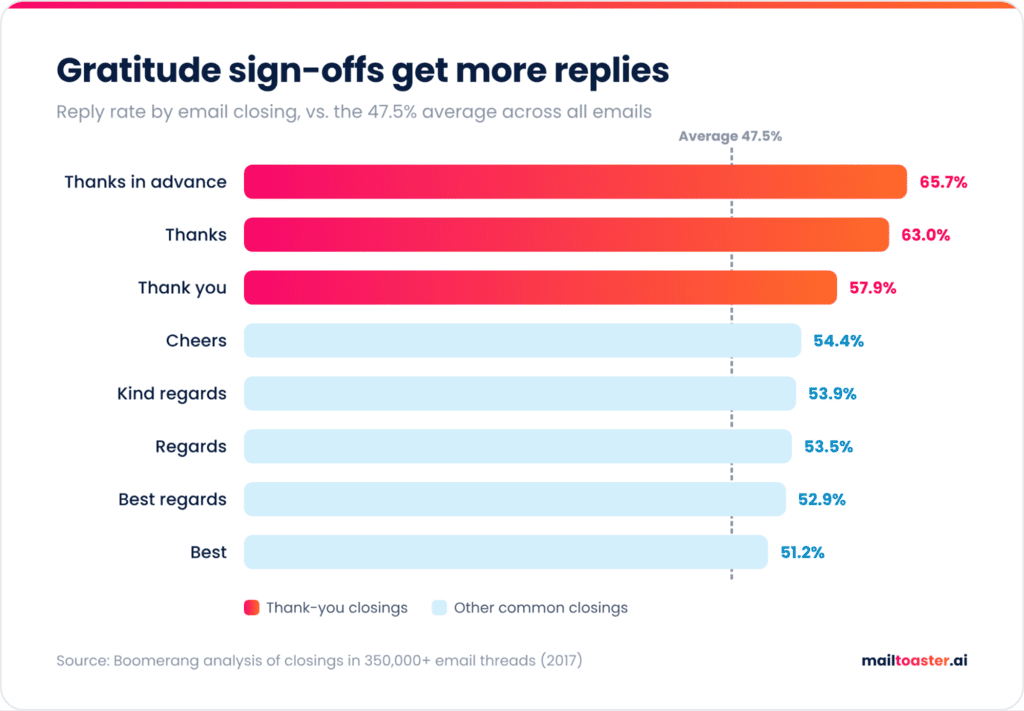
Keep in mind that the data comes from 2017 and mostly from community mailing lists, and it shows correlation, since an email ending in “thanks” is usually an email that asks for something. Even so, it’s one of the few large-scale looks at email closings, and the direction is clear enough to act on.
The closing line: what to write before your sign-off
The best closing line asks for one specific thing and makes it easy to answer, ideally with a single short reply. Vague endings like “Let me know your thoughts” leave the recipient to work out what you want, and the easiest response to an unclear request is no response at all.
Here’s how common closing lines look before and after a quick rewrite:
- “Let me know your thoughts.” → “Does option B work for you, or should I rework the budget first?”
- “Looking forward to hearing from you.” → “Could you confirm by Thursday so I can book the venue before the price goes up?”
- “Feel free to reach out with any questions.” → “If anything in section 3 looks off, reply here and I’ll fix it before the client call.”
- “Hope this helps!” → “I can walk you through the setup in 15 minutes tomorrow if that’s easier.”
- “Would love to connect sometime.” (cold email) → “Worth a 15-minute call next week, or should I send a short overview first?”
The stronger versions share a few distinct patterns — each one names a specific action, attaches a deadline and a reason when timing matters, and in cold outreach, gives the reader an easy way out, which takes the pressure off and makes a quick reply more likely.
Formal emails follow the same logic only with more polite phrasing. “I would appreciate your confirmation by November 14” does the same job with a senior stakeholder that “Can you confirm by the 14th?” does with a teammate.
Of course, even the sharpest closing line only works once your email actually reaches the recipient’s inbox. A new mailbox, or one that’s been quiet for a while, often lands in spam no matter what’s written in it, because Gmail and Outlook haven’t seen enough positive engagement from that sender to trust it yet.
That’s exactly the gap MailToaster fills for teams sending at volume, running your mailbox through a network of real inboxes that open your emails, reply to them, and pull them out of spam, building the kind of sending history that gets your closing lines seen in the first place.
Email sign-off examples for every situation
The right email sign-off depends on who you’re writing to and why, so the fastest way to choose one is to start from your exact situation. Use this table as a cheat sheet, then browse the full lists of email sign-offs below for alternatives:
| Situation | Safe sign-off | Skip |
|---|---|---|
| First email to someone you don’t know | Best regards | Cheers |
| Update to a client | Thanks / Best | Sincerely |
| Quick note to a colleague | Thanks | Kind regards |
| Asking for a favor or a decision | Thank you | Thanks in advance |
| Job application or recruiter email | Thank you for your time | Talk soon |
| Cold outreach | Thanks / Best | Looking forward to working together |
| Follow-up on a quiet thread | Thanks again | As per my last email |
| Bad news or an apology | Thank you for your patience | Cheers |
Formal email sign-offs
For first contact, senior stakeholders, legal or financial topics, and job applications:
- Best regards → the safest formal option in English-language business email.
- Kind regards → a touch warmer, and especially common in the UK and Europe.
- Sincerely → still standard for cover letters and official letters, but stiff for everyday email.
- Respectfully → for government officials, judges, or very senior leaders. Preply’s respondents rated it one of the most uptight closings, so save it for truly formal emails.
- With appreciation → formal but warmer, good after someone has gone out of their way for you.
- Thank you for your time → ideal after an interview, or when the recipient owes you nothing.
Everyday professional sign-offs
For clients you talk to regularly, colleagues in other teams, and partners:
- Thanks → the best all-rounder, and one of the top performers in Boomerang’s data.
- Best → short and neutral, fine for quick updates.
- All the best → friendly, and a good fit at the end of a project.
- Many thanks → for when someone has delivered something useful.
- Talk soon → when a call or meeting is already on the calendar.
- Have a great week → natural on a Monday or Tuesday, a bit odd on a Friday.
Friendly and casual sign-offs
For teammates, long-time clients, and people you’d happily grab a coffee with:
- Cheers → standard in the UK, Ireland, and Australia, but it can sound forced from an American sender writing to a stranger.
- Take care → warm without getting personal.
- Speak soon → a more relaxed version of “Talk soon”.
- Thanks a ton → casual gratitude for a small favor.
- Enjoy your weekend → Friday emails only.
- Catch you later → internal threads and close colleagues.
A little humor fits in this category too, but only with people who already know you, and never in a first email or one that carries bad news.
Thank-you sign-offs
For requests and favors, where someone’s time is what you’re really asking for:
- Thanks again → after you’ve already thanked them in the body of the email.
- Thank you for considering this → for proposals and requests where the answer could be no.
- Grateful for your help → personal, good after someone has put in real effort.
- Appreciate it → casual, fine with colleagues.
- Thanks for the quick turnaround → specific gratitude sounds more sincere than a generic thank-you.
- With gratitude → warm and slightly formal, a good fit for mentors and references.
Sign-offs for cold emails and sales outreach
In cold email, the closing line does the heavy lifting, so the sign-off should stay short and neutral:
- Thanks → the simplest and most consistent option.
- Best → neutral and safe in every market.
- Either way, thanks for reading → acknowledges that you’re interrupting their day and takes the pressure off.
- Happy to send more details if useful → a soft, low-pressure offer.
- Appreciate your time → respectful without sounding stiff.
Keep the signature in cold emails plain as well, with your name, title, company, and one link at most (the deliverability section below explains why).
Follow-up sign-offs
- Thanks again → reminds them of the original request without repeating it.
- Looking forward to your thoughts → fine once, but don’t use it on every follow-up.
- No rush, just keeping this on your radar → takes the pressure off non-urgent requests.
- Talk soon → when the next step is already agreed.
- Appreciate your time → keeps a third or fourth nudge polite.
- Let me know if next month works better → a graceful exit that makes it easy to reply with a quick “not now”.
Sign-offs for difficult emails
Apologies, bad news, and condolences need warmth without sounding breezy:
- With apologies → when you’re at fault, paired with a concrete fix in the body.
- Thank you for your patience → after a delay or an outage on your side.
- Thank you for understanding → only after you’ve clearly explained the reason behind a decision.
- With sympathy → for condolence emails.
- Thinking of you → for a personal loss when you know the person well.
- Here if you need anything → only if you mean it.
Email sign-offs to avoid
Some endings cost you goodwill no matter how good the rest of the email is, and these are the ones worth dropping:
- Automatic device lines: “Sent from my iPhone” and “Sent from my phone, please excuse typos” are some of the most disliked endings out there, and it takes just a quick tweak in your mail app settings.
- “Thanks in advance” to people you don’t know well: It earns replies from people already willing to help, but with a stranger, presuming a yes makes for a poor first impression.
- Abbreviations: “Rgds”, “Thx”, and “BR” look rushed, and they save you about half a second.
- Overly personal closings: “Love”, “xo”, and “Hugs” belong in personal email, definitely not in a work thread.
- Passive-aggressive closers: “As previously stated” and “Per my last email” signal irritation, and readers pick up on it right away.
- No sign-off at all on a first email: Preply’s respondents rated ending with no sign-off as the worst option of all, so save the bare ending for fast-moving threads.
In outreach, there’s a riskier problem than sounding awkward, and that’s a closing line that sounds like an ad. Phrases like “Act now”, “Click here”, or “Risk-free trial” at the end of a cold email are common spam keywords, and they’re easy to miss after you’ve rewritten the same template ten times. Run your closing paragraph through the spam checker below to see which words get flagged.
Free Email Spam Checker
Paste your subject line and copy to see what a spam filter sees — every trigger word highlighted in place, scored, with the fix for each one. Nothing is uploaded; the analysis runs in your browser.
Your copy, with every trigger marked
What this score does and doesn’t tell you
Content is only part of why email goes to spam — and honestly, not the biggest part. This tool checks the part you control while writing.
- What it checks: trigger vocabulary, structure, formatting, links, personalisation and the patterns filters are trained on.
- What it can’t check: your sending domain’s reputation, whether SPF, DKIM and DMARC are set up, how warmed up the mailbox is, your bounce and complaint rates, and whether the recipient has engaged with you before. Those matter more than wording — a perfect email from a cold domain with no authentication still lands in spam.
- A single trigger word almost never gets you filtered. Modern filters score the whole message. Concentration is what hurts, which is why density is scored separately here.
- Clichés are scored gently on purpose. “Hope this email finds you well” won’t send you to spam — it will just get your email ignored, which costs you the same meeting.
Fix the infrastructure too
If your email is landing in spam despite clean copy, the cause is almost always authentication or reputation:
- Publish SPF, DKIM and DMARC on the sending domain. Google and Yahoo now require all three from bulk senders — without them you’re throttled or rejected before anyone reads a word.
- Warm up new domains and mailboxes over several weeks. A brand-new domain sending hundreds of cold emails on day one is the single fastest way to get blocked.
- Keep your bounce rate under 2–3% by verifying addresses before you send. High bounce rates tell providers you’re working from a scraped list.
- Keep complaints under 0.3%. One person hitting “report spam” costs you more than a hundred deletions.
- Send from a separate domain for cold outreach so a bad campaign can’t damage the reputation of the domain your invoices and support replies go out on.
Why the end of your email affects deliverability
No spam filter cares whether you wrote “Best” or “Cheers”, but what sits around your sign-off is a different story. The signature block and the last lines of an email are where most of the links, images, and legal text live, and mailbox providers check all three closely.
Here’s where the bottom of an email can work against you:
- Image-heavy signatures: Exclaimer’s 2026 guide on signature deliverability notes that a signature built mostly from one large image with little text matches a pattern that many spam filters have long associated with junk mail.
- Hidden or disguised links: Google’s email sender guidelines say links should be visible and easy to understand, and that hiding content with HTML or CSS can get messages marked as spam. Link shorteners and redirect tracking both hide where a link goes.
- A missing opt-out: under the CAN-SPAM Act, commercial emails need a valid physical postal address and a clear way to opt out, with no exception for B2B email and penalties of up to $53,088 per violating email. Google also requires one-click unsubscribe for marketing messages from anyone sending 5,000+ emails a day.
- Spam complaints: Google asks senders to keep their spam rate below 0.10% and never reach 0.30%. When an email offers no easy way to say “no thanks”, some recipients reach for the spam button instead, and every one of those clicks counts against you.
| Element | Risk | Safer version |
|---|---|---|
| Logo or banner image | Image-heavy signature, heavier message | Text-only signature, or one small logo at most |
| Link shortener (bit.ly and similar) | Hides the destination | Full URL on your own domain |
| Redirect click tracking | Routes clicks through an unfamiliar domain | A custom tracking domain, or no tracking in the signature |
| Row of social icons and links | More links and domains to scan, promotional look | One link, usually your website or LinkedIn |
| Hidden text or HTML tricks | Can get the email marked as spam | Plain, visible text only |
| No opt-out line | Spam complaints and CAN-SPAM risk | One plain sentence offering to stop emailing |
Once everything at the bottom of your email is clean, what’s left is the sender reputation behind it, and that’s what decides your inbox placement long before anyone reads your sign-off.
A clean ending removes the obvious reasons to filter your email, while the trust itself comes from your sending history. Mailbox providers judge that history by how often people open, reply to, and rescue that sender’s emails from spam, and how often they complain.
How MailToaster helps your emails reach the inbox
MailToaster builds that positive sending history automatically through email warm-up. Once you connect your Gmail, Outlook, or other mailbox, it sends and receives emails across a peer-to-peer network of real inboxes, with no free or temporary accounts involved. Those inboxes open your messages, reply to them, mark them as important, and move them out of spam whenever they land there.
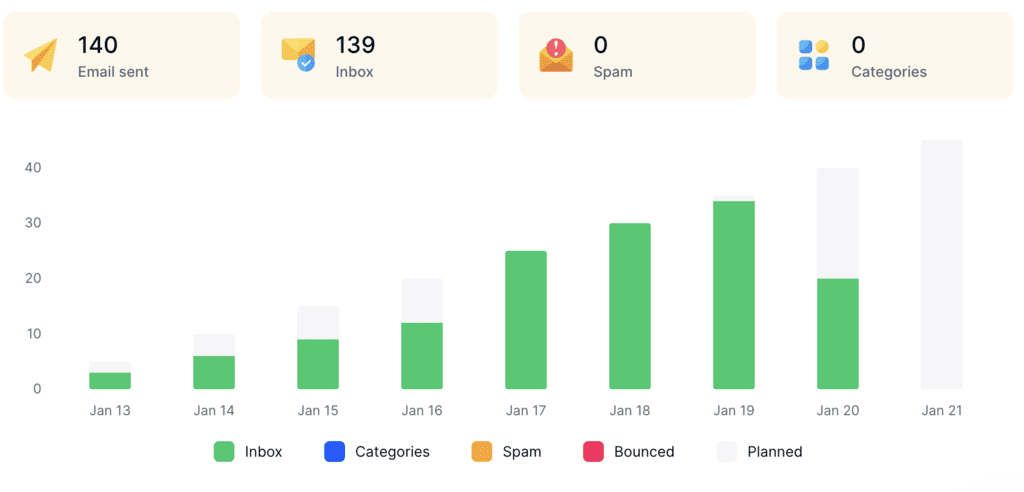
You can choose the New Email Account profile for a mailbox starting from zero, or Reputation Protect to keep an established one healthy while you send. MailToaster also checks your SPF, DKIM, and DMARC records, and its reports show how many emails landed in the inbox, in spam, or in a category tab. It costs $29 per mailbox per month, and there’s a 7-day free trial to test it on your own sending.
Final thoughts
The best email endings share three main habits: write a closing line that asks for one clear action, pick a sign-off that fits the relationship, and keep your signature plain enough to avoid getting flagged by spam filters.
Start by choosing one default sign-off for formal emails and one for everyday ones, then rewrite the closing line on your most-used template and strip your signature down to text. And if your emails still aren’t getting the replies they deserve, check where they’re actually reaching your recipients’ inboxes in the first place, then start building your sender reputation with MailToaster.
FAQ
What is the best email sign-off?
For most work emails, “Thanks” is the best email sign-off, since it’s friendly, fits almost any context, and was one of the top performers in Boomerang’s study. For formal emails or first contact with someone senior, “Best regards” is the safer choice.
Is it okay to end an email without a sign-off?
Yes, dropping the sign-off is completely normal once a conversation is moving. In Preply’s survey, 32% of people said sign-offs should disappear after the first email, and another 27% said they should fade out gradually. On a first email, though, skipping the sign-off makes you come across as abrupt.
How does Gen Z sign off emails?
Many younger professionals keep sign-offs short and casual, like “Thanks!”, “Best”, or just a first name, and save playful closings for people they know well. Preply also found that Gen Z is the generation most likely to change their usual sign-off to show frustration, so a sudden “Regards” from a younger colleague is worth paying attention to.
What can I use instead of “Sincerely”?
“Best regards”, “Kind regards”, and “With appreciation” keep the same formal tone without sounding like a cover letter from 1995. For everyday email, “Thanks” or “All the best” works better than any formal closing.
Should I type my name after the sign-off if I have a signature?
Yes, put your first name on the line right after the sign-off, even if a full signature follows. It feels more personal, and in long threads many mail apps trim repeated signatures, so your name is often the only part the reader actually sees.