

How to Set Up Free SMTP for Better Email Outreach in 2026
Every contact form, CRM, WordPress site, and outreach tool needs an SMTP server to actually send its emails. And most of them can run on a free one, as long as you pick the right provider for the job and stay inside its limits.
The catch is that “free SMTP” means very different things depending on what you’re sending. Below, we’ll compare the best free SMTP servers with their real 2026 limits and settings, explain which ones you can (and can’t) use for outreach, and walk through setting one up step by step.
What is a free SMTP server?
A free SMTP server is an outgoing mail server you can send email through at no cost, usually up to a daily or monthly limit. SMTP (Simple Mail Transfer Protocol) is the standard every email uses to leave one server and reach another, so your app or email client connects to the SMTP server, authenticates, and hands over the message for delivery.
Free SMTP comes in three forms:
- Your mailbox provider’s SMTP, like Gmail’s smtp.gmail.com or Outlook’s smtp-mail.outlook.com, which sends as you, from your own account.
- SMTP relay services, like Brevo, Mailjet, or SMTP2GO, which send on your behalf through their infrastructure and offer a free tier to get you started.
- A self-hosted server, like Postfix on your own VPS, which is free in software terms but comes with a lot of setup and no sending reputation at all.
The best free SMTP servers compared
Here’s what each free tier actually includes, checked on the providers’ own pricing and help pages in September 2026.
| Provider | Free limit | SMTP host | Login | Built for |
| Gmail | 500/day (2,000/day on Workspace) | smtp.gmail.com | App password | Sending as yourself |
| Outlook.com | Up to 5,000/day (Microsoft 365), less on free accounts | smtp-mail.outlook.com | OAuth2 | Sending as yourself |
| Brevo | 300/day | smtp-relay.brevo.com | SMTP key | Transactional + opted-in marketing |
| Mailjet | 6,000/month, 200/day | in-v3.mailjet.com | API key + secret key | Transactional + opted-in marketing |
| SMTP2GO | 1,000/month | mail.smtp2go.com | SMTP user from dashboard | Transactional |
| Mailtrap | 4,000/month, 150/day | live.smtp.mailtrap.io | API token | Transactional + testing |
| MailerSend | 500/month | smtp.mailersend.net | SMTP user from dashboard | Transactional |
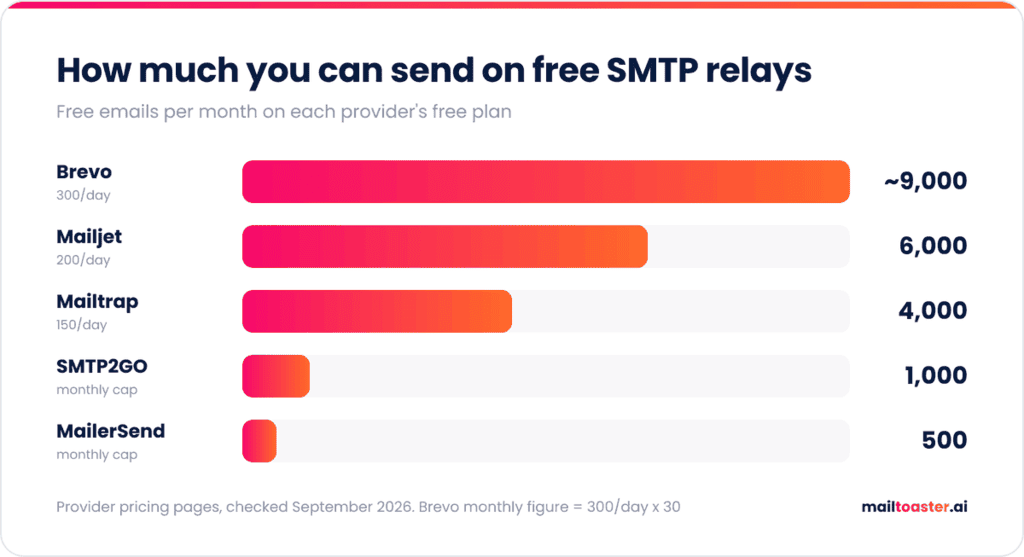
On volume, Mailjet and Brevo’s free plans are the most generous at roughly 6,000 and 9,000 emails a month. On deliverability, EmailToolTester’s August 2026 test of free SMTP services, run through GlockApps across more than 20 mailbox providers, put SMTP2GO first with a 96% average and Postmark second at 94%, while the weakest service in the test managed only 60%. So a bigger free allowance doesn’t automatically mean more of those emails reach the inbox.
Can you use a free SMTP server for cold outreach?
You can’t use a relay service for cold outreach, because Brevo, Mailjet, SMTP2GO, and similar relays are built for transactional email and marketing to people who opted in, and their terms say so. Brevo’s anti-spam policy, for example, states that scraped, acquired, or purchased contact lists are “strictly prohibited” and that consent has to be active and explicit. Sending cold outreach through a relay is the fastest way to get the account suspended, and on a shared IP pool it hurts other senders too.
For outreach, the SMTP server you should use is the one attached to your own mailbox. Cold emails are supposed to look like one person writing to another, so they should come from a real Gmail or Microsoft 365 account on your domain, sent through that account’s own SMTP. We’ve covered the exact setup for Gmail SMTP settings and Outlook SMTP settings separately, including the authentication changes that break most older tutorials.
That route is free in the sense that SMTP comes included with a mailbox you’re already paying for. What it doesn’t come with is a sending reputation, which a new mailbox has to build before it can carry any real volume. That’s the part a warm-up tool like MailToaster handles, and we’ll come back to it below.
How to set up a free SMTP server
The setup is almost identical across relay providers, and most of it happens in your DNS, not the SMTP settings.
- Pick a provider that matches your use case and volume from the table above.
- Create an account and verify your sending domain. Every relay asks you to prove you own the domain before it lets you send from it.
- Add the DNS records it gives you. That means an SPF include for the provider, a DKIM record (usually a CNAME or TXT), and a DMARC record if you don’t have one yet.
- Generate your SMTP credentials. Depending on the provider, that’s an SMTP key (Brevo), an API key and secret key pair (Mailjet), or a dedicated SMTP user (SMTP2GO). Brevo’s help docs specifically warn against using an API key in place of the SMTP key, which is one of the most common setup errors.
- Enter the settings in your app or plugin. Use the provider’s host, port 587 with STARTTLS (port 2525 works as a fallback on most relays if 587 is blocked), and the credentials from step 4.
- Send a test email and check the headers. Open the original message in Gmail (“Show original”) and confirm that SPF, DKIM, and DMARC all show PASS.
Step 3 is where most setups quietly go wrong. Every sending service you add needs its own include: in your SPF record, and SPF allows only 10 DNS lookups in total, so a domain that already sends through Google Workspace, a CRM, and a marketing tool can tip over the limit with one more provider. If you’re adding a new service, build the combined record here so you can see the lookup count before you publish it:
Free SPF Record Generator
Build a valid SPF DNS record in seconds. Pick your email providers, add custom servers, and copy the TXT value into your DNS.
What is SPF and why do I need it?
SPF (Sender Policy Framework) is a DNS record that tells the world which servers are allowed to send email for your domain. Without it, anyone can spoof your domain — and modern inbox providers will dump your real mail into spam.
This tool builds the TXT record value you’ll publish at the root of your domain (host = @). You only get one SPF record per domain — if you already have one, replace it (don’t add a second).
SPF has a hard limit of 10 DNS lookups. Each include:, a, mx, and exists: mechanism counts. We’ll track this for you.
Your SPF record
How to publish this record
- Sign in to your DNS provider (where your domain’s nameservers live — Cloudflare, GoDaddy, Namecheap, Route 53, etc.).
- Find the DNS records section for your domain.
- Add a new record with: Type =
TXT, Host/Name =@(or your domain), Value = the SPF record above. - If a TXT record starting with
v=spf1already exists, replace it — never publish two SPF records on one domain. - Save. DNS propagation usually takes a few minutes to an hour. Verify with
dig TXT yourdomain.comor any free SPF checker.
If the test email doesn’t go through, the error code usually points straight at the cause:
- 535 authentication failed means the credentials are wrong, most often an API key where an SMTP key or app password was needed.
- A connection timeout means the port is blocked by your host or network, so switch from 587 to 2525 (or 465 with SSL).
- 550 with “sender not verified” or similar means step 2 isn’t finished, or you’re sending from an address on a domain the provider hasn’t verified yet.
Which free SMTP server should you choose?
The right pick depends on what’s doing the sending:
- A WordPress site or contact form: Brevo or SMTP2GO, both of which have plugins or simple SMTP setup and enough daily volume for form notifications.
- App notifications and password resets: SMTP2GO or Mailjet, where deliverability and API access matter more than marketing features.
- Testing emails before they reach real users: Mailtrap, which is built around a sandbox that catches test emails instead of delivering them.
- Newsletters to opted-in subscribers: Brevo or Mailjet, since both combine SMTP with list management and unsubscribe handling.
- Sales, recruiting, or partnership outreach: your own Google Workspace or Microsoft 365 mailbox, never a relay.
Limits of free SMTP (and when to upgrade)
Free tiers are great for a contact form, password resets, or a low-volume app. They start to hold you back when:
- You hit the cap mid-send. Once the daily limit is reached, the rest of your emails queue or fail until the next day.
- You share an IP pool with strangers, since free plans send from shared IPs, so another sender’s bad campaign can affect your delivery.
- You need support or logs. Human support and longer log retention are usually reserved for paid plans.
- Your emails carry the provider’s branding, since some free tiers add a footer or logo to every message.
If you’re sending more than a few hundred emails a day through a relay, or email is critical to your product (think order confirmations), a paid plan with a dedicated IP option is usually worth it.
Getting free SMTP email into the inbox
Whichever SMTP server you use, it only decides whether your email gets accepted by the recipient’s server. Where it lands after that, inbox or spam, comes down to your authentication and your sender reputation, and a new mailbox or domain starts with no reputation at all.
That’s what email warm-up fixes, by building a history of consistent sending and positive engagement before you ask the mailbox to carry real volume.
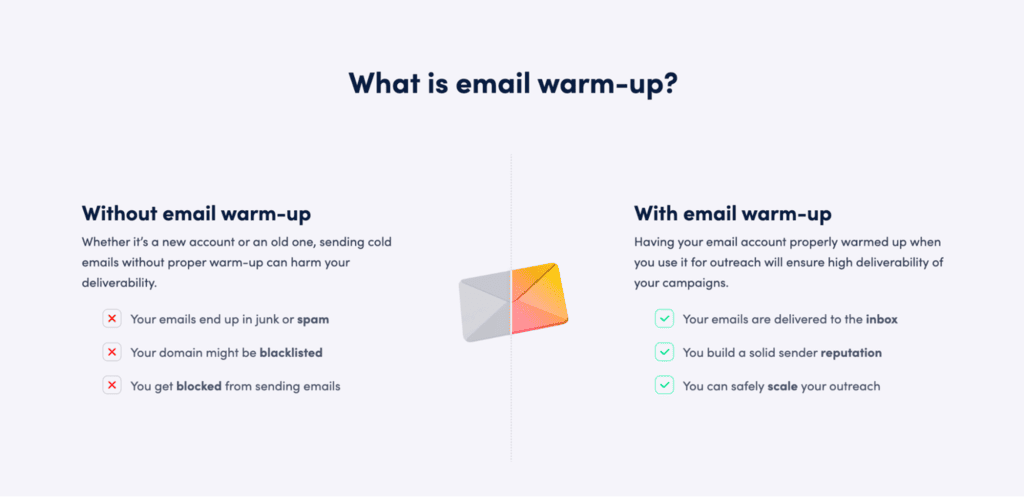
MailToaster connects to Gmail, Outlook, and other email providers in a couple of clicks, so there’s nothing to change in your SMTP setup. It then sends and receives emails across a peer-to-peer network of real inboxes (no free or temporary accounts), which open your messages, reply to them, mark them as important, and pull them out of spam.
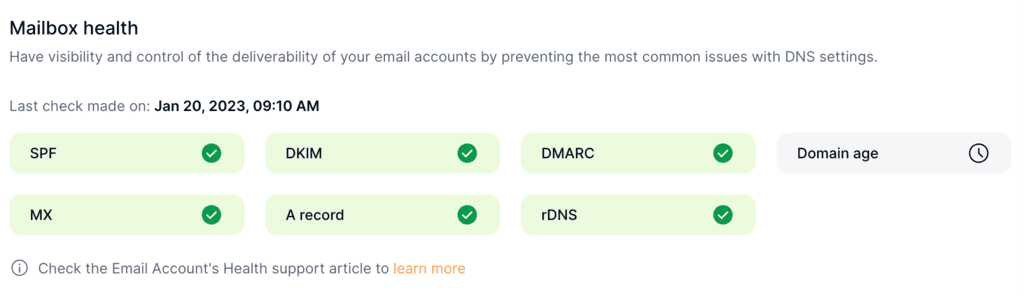
It also checks your SPF, DKIM, and DMARC records automatically, which covers the DNS work from the setup steps above, and shows you daily how many warm-up emails reached the inbox, spam, or a category tab.
Final thoughts
For transactional email and opted-in newsletters, a free relay like SMTP2GO, Mailjet, or Brevo will cover you until volume grows. For outreach, skip the relays and use your own Gmail or Microsoft 365 mailbox’s SMTP, since that’s what cold email is supposed to look like anyway.
Either way, set up SPF, DKIM, and DMARC before the first send and confirm they pass. And if the mailbox is new, warm it up with MailToaster’s 7-day free trial before it sends at volume.
FAQ
What is the best free SMTP server?
For most transactional use, SMTP2GO is the best free SMTP server, with 1,000 free emails a month and the highest average deliverability (96%) in EmailToolTester’s 2026 test. If you need more volume, Mailjet’s 6,000 emails a month is the biggest free allowance among the major relays.
Is Google SMTP free?
Yes, Gmail’s SMTP server (smtp.gmail.com) is included with every Gmail and Google Workspace account at no extra cost. Personal accounts can send to 500 recipients a day and Workspace accounts 2,000 messages a day, and you’ll need an app password or OAuth to connect a third-party app.
Can I run my own SMTP server?
Yes, with software like Postfix on a VPS, but it’s rarely worth it for sending. A new server IP has no reputation, you need reverse DNS set up correctly, and many cloud providers block outbound port 25 by default, which is the port servers use to deliver mail to each other.
How much does an SMTP server cost?
It can be free within the limits above. Relay providers charge by monthly email volume once you outgrow the free tier, and for outreach, SMTP comes included with each Google Workspace or Microsoft 365 mailbox you already pay for.