
Best Email Testing Tools to Improve Deliverability and Performance
You can score a perfect 10 on a spam test and still land in Promotions. That gap catches out a lot of senders, because most email testing tools check the message you just wrote, not the domain you’re sending it from in the first place. Both matter, but they cover different jobs.
This guide covers five tools worth your time, sorted by what each one actually tests, from how your email renders, how your copy reads to a filter, whether your technical setup is valid, and where the message ends up, along with what to do if a test comes back bad.
What Email Testing Tools Actually Do
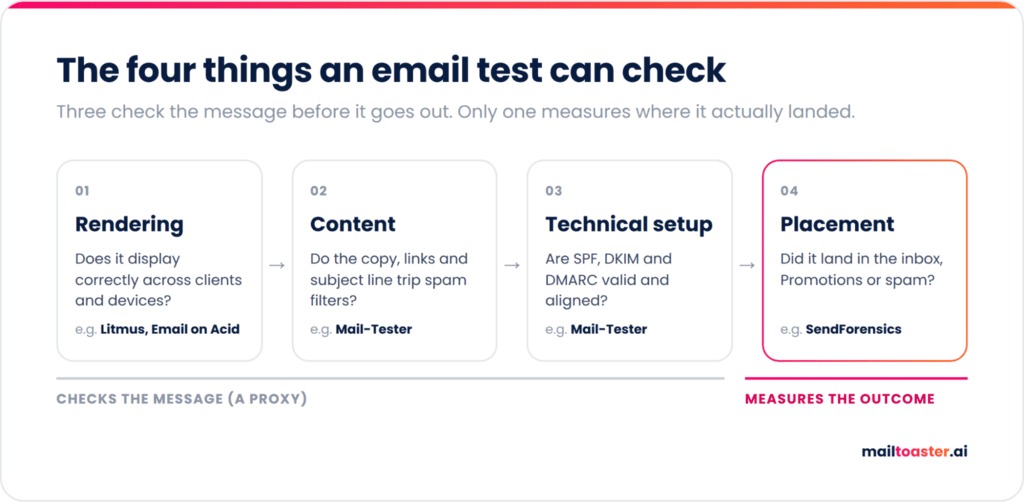
Email testing tools answer four separate questions:
- Rendering → Your email is HTML being interpreted by dozens of clients that each handle it differently, so a layout that looks right in Gmail can collapse in Outlook. This matters more than it used to, since according to Litmus Email Analytics, Apple accounted for 62.26% of opens and Gmail for 27.03% in 2026, which puts nearly 90% of your audience in just two ecosystems.
- Content → Spam filters read your copy, your links, your image-to-text ratio, and your subject line, and they assign a score before a human sees any of it.
- Technical setup → SPF, DKIM, and DMARC, reverse DNS, unsubscribe headers, and whether your sending domain matches the one you authenticate with.
- Placement → the only one that measures an outcome, while everything else is a proxy. Placement testing sends to a panel of real accounts and reports where the message actually landed.
| Test type | What it answers | What it cannot tell you |
|---|---|---|
| Rendering | Does my email display correctly across clients and devices? | Whether anyone receives it |
| Content | Does my copy trigger spam filters? | How your domain is regarded by mailbox providers |
| Technical setup | Are my authentication records valid and aligned? | Whether valid records are enough on their own |
| Placement | Did this land in inbox, Promotions, or spam? | Why it landed there |
A single email testing tool rarely covers more than two of these well, which is why most teams end up adding at least a couple into their toolstack.
Why Email Testing and Deliverability Are Not the Same Thing
An email test measures one message, while deliverability comes from your domain’s sending history, which no test can change.
Validity’s 2026 Email Deliverability Benchmark Report puts global inbox placement at 87.2%, so roughly one in eight legitimate emails miss the inbox, and Outlook is even worse at 75.6%.
And when it comes to spam, Google’s guidelines are just as specific — keep the spam rate in Postmaster Tools below 0.1% and never let it reach 0.3%, and that figure reflects how thousands of recipients have treated your mail over weeks.
Any email deliverability testing tool hands you that number and stops there. Improving it takes consistent sending, real engagement and time, which is what email warm-up is for.
Tools like MailToaster handle that part automatically, connecting your Gmail, Outlook, or other mailbox to a peer-to-peer network of real inboxes that open your emails, reply to them, mark them as important and pull them out of spam.
The 5 Best Email Testing Tools for 2026
These are sorted by what they test, not ranked against each other, because a rendering tool and a placement tool are not competing for the same spot in your stack. Several have genuinely usable free tiers, so if you’re looking for free email testing tools, start with the first and third entries below:
| Tool | What it tests | Free tier | Paid from |
|---|---|---|---|
| Mail-Tester | Content, technical setup | 3 tests per 24 hours | Micro-payment packs |
| Litmus | Rendering, accessibility, spam filters | No | Quote only |
| Mailtrap Email Sandbox | Application email in staging | 50 test emails | \$14/mo annual |
| MailToaster | Sender reputation, DNS records, placement reporting | 7-day trial | \$29/account/mo |
| Email on Acid | Rendering, pre-send QA | No | \$99/mo |
| SendForensics | Placement, DMARC analytics | No | \$49/mo |
1. Mail-Tester
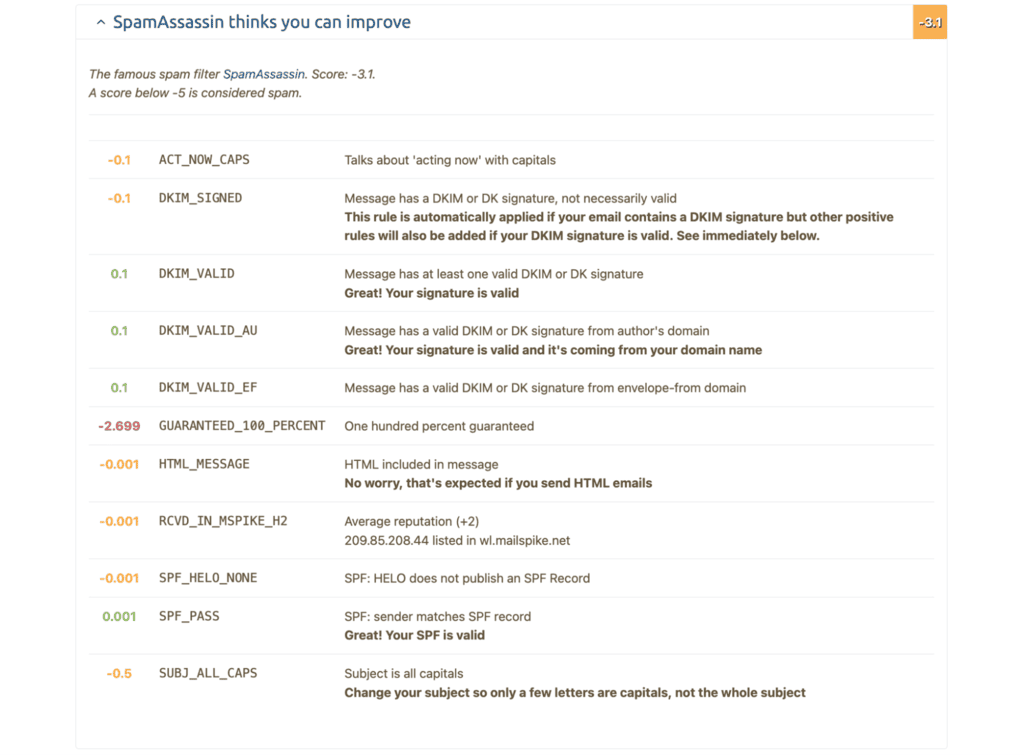
Mail-Tester is the default free email testing tool out there, and for good reason — it’s free and it takes about thirty seconds. You send your message to a randomly-generated address, open the results page, and get a score out of 10 covering spam-filter triggers, authentication records, message construction, and blacklist status. The report explains each deduction, which makes it a teaching tool as much as a diagnostic one.
You get 3 free tests per rolling 24 hours, and micro-payment packs beyond that.
Its limitation is also its design, though. Mail-Tester scores one message in isolation and has no visibility into your domain’s history, so a 10/10 tells you your message is clean, but that doesn’t mean your sender reputation is. Treat the score as a floor to clear before you send, not as a prediction of where the email will land, especially when it comes to sales and marketing outreach at scale.
The fastest part of a Mail-Tester score to act on is the copy itself, since trigger words are the one deduction you can fix in a minute. If you want to see which phrases in your draft are pulling the score down, run it through the spam checker below and it will highlight them in place and grade the message A to F.
Free Email Spam Checker
Paste your subject line and copy to see what a spam filter sees — every trigger word highlighted in place, scored, with the fix for each one. Nothing is uploaded; the analysis runs in your browser.
Your copy, with every trigger marked
What this score does and doesn’t tell you
Content is only part of why email goes to spam — and honestly, not the biggest part. This tool checks the part you control while writing.
- What it checks: trigger vocabulary, structure, formatting, links, personalisation and the patterns filters are trained on.
- What it can’t check: your sending domain’s reputation, whether SPF, DKIM and DMARC are set up, how warmed up the mailbox is, your bounce and complaint rates, and whether the recipient has engaged with you before. Those matter more than wording — a perfect email from a cold domain with no authentication still lands in spam.
- A single trigger word almost never gets you filtered. Modern filters score the whole message. Concentration is what hurts, which is why density is scored separately here.
- Clichés are scored gently on purpose. “Hope this email finds you well” won’t send you to spam — it will just get your email ignored, which costs you the same meeting.
Fix the infrastructure too
If your email is landing in spam despite clean copy, the cause is almost always authentication or reputation:
- Publish SPF, DKIM and DMARC on the sending domain. Google and Yahoo now require all three from bulk senders — without them you’re throttled or rejected before anyone reads a word.
- Warm up new domains and mailboxes over several weeks. A brand-new domain sending hundreds of cold emails on day one is the single fastest way to get blocked.
- Keep your bounce rate under 2–3% by verifying addresses before you send. High bounce rates tell providers you’re working from a scraped list.
- Keep complaints under 0.3%. One person hitting “report spam” costs you more than a hundred deletions.
- Send from a separate domain for cold outreach so a bad campaign can’t damage the reputation of the domain your invoices and support replies go out on.
2. Litmus (now part of Validity)
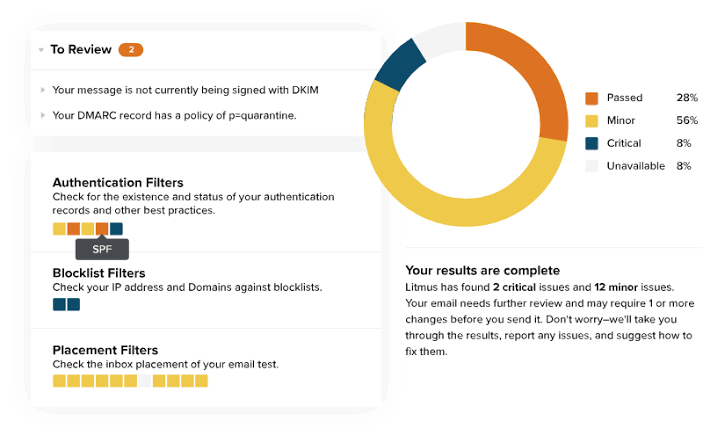
Litmus is the long-standing standard for rendering. It previews your email across more than 100 clients and devices, then layers on link validation, accessibility checks, and spam filter testing, so one pass tells you whether the email works everywhere it will be opened.
There’s been a significant change worth knowing about before you shop. Validity acquired Litmus in April 2025, and the product now sits inside Validity Engage. The self-serve pricing page has been retired and the pricing link routes to a sales form, so the \$99 and \$500 monthly figures still quoted across other roundups no longer reflect how it is sold.
Litmus is built for marketing teams shipping designed HTML campaigns on a schedule, and at that job, it’s hard to beat. If you send plain-text outbound from a single mailbox, though, you’re paying for a rendering engine you’ll barely touch.
3. Mailtrap Email Sandbox
Mailtrap solves a problem the other tools on this list do not touch: testing the email your application generates, not the email your marketing team writes. Password resets, receipts, order confirmations, and notifications all need checking, and none of them should ever reach a real recipient from a staging environment.
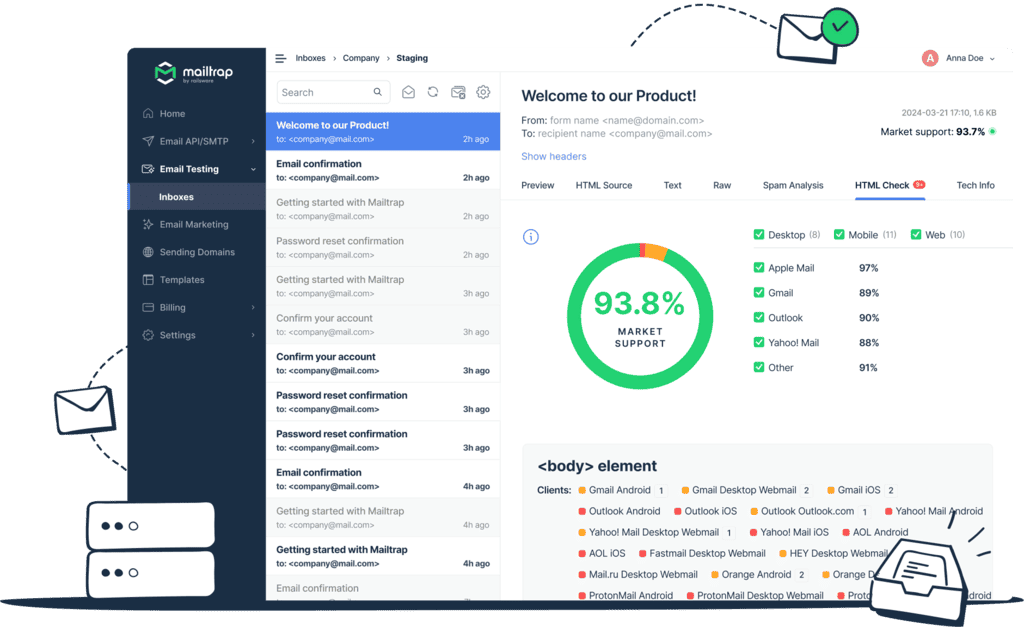
Email Sandbox captures outgoing mail from staging into a fake inbox, then shows you the HTML preview, a spam score, and blacklist checks for every captured message, before reaching a single customer.
Pricing starts free with 50 test emails and one sandbox, which is enough for a solo developer. Paid plans start at $ 14/month for 500 emails, $34/month for the Team plan, $99/month for Business, and $399/month for Enterprise.
If your email is written in a campaign editor or an AI outreach platform like Reply.io, skip this one. If it’s generated in code, it belongs in your stack.
4. MailToaster
MailToaster is not an email tester in the traditional sense, but it’s an email warm-up and deliverability tool that tests your email authentication and improves your sender reputation, so more of your emails land in their intended inboxes even at volume. When Mail-Tester flags a poor authentication setup, or a placement report shows 30% of your mail in spam, the finding is about your sender reputation, and reputation is built by sending behavior over time. That is the gap it fills.
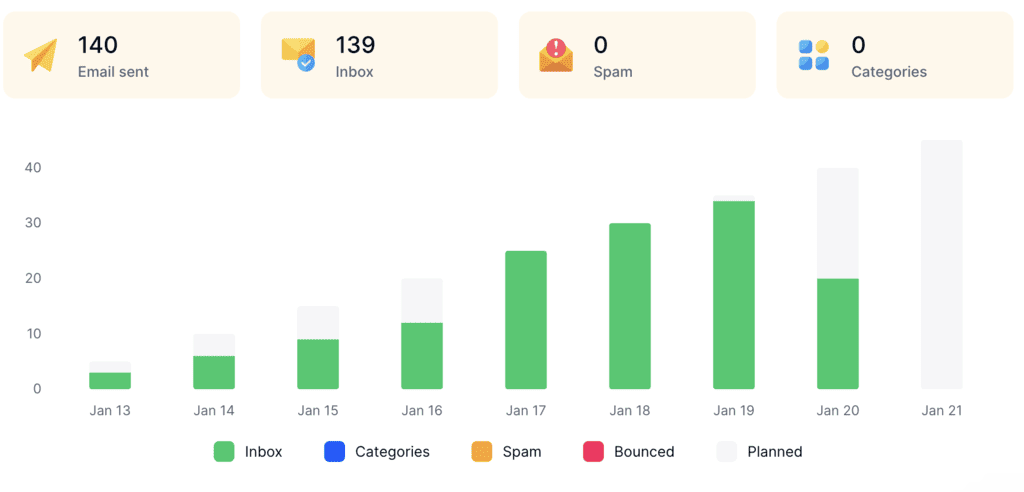
Connect a Gmail, Outlook, or other account in a few clicks and MailToaster starts warming it through a peer-to-peer network of real inboxes, with no free or temporary accounts involved. The system opens your emails, replies to them, marks them as important, and rescues them from spam folders, so mailbox providers see a consistent pattern of wanted mail.
MailToaster validates your SPF, DKIM, and DMARC records automatically, and reports per account on emails sent, landed in inbox, landed in spam, sorted into categories, and bounced. That is the same readout a placement test gives you, except it runs continuously on the accounts you actually send from.
Two profiles depending on your use case: New Email Account for building reputation from zero, and Reputation Protect for maintaining an established sender. Pricing is $29 per email account per month with a 7-day free trial.
5. Email on Acid (moving to Mailgun Inspect)
Email on Acid occupies the same category as Litmus but with a different emphasis. Where Litmus is an ongoing suite, Email on Acid works as a pre-send gate, with previews across 100+ clients and devices, HTML code analysis, image and link validation, and accessibility testing, all run as a checklist before your campaign goes out.
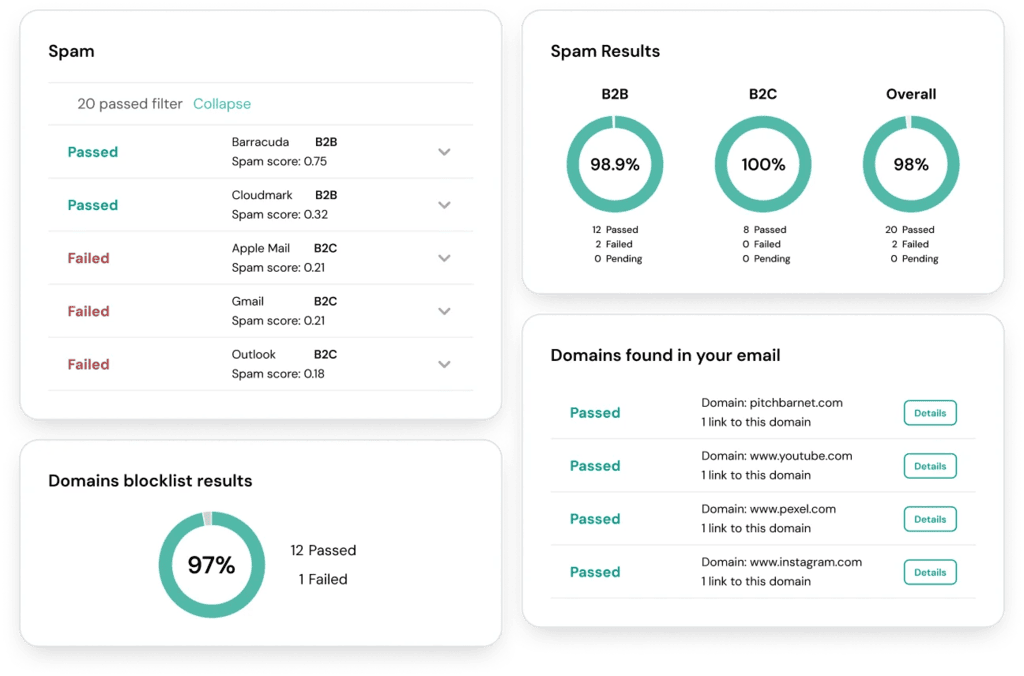
The Basic plan costs $99/month for 1,000 previews and Premium $199/month for 2,000, with overages at $0.15 per preview. Keep in mind that it’s the premium plan where the accessibility, code analysis, and spam content checks come into play.
Email Marketing Tools With A/B Testing
A/B testing doesn’t live in standalone testers, because it needs your list and a real send. Marketing platforms and sales outreach platforms both ship it as a default feature now, so it’s rarely a reason to buy anything extra.
For instance, Mailchimp lets you test one variable at a time, either subject line, from name, content or send time, across up to three variations. Multivariate testing is available on Standard plans and above.
Outreach platforms tend to automate the whole thing, for instance, in Reply.io’s AI multichannel campaigns, the system tests subject line, opening, and CTA variants across your segments and settles on the strongest performer for each one, so you get the optimization without building the test yourself.
An A/B test only measures performance among people who received the email, but if a third of your sent emails are sitting in spam, all those opportunities are still missed. So fix placement first, and only then optimize performance, when the results reflect your whole audience.
How to Build a Testing Routine You Will Actually Keep
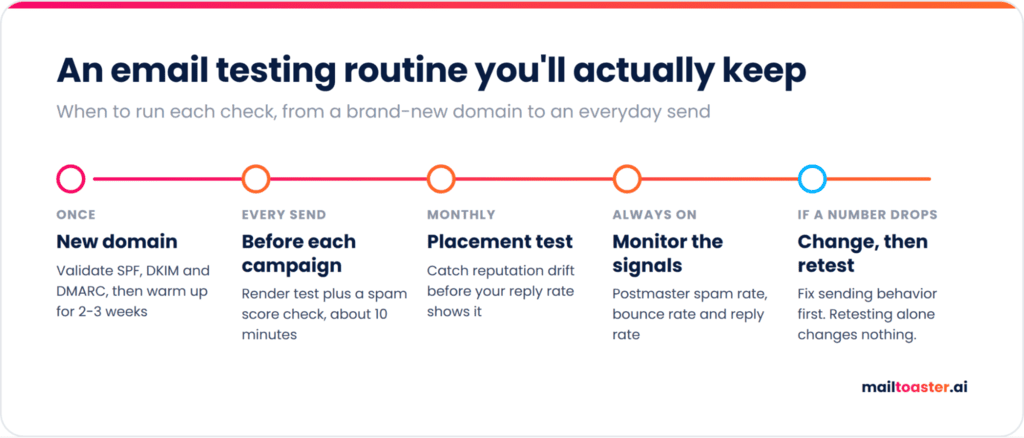
Most testing plans fail because they’re event-driven, often after something bad happened, but the better way to go about email testing is to make it a routine:
- Before a new domain sends anything: validate SPF, DKIM, and DMARC, then warm the account for two to three weeks before real outreach.
- Before every campaign: render-test the email and run the copy through a spam score check. Ten minutes, every time.
- Monthly: run a placement test to catch reputation drift before your reply rate shows it.
- Continuously: watch your Postmaster spam rate, bounce rate, and reply rate. These are leading indicators and they move before placement does.
- When a number moves the wrong way: change sending behavior first, then retest. Retesting an unchanged sender just confirms the same result.
Wrapping up
Pick one tool per test type instead of five that overlap, since chances are your stack is already pretty packed. For most senders that means Mail-Tester for content and setup, one rendering tool if you send designed HTML, and a placement test on a monthly cadence. Build the routine into your calendar and testing stops being the thing you scramble to do after a campaign underperforms.
And if your tests keep coming back poor, another tester won’t help you. Improving your sender reputation will. Start a 7-day MailToaster trial and let your accounts warm up properly before your next send.
FAQ
Are email testing tools free?
Partly. Mail-Tester gives you 3 tests per 24 hours, Mailtrap includes 50 test emails on its free plan, and Google Postmaster Tools and Microsoft SNDS cost nothing at all. Rendering suites like Litmus and Email on Acid are the paid part of the category.
How do I test if my email goes to spam?
Send the message through Mail-Tester for a spam score, then run a placement test that delivers to real seed accounts across Gmail, Outlook and Yahoo. The spam score predicts filter behavior; the placement test shows you where the email actually landed.
What is a good spam score?
Aim for 9 out of 10 or better on Mail-Tester, and separately keep your Google Postmaster spam rate under 0.10%. The first measures the message you are about to send. The second measures how recipients have treated your mail over time.
Do I need more than one email testing tool?
Usually two. One covers content and technical setup, which is where most problems originate, and one covers either rendering or placement depending on what you send. A third is only worth it if you ship designed HTML campaigns weekly.
How often should I test my emails?
Test content and rendering before every campaign, run a placement test monthly, and monitor your spam and bounce rates continuously. Increase the frequency whenever you add a new sending domain, change email service providers, or raise your daily volume.