

Best Email Warmup Tools in 2026 (Compared on Network, Coverage, and Cost)
Business needs speed, but with email outreach at scale, it’s not that simple. If you buy a domain on Monday, connect the mailbox on Tuesday, and send 40 cold emails on Wednesday, chances are, most of them will land in spam. Gmail and Outlook have no history on that domain, so they default to suspicion.
Email warm-up is what builds up your domain’s sender reputation and gives those filters a real engagement history to read before your prospects ever receive a message.
There are dozens of products competing for that job now, some as standalone tools and some as part of larger email outreach suites. The list below covers our top five picks, with verified pricing, what each is genuinely good at, and what no email warmup tool can fix for you.
What email warm-up tools actually do
Email warm-up tools send and receive mail on your behalf across a network of other inboxes, then engage with it the way a real recipient would by opening them, replying, marking as important, and dragging them out of spam. The goal is to build a record of positive interaction on your domain and mailbox so your recipients’ providers trust your emails and let them reach their intended inboxes.
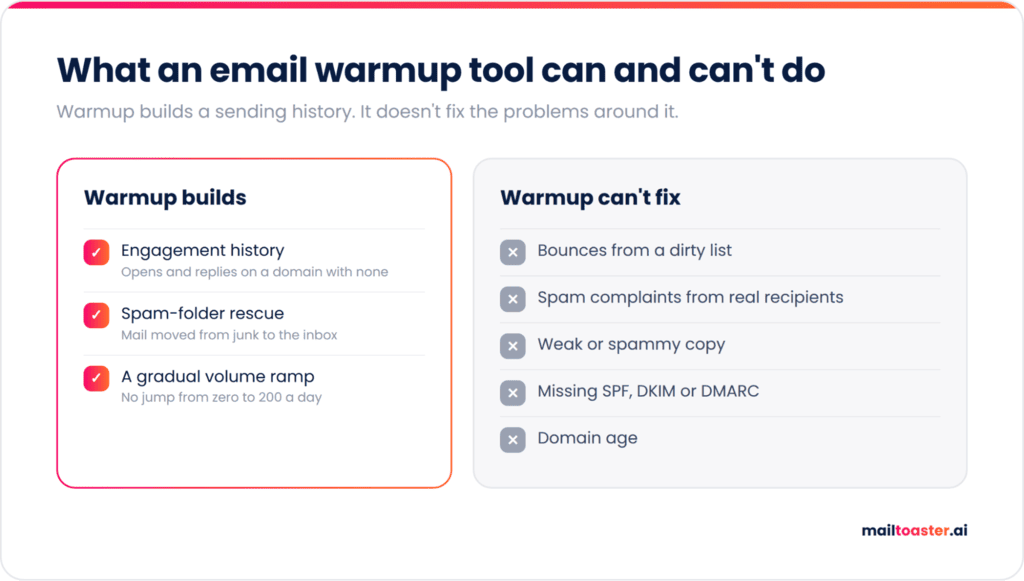
That record influences three things, and only three. Engagement history comes first, since mailbox providers weigh how often mail from your domain gets opened and replied to, and a new domain gives them nothing to weigh. Spam-folder rescue matters nearly as much, since when a warm-up account finds your message in junk and moves it to the inbox, Gmail in particular treats that as a strong signal. Last is a gradual volume ramp, because jumping from zero to 200 sends a day looks like a compromised account.
What email warmup tools can’t fix
Bounces from dead addresses will undo weeks of careful ramping, and no warm-up network cleans your list for you. Real recipients hitting the spam button outweigh anything the network contributes. Bad copy stays bad, your domain doesn’t age any faster, and authentication records you never created don’t appear.
That last one is now a hard gate rather than a best practice. Since May 2025, Outlook, Hotmail, and Live reject mail outright from any sender pushing 5,000 or more messages a day that fails SPF, DKIM, or DMARC, returning a 550 5.7.515 error instead of quietly filing it in junk. Google’s sender guidelines set a parallel bar on behavior — keep the spam rate reported in Postmaster Tools under 0.3%, ideally under 0.1%. Warm-up helps you stay under that number, but it will not get you past the authentication check.
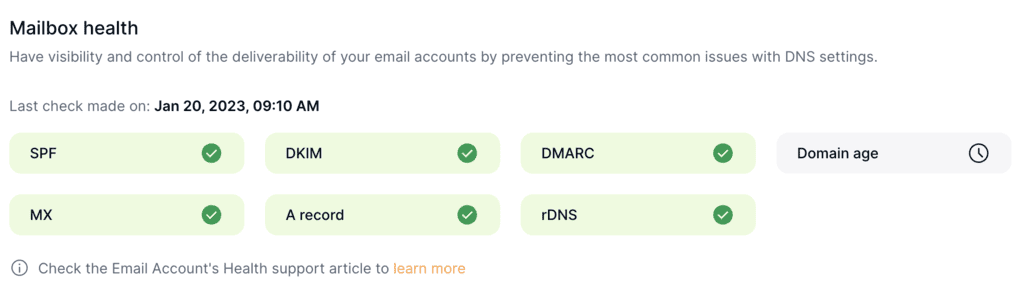
So fix SPF, DKIM, and DMARC first, confirm they pass, then start warming. Some email warm-up tools like MailToaster validate those records when you connect an account, which stops you paying for warm-up on a mailbox that was never going to deliver in the first place:
Why the warmup network matters more than the feature list
Every vendor claims a large network, but only few tell you what’s in it, and that single detail decides whether the product helps or actively hurts you.
There are two models:
- Peer-to-peer networks route your warm-up mail to real business inboxes belonging to other paying customers, running on Google Workspace and Microsoft 365.
- Seed-pool networks use accounts the vendor created and controls, which is cheaper to operate and much easier to scale to an impressive-sounding number.
The problem with the second model is what it teaches the filter. If your domain’s only correspondents are free Gmail addresses created in bulk, the engagement pattern it builds is a domain that talks exclusively to throwaway accounts, and Gmail has been clustering that behavior for years. A weak network is worse than no warm-up, because it produces a fingerprint rather than a reputation.
Four questions sort the good from the mediocre, and a vendor should answer all four without a sales call:
- Are the network accounts real business mailboxes, or accounts the vendor created?
- Does engagement include replies and spam-folder rescue, or only opens?
- Does it cover both Google Workspace and Microsoft 365, or one properly and the other as an afterthought?
- Does sending follow recipient working hours, or run at a constant rate around the clock?
The best email warmup tools in 2026
The five email warmup tools below cover the three cost shapes you actually choose between: a flat per-mailbox fee, a quote-based enterprise plan, and warm-up bundled into a sending platform you’re already paying for. Use it as a shortlist filter for the best email warmup tools 2026 has on the market, and note that every price here comes from the vendor’s own pricing page as of September 2026.
MailToaster
MailToaster is a dedicated email warm-up product, which means it does one job and doesn’t ask you to move your outreach stack to get it. You simply connect a Gmail, Outlook, or other provider account in just a few clicks, pick a profile, and the warm-up starts. Nothing changes about where you send from or how.
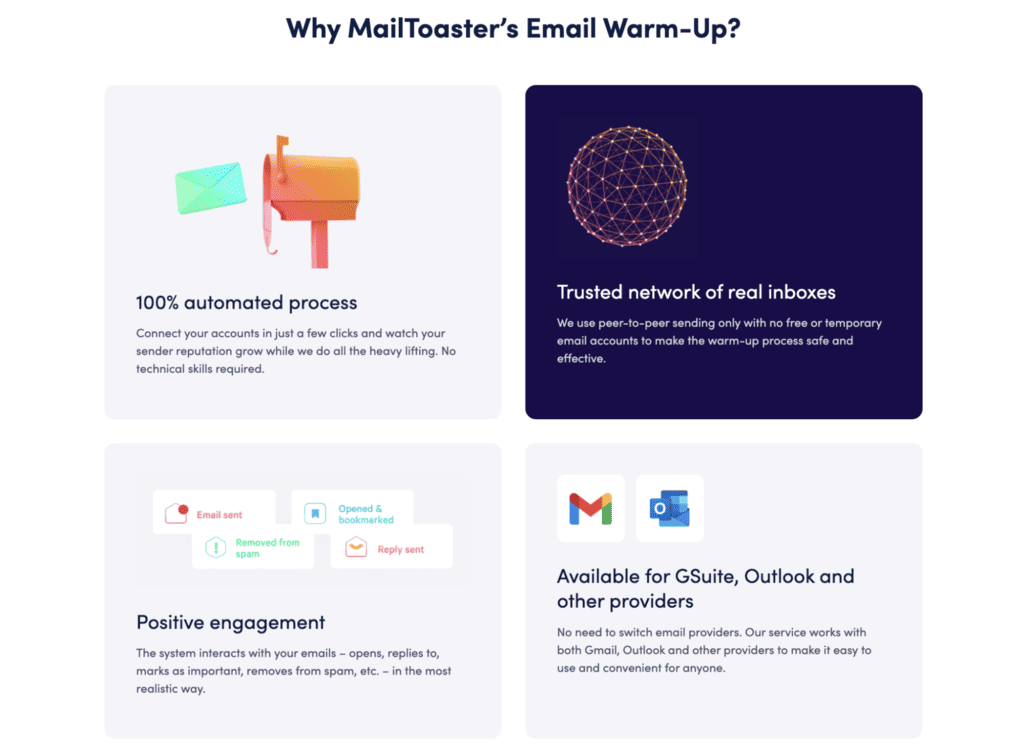
The network is peer-to-peer and made up of real inboxes only, with no free or temporary accounts used to inflate the pool. Engagement is the full set, as the platform opens your messages, replies to them, marks them as important, and pulls them out of spam where they land there.
Two profiles, depending on your use case: New Email Account builds reputation on a mailbox with no history, and Reputation Protect runs underneath live campaigns to hold the reputation you’ve already earned, which is the part most teams skip.
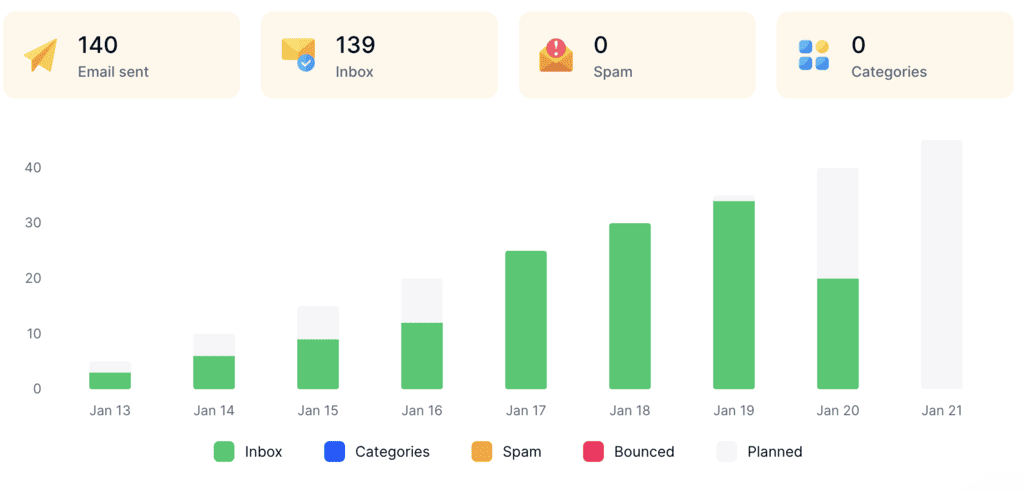
Reporting splits results into emails sent, landed in inbox, landed in spam, sorted into Promotions or other categories, and bounced, so you can see placement moving rather than a single composite score. SPF, DKIM, and DMARC validation is built in. Warm-up mail is filed into its own folder, so your real inbox stays readable.
The thing that separates it from most of this list is the pricing shape — one flat number per account, self-serve, no demo call and no sequencer you didn’t ask for.
And for those looking not only to warm up their email accounts but also fully automate email outreach with AI, MailToaster is a native tool inside the Reply.io suite — an AI engagement platform that helps businesses find targeted leads, launch tailored email and LinkedIn outreach, and close deals.
Pricing: \$29 per email account per month, or \$26 per account on annual billing (10% off, minimum commitment applies). 7-day free trial.
Warmy.io
Warmy runs the largest network anyone on this list publishes a number for, claiming over a million mailboxes plus a US seed list of 500,000 addresses that rotates monthly. Warm-up sends follow recipient working hours by time zone, and Adeline, their AI assistant, monitors sending and surfaces recommendations as conditions change. It’s a great tool for enterprise teams, but for small and medium-sized businesses, there are less feature-packed and more affordable Warmy alternatives out there.
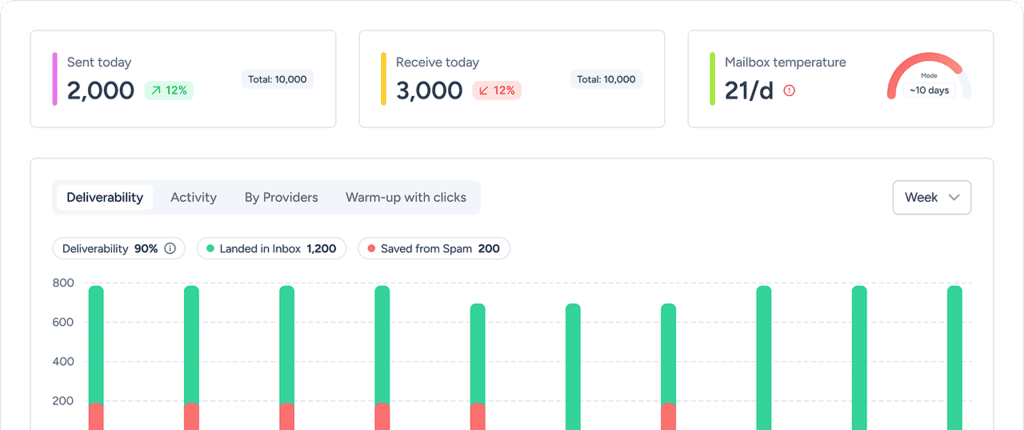
Google Postmaster data pulls in, blacklist monitoring alerts you on listings, a template optimizer scores copy against spam filters, and there’s full API access with native Zapier, Make, and n8n connections. Warmy also splits plans by audience, with separate B2B and B2C configurations.
The limitation is budgeting, since Warmy publishes no prices at all, so working out what ten mailboxes cost means booking a demo first. For teams that need to price a setup before committing, that’s real friction.
Pricing: quote-based across three plan shapes (B2B Sender, B2C Sender, Custom). 7-day free trial, no card required.
MailReach
MailReach pairs a warmer with a spam tester in a single subscription, and the combination is the main reason many pick it. Warm-up runs up to 100 emails a day per mailbox on an adaptive algorithm, with domain and inbox health checks covering blacklists, SPF, DKIM, and DMARC. Co-Pilot flags deliverability issues as they appear.

Per-mailbox pricing drops as you add mailboxes, which makes it a common choice for agencies. The spam tester reports inbox placement by provider and pushes alerts into Slack or a webhook, useful when you’re managing client mailboxes and need to know about a problem before the client does.
One thing worth knowing is that spam test credits are capped per plan at 20, and heavier placement testing means buying more. If you test placement weekly across several domains, factor that in.
Pricing: from \$19.50 per mailbox per month at volume, with 20% off on annual billing, and 20 spam test credits included.
lemwarm
lemwarm is the longest-running warm-up product in the category and is now bundled into every lemlist plan rather than sold on its own. Deliverability features are identical across tiers, covering custom tracking domains, DNS setup testing, rotating IPs, and inbox rotation, so there’s no upsell path to a better version of the warm-up itself.
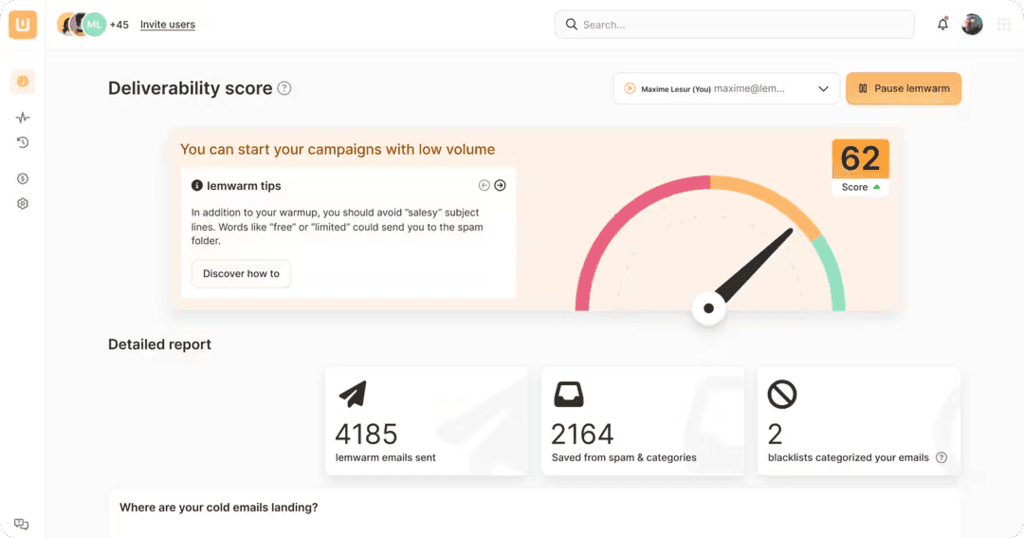
If you’re looking for a bundle of an AI outreach platform + email deliverability, lemlist is a serious contender with the built-in lemwarm, but there are other options to consider. Reply.io stands out as the all-in-one suite with a native lead database, email verification, enrichment, multichannel outreach, analytics, and of course, built-in MailToaster for email warm-up and deliverability. It’s also more affordable than lemlist while packing more features.
The catch with lemlist is the entry cost for anyone who isn’t already a customer. Because it’s no longer standalone, the cheapest way in is a full lemlist seat, which is a lot to spend if warm-up is all you need.
Pricing: bundled with all lemlist plans, starting from \$55/month billed annually for the Email plan, though there’s a 14-day free trial.
TrulyInbox
TrulyInbox prices by daily warm-up volume rather than by mailbox count, so every paid plan includes unlimited email accounts, and you’re buying throughput instead of seats. Starter covers 200 warm-up emails a day, Growth 1,000, Scale 3,000. Reply rates scale with the tier, from 25% up to 60%, and higher plans add ESP-level analytics, custom sending schedules and multiple warm-up strategies.
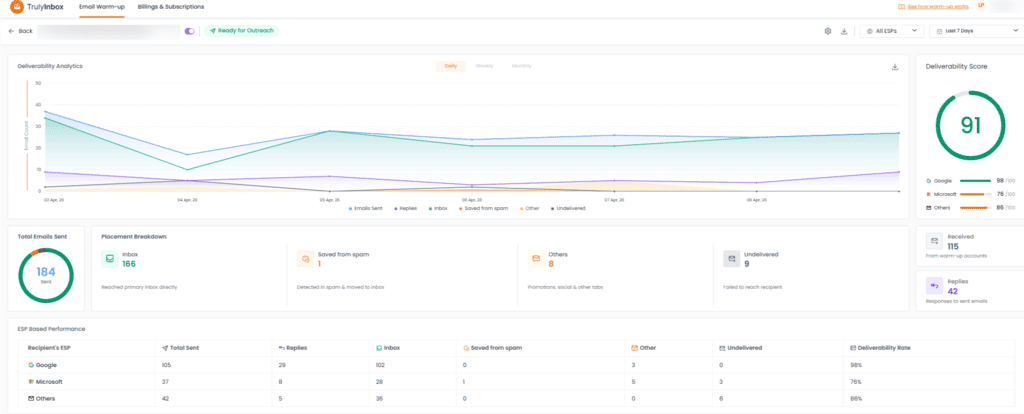
That model suits agencies running many low-volume mailboxes, where per-mailbox billing gets expensive fast.
It’s also the only tool here with a genuinely free plan, covering one account at 10 warm-up emails a day with no card required. That’s enough to see how the dashboard works and not much else, which is the honest framing for every free tier in this category.
Pricing: free plan available, while paid plans starting from \$22/month (billed annually) all the way to \$169/month for the Scale plan. 7-day trial on paid plans, 14-day money-back guarantee.
| Tool | Pricing model | Entry price | Free option | Best for |
|---|---|---|---|---|
| MailToaster | Flat per account | \$29/account/month | 7-day trial | Teams who want warm-up only, at a price they can see upfront |
| Warmy.io | Quote-based | Not published | 7-day trial | Large senders wanting seed lists and B2C coverage |
| MailReach | Per mailbox, volume discounts | \$19.50/mailbox/month | None | Agencies needing warm-up plus placement testing |
| lemwarm | Bundled with lemlist | \$55/month | 14-day trial | Existing lemlist users |
| TrulyInbox | By daily volume | \$22/month annual | Free plan, 1 account | Many mailboxes at low volume each |
Are free email warmup tools worth using?
Free email warm-up tools are fine for a demo but too small to sufficiently warm a mailbox. Even TrulyInbox, the most generous free tier in the category, caps you at one account and 10 messages a day. A new mailbox has to climb to 30 or 40 sends a day over three to four weeks, with engagement coming back on most of them, and no free plan can support that volume.
That volume gap is only the first problem with hunting for an email warmup free tool. The ones advertising more get there by filling the network with disposable accounts, because real business inboxes belong to paying customers, and a product with no revenue can’t afford them, simple as that. Engagement from that kind of pool creates a detectable pattern on your domain that most email clients will flag.
Free does earn its place in diagnostics, since authentication checkers and placement tests cost vendors almost nothing to run and tell you something real. Before you pay for warm-up, confirm your DMARC record is valid and authorizing the right senders, because a broken record makes every dollar of warm-up spend pointless:
Free DMARC Record Checker
Check any domain’s DMARC record, see exactly how much protection it actually gives you, and get the next record to publish. Runs entirely in your browser.
What is DMARC, and what does “enforced” mean?
DMARC ties SPF and DKIM together and tells receivers what to do when mail claiming to be from your domain fails both. It’s published as a TXT record at _dmarc.yourdomain.com.
p=noneprotects nothing. It only collects reports. Most domains that “have DMARC” are sitting here — spoofable, with a record that looks reassuring.p=quarantinesends failing mail to spam.p=rejectrefuses it at the door. Only these two are enforcement.- Google and Yahoo require DMARC for anyone sending bulk mail — no record means throttling or outright rejection.
- Reports sent to another domain need permission. If
ruapoints somewhere else, that domain must publish an authorisation record or receivers silently drop your reports. We check that live.
Lookups are performed from your browser via Cloudflare’s public DNS-over-HTTPS resolver. Nothing is logged or stored by this tool.
The safe way to reach p=reject
- Weeks 1–2:
p=nonewith rua. Change nothing else. Read the aggregate reports and build a list of every service sending as you — you will find some you forgot about. - Fix alignment first. Every legitimate sender needs SPF or DKIM aligned with your domain. A tool that passes SPF on its own domain still fails DMARC for yours.
- Week 3:
p=quarantine; pct=10. A mistake now affects 10% of failing mail, not all of it. Watch reports for a week. - Ramp to
pct=100, thenp=reject. Give each step a week of clean reports before the next one. - Don’t forget subdomains. If you never send from them, publish
sp=rejectexplicitly — unused subdomains are a favourite spoofing target.
So the best free email warmup tool is the free trial on a paid one. Seven days on MailToaster or TrulyInbox tells you more than a permanent free tier that can’t send enough to matter.
How long warmup takes and when to stop
A new mailbox needs two to four weeks of warm-up before it’s ready for live campaigns, and you shouldn’t stop after that.
The ramp is gradual by design — start around 10 warm-up emails a day, climb steadily, and hold at 30 to 40 while placement reports stabilize above roughly 90% inbox. Domains under a month old sit at the longer end of that range. Microsoft 365 mailboxes generally take longer to settle than Google Workspace ones.
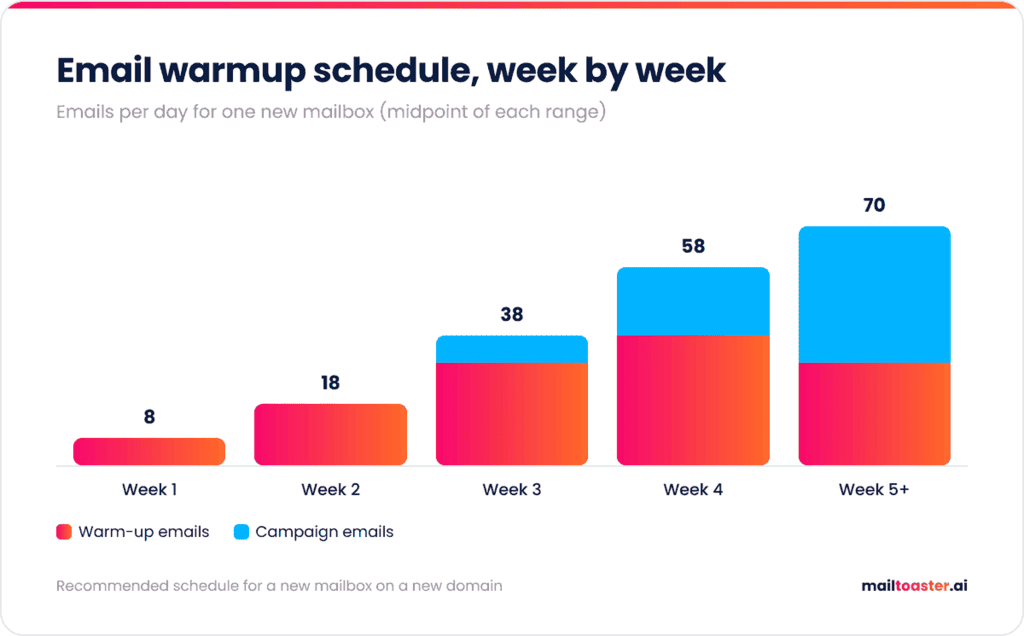
Sender reputation is calculated on a rolling window, so once warm-up ends, the only signal left is cold email to strangers who mostly don’t reply. Engagement rate falls, placement follows it down, and the domain you spent a month building quietly degrades. Running warmup underneath live sending at reduced volume is what prevents that, and it’s the entire purpose of MailToaster’s Reputation Protect profile.
Warmup protects the channel, but it doesn’t decide whether anyone replies, which then comes down to targeting, timing, and the message itself, and that’s the job of your outreach platform like Reply.io.
Choosing the right tool
Every one of these email warm-up tools will build engagement on a healthy mailbox, so make your pick grounded in three key things: what email network the product works with, whether your provider is properly supported, and what the bill looks like at the number of mailboxes you’ll actually run. Fix SPF, DKIM, and DMARC before you spend anything, then keep warm-up running once campaigns start.
If you want warm-up without buying a sending platform to get it, MailToaster is the best email warmup tool for that job at just \$29 per account with a 7-day trial. Connect a mailbox, pick a profile, and watch placement move on autopilot while you focus on the actual outreach.
FAQ
Do email warm-up tools actually work?
Yes, with a caveat. They reliably build engagement history and improve inbox placement on new or damaged mailboxes. They can’t offset a dirty list, high complaint rates, or missing authentication, so warm-up works as one input among several rather than a fix on its own.
How many warm-up emails should I send per day?
Start at about 10 a day on a new mailbox and climb gradually to 30 or 40 over three to four weeks. Most tools handle the ramp automatically. Pushing higher faster is the most common way people get a fresh domain filtered before they’ve sent a single campaign.
Do I need a separate warm-up tool if my sending platform already has one?
Usually not, if the bundled network is solid. Instantly and lemlist both include capable warm-up at no extra cost. A standalone tool makes sense when you want warm-up independent of your sequencer, or when you’re running mailboxes across several sending platforms.
Why are my emails still going to spam after warm-up?
Check authentication first, then your list. Warm-up can’t fix a failing DMARC record, bounces from unverified addresses, or recipients marking you as spam. Content triggers and a sudden jump in sending volume after the warm-up period are the other two common causes.